Warning in case of premature collection, Opter Driver
Last updated: 3 September 2025
In this article
When a driver manually sets the status of a shipment to Picked up or performs a pickup scan earlier than the earliest pickup time specified on the order, the pickup is considered early. Choose whether drivers should receive a warning in Opter Driver if they pick up a shipment too early. You make the setting per customer in the customer register.
The early pick-up warning will appear in Opter Driver if the following applies:
-
The driver will collect from the sender or manually change the status to Picked up at a time before the earliest time and date of collection of the shipment.
-
This is the first shipment on the order. When scanning, the warning is only displayed during pickup scan at the sender's premises, i.e. not during pickup scan at the Terminal.
If the shipment has multiple packages, the warning is displayed only once even if multiple packages are scanned.
When scanned, the warning can be displayed even if the shipment has not yet been allocated to the vehicle/driver.
When the driver receives the alert in the app, they can choose to undo the scan/status change or go ahead and still change the status to Picked up. So it's just a warning, not a block. Instructions for drivers are available at Proof of Delivery (POD) in Opter Driver and Scan using Opter Driver.
Proceed as follows
If you want drivers to receive a warning for early collection, do this:
-
In Opter, click on Register > Customers and select the customer you want to make the setting for in the list on the left.
-
Click on the Dispatching tab and select the Warn if early pickup checkbox.
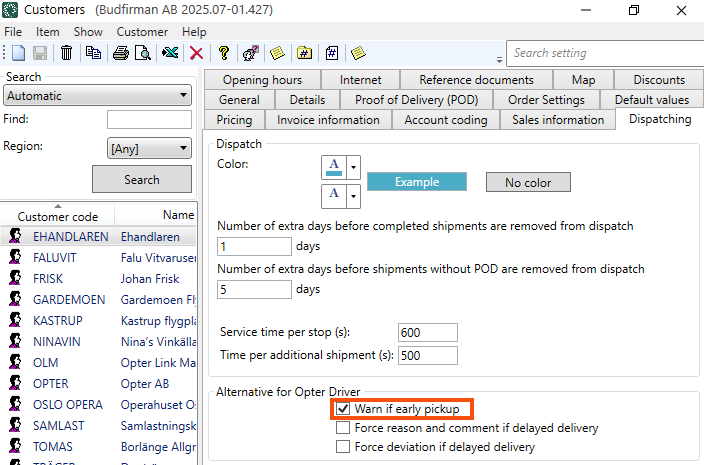
-
Click on Save to save all changes.

