Length weight calculation (window)
Last updated: 12 August 2026
 Settings > Weight calculation >
  next to the drop-down menu Length weight calculation.
In this article
In this window, you can set the rules that apply to weight calculations for long goods.
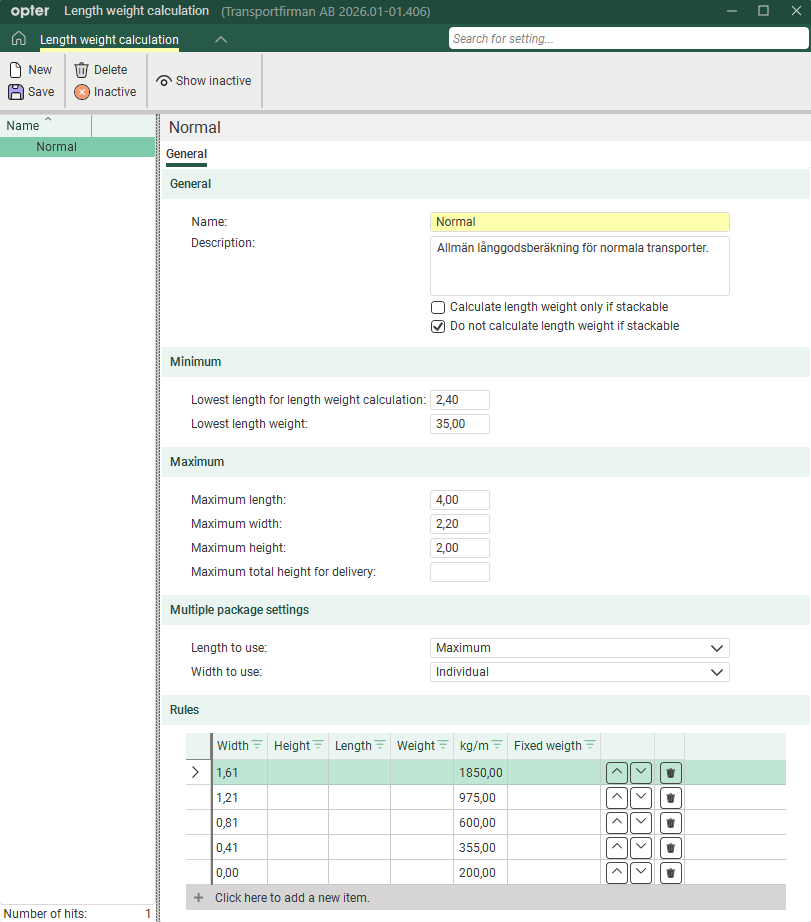
General
|
Function |
Description |
|---|---|
|
Name |
Used for identification. The name is shown in the list on the left when a new configuration is saved. |
|
Description |
Free text field for internal notes. The description is not displayed anywhere else but here. |
|
Calculate length weight only if stackable + Do not calculate length weight if stackable |
These settings allow you to define what you mean by ‘stackable’ in your business. Whether or not stackable packages are to be regarded as long goods, that is to say, whether you mean that the bottom or top item is the one that is ‘stackable’. The checkbox on the parcel row in the order reception determines which parcels are stackable.
See examples in Setting up weight calculation for long goods. |
 +
+  +
+ Minimum
|
Function |
Description |
|---|---|
|
Lowest length for length weight calculation |
Enter the minimum length, in metres, for a parcel to be classified as long goods. |
|
Lowest length weight |
Enter the minimum length weight of long goods that the calculation can return, in kg. Example: If you enter 35 kg in the field, and if the length weight calculation produces a total weight of 22 kg (i.e. less than 35 kg), 35 kg will be used as the length weight. |
Maximum
|
Function |
Description |
|---|---|
|
Maximum length Maximum width Maximum height |
Enter the maximum length, width and height in metres for a parcel to be classified as oversized goods.
|
|
Maximum total height for delivery |
This field has no bearing on the length weight calculation. The maximum height is checked for each parcel against the field Maximum height. |
Multiple package settings
|
Function |
Description |
|---|---|
|
Length to use |
|
|
Width to use |
|
Rules
In the table, enter the rules that will apply to the long goods weight calculation. Enter one line per row.
In the first four columns (Width, Height, Length and Weight) you indicate which conditions apply. You can enter one or more conditions on the same line, for example Width and Height, or simply Width.
In the next two columns (kg/m and Fixed weigth), enter the result you want. Select whether you wish to use a fixed length-based weight (Fixed weigth) for parcels that meet the criteria in a row, or if you wish to use a factor (kg/m) by which the parcel’s length is multiplied to calculate the length weight. For more information and examples, see Setting up weight calculation for long goods.
Opter checks the rules from the top down in the table, so it is important that you place the rules in the correct order. You can use  and
and  to move the rows up and down.
|
Function |
Description |
|---|---|
|
Width Height Length Weight |
Specifications for width, height and length in metres. Weight specifications are given in kilograms. Example: If you enter “1.61” in column Width, Opter will check whether the width of the package is 1.61 metres or more. If this is the case, Opter uses the factor in column kg/m or the value in column Fixed weigth when calculating the length weight. If the width of the parcel not is 1.61 metres or more, Opter moves on to check the next row in the table. |
|
kg/m |
A factor used to calculate the length weight, i.e. how many kilograms one metre of the consignment corresponds to. The factor is multiplied by the length of the package. |
|
Fixed weigth |
Parcels that meet the criteria for long goods are assigned a fixed length weight. Expressed in kg. |
|
|
Moves the rows up or down. Opter checks the rules from the top down in the table. Arrange the rules in the order you wish. |
|
|
Deletes the line. |


