Fuel (window)
Last updated: 4 February 2026
 Register > Fuel
In this article
In this window you register the fuels you use. Next, you can set up fuel in the registers for vehicles, vehicle types, price vehicle types and subcontractors on the tab Emissions. For more information, see Settings for CO2 emission calculations.
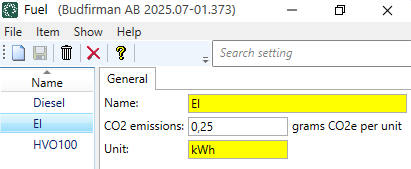
General
|
Function |
Description |
|---|---|
|
Name |
Enter the name of the fuel, for example "Electricity", "Diesel", "Biogas" or "HVO". |
|
CO2 emissions |
Enter the CO2 emissions of the fuel, i.e. indicate how much carbon dioxide the fuel emits in grams (per Unit, see field below). For example, if you enter "2680" in the CO2 emissions field and "litres" in the Unit field, it means that the fuel emits 2680 grams of CO2 per litre. The fuel supplier should have information about the fuel’s CO2 emissions.  Please specify WTW, WTT or TTW for the CO2 emissions of the fuel? Please specify WTW, WTT or TTW for the CO2 emissions of the fuel?
In the field CO2 emissions in the fuel register you can choose whether you want to use WTW, WTT or TTW. For example, if you use TTW, you will need separate handling to add WTT afterwards. We therefore suggest that you use WTW in the field CO2 emissions in the fuel register. So it is the figure you choose to use (WTW, WTT or TTW for the CO2 emissions of the fuel) that will be used in the CO2 emissions calculations in Opter. So what you get as a result (CO2 emissions for orders/shipments) in Opter depends on the figures you chose to use. The same applies to the figures you choose to use for the fuel consumption of vehicles, for example. WTT for a fuel type may differ from refuelling to refuelling
The WTT (and thus also the WTW) of a fuel type may differ from refuelling to refuelling, but the difference is quite small compared to all other uncertainties. (For more information, see This is how Opter calculates CO2 emissions). If you want exact figures for WTT or WTW, the fuel supplier should have this information. |
|
Unit |
Enter the unit, for example 'litres', 'kg' or 'kWh'. For example, if you enter "0.25" in the CO2 emissions field (above) and "kWh" in the Unit field, it means that the fuel emits 0.25 grams of CO2 per kilowatt hour (kWh). |

