This is how Opter calculates CO2 emissions
Last updated: 9 October 2025
In this article
The following describes how Opter calculates carbon dioxide emissions (CO2 emissions). Further information on CO2 emissions can be found in CO2 emissions, overview.
Conditions
For Opter to calculate CO2 emissions, the following applies:
-
You must first make the settings described in Settings for CO2 emission calculations.
-
There must be a distance on the order. Further information on how to set a price limit on orders can be found in Distances, addresses and maps, overview.
Consider the following
If the distance is specified manually on the order
The CO2 emissions for the shipment are calculated based on the distance provided by Opters/PTV, even if the distance has been entered manually on the order and the order contains only one shipment.
From 2025.12.00 the shipment will be sent at the same distance as you specified on the order if the following applies:
-
The order has only one shipment.
-
The shipment does not have a manually specified distance.
-
You enter the distance manually on the order.
The calculated CO2 emissions for the shipment are therefore based on the distance entered manually on the order. For more information, see How Opter calculates the CO2 emissions of a shipment below.
CO2 emissions
Exact CO2 emissions for an individual transport depend on actual fuel consumption and specific fuel, what other goods were being transported at the same time, how much empty running the transport caused, etc. It is difficult to obtain exact values for these data, so a standardised figure is used for fuel consumption and the CO2 emission factor. The templates are chosen so that the CO2 emissions data are reliable on average over time.
The statistical report is based on templates. To get it as accurate as possible, you need to find out your actual CO2 emissions, for example by totalling everything refuelled over a period of time. Then try out different factors on services until the sum in the statistics matches the reality and the allocation between different shipments is reasonable.
CO2 emission factor
The CO2 emission factor is a conversion factor used to show the climate efficiency of transport operation for a particular service and, if applicable, also for a particular price vehicle type during provision of that service. The CO2 emission factor reflects how much of the transport operation is usually an empty run/pickup run for collection and how much is a shared load.
For more information and examples, see the CO2 emission factor for the service and the CO2 emission factor for the price vehicle type below
CO₂ emissions calculations in Opter
Opter calculates the following values for CO2 emissions:
-
The order’s estimated CO2 emissions.
The estimated CO2 emissions are an initial calculation of the CO2 emissions of the order and the calculation is based on the information available at the time the customer places the order. For more details, see How Opter calculates the estimated CO2 emissions of the order below.
-
The shipment’s calculated CO2 emissions.
Calculated CO2 emissions for a shipment are a more accurate calculation than estimated CO2 emissions for an order, as this calculation is based, among other things, on information about the actual vehicle and distance of the mission. Further details can be found in How Opter calculates the CO2 emissions of a shipment below.
-
The order’s calculated CO2 emissions.
The calculated CO2 emissions of an order are a summation of the calculated CO2 emissions of the shipments in the order, and this is therefore a more accurate calculation than the estimated CO2 emissions of an order.
If the data on which the calculations are based is changed, there may be orders for which the CO2 emissions should be recalculated. For instructions, see Recalculate CO2 emissions for orders.
 This is how Opter calculates the estimated CO2 emissions of an order
The estimated CO2 emissions for the order are calculated when the customer places the order, and the calculation is based on the following:
-
The distance as it is calculated on the order.
-
Selected price vehicle type (CO2 emissions, or fuel and fuel consumption).
-
The CO2 emission factor of the service according to one of the following (depending on the settings that are made):
-
The CO2 emission factor of the service.
-
The CO2 emission factor of the price vehicle type on the service.
-
The CO2 emission factor of the service, combined with the pricing weight of the order compared to the price vehicle type’s capacity. (For more information, see Please take into account the pricing weight when calculating CO2 emissions below.)
-
The estimated CO2 emissions for the order are based on factors that the customer can influence, such as the choice of service and the price vehicle type. The estimated CO2 emissions are therefore not recalculated when we later know which vehicle is carrying out the transport or when we decide to go via a terminal, for example. If you want to know a more precise calculation of the CO2 emissions of an order, use the calculated CO2 emissions of the order instead. (The calculated CO2 emissions for the order are recalculated when we, for example, decide to go via a terminal or change vehicles).
The following applies to consignments
-
We may choose to group shipments in a consignment, but this creation of a consignment does not affect the order placed by the customer. In other words, the estimated CO2 emissions of the order are not affected by whether or not the shipments are in a consignment.
-
The estimated CO2 emissions for consignment orders are calculated when the consignment order is created, and the calculation is based on the same parameters as a regular customer order.
How Opter calculates the CO2 emissions of a shipment
The calculated CO2 emissions for a shipment are a more accurate calculation than the estimated CO2 emissions for an order, and the calculation is based on the following:
-
The shipment’s distance in km.
If there is no distance on the shipment, the order’s distance in km x the shipment’s percentage share of the order is used.
If the distance is specified manually on the order
As of Opter version 2025.12.00 the shipment will automatically receive the same distance as you have specified on the order, if
-
The order has only one shipment.
-
The shipment does not have a manually specified distance.
(In the Order reception, in the section Shipments, under Details, in the tab Pricing, in the fields under Distance.)
-
You enter the distance manually on the order.
The calculated CO2 emissions of the shipment are then based on the manually entered distance on the order. If the order is later split into several shipments, Opter will recalculate the CO2 emissions of the shipments based on the PTV distance calculation (i.e. not on the manually entered distance of the order).
For Opter version 2025.06.00 and earlier, the CO2 emissions of the shipment are calculated based on the distance of the Opter/PTV, even if the distance is manually entered on the order and the order has only one shipment.
-
-
The CO2 emissions of the vehicle, vehicle type or price vehicle type in grams/km:
The data on CO2 emissions is taken firstly from the vehicle, secondly from the vehicle type and thirdly from the price vehicle type.
If the shipment is subcontracted, the CO2 emissions data will be obtained firstly from the subcontractor and secondly from the price vehicle type.
The CO2 emissions data is retrieved from the relevant register in Opter (e.g. vehicle register or subcontractor register) and can be entered directly as CO2 emissions (in g/km) or as fuel and fuel consumption.
If CO2 emissions (g/km), Fuel and Fuel consumption (per 100 km) are specified, Opter uses the data in the CO2 emissions (g/km) field to calculate CO2 emissions.
If you want Opter to calculate the CO2 emissions of the vehicle, vehicle type, price vehicle type and/or subcontractor (in g/km), leave the field CO2 emissions (g/km) empty and fill in the fields Fuel and Fuel consumption (per 100 km).
If the shipment is subcontracted to a subcontractor
If the shipment is subcontracted, your Opter can obtain information on CO2 emissions in one of the following ways
-
Via EDI, i.e. the subcontractor sends information on calculated CO2 emissions via EDI. For more information, see CO2 emissions via EDI.
-
Via the subcontracting register, from Opter version 2025.12.00 and later.
That is, via the fields CO2 emissions (g/km), Fuel, Fuel consumption (per 100 km) and Capacity converted into pricing weight (kg) on the Emissions tab of the Subcontractors window.
-
Via the price vehicle type.
That is, via the fields CO2 emissions (g/km), Fuel, Fuel consumption (per 100 km) and Capacity converted into pricing weight (kg) on the Emissions tab of the Price vehicle types window.
If you have entered CO2 emissions data in the subcontractor register, and on the price vehicle type, and if you also receive Calculated CO2 emissions data from the subcontractor via EDI, then
-
Opter uses the Calculated CO2 emissions data (for the shipment/order) received via EDI.
-
If you later change something on which the CO2 emissions calculations in Opter are based, such as the distance of the shipment or order, Opter will calculate the CO2 emissions for the shipment/order based on the data in the subcontractor register.
If CO2 emissions data is not available in the subcontractor register, Opter will use the data on the price vehicle type.
The same applies if you choose to recalculate the CO2 emissions of the order (where the shipment is included) in the order check or in the Order reception. For more information, see Recalculate CO2 emissions for orders.
-
-
The CO2 emission factor of the service according to one of the following (depending on the settings that are made):
-
The CO2 emission factor of the service.
-
The CO2 emission factor of the price vehicle type on the service.
-
The CO2 emission factor of the service, combined with the pricing weight of the order compared to the vehicle’s capacity.
The information on the vehicle Capacity converted into pricing weight (kg) is taken firstly from the vehicle, secondly from the vehicle type and thirdly from the price vehicle type. If the shipment is subcontracted, the vehicle's Capacity converted into pricing weight (kg) is taken firstly from the subcontractor register and secondly from the price vehicle type.
(For more information, see Please take into account the pricing weight when calculating CO2 emissions below.)
-
-
For consignments, it works in different ways, depending on the settings you choose.
You select if the CO2 emissions calculated for the consignment order are to be distributed between the original shipments, and in that case how the CO2 emissions should be distributed. (The settings are described in Step 8 of Settings for CO2 emission calculations.)
Depending on the setting you have made, Opter does one of the following:
-
If you have chosen not to allocate the CO2 emissions to the original shipments, the original shipments (and therefore the original orders) retain their normal CO2 emission calculations, as if they were not in a consignment.
-
If you select that the consignment order’s calculated CO2 emissions are to be distributed among the original shipments, Opter does the following:
-
Totals the CO2 emissions of the consignment shipments that are included in the consignment order.
-
Distributes the CO2 emissions calculated for the consignment order between the original shipments, in the chosen way. (For more information, see Step 7 in Settings for CO2 emission calculations.)
Thereafter, every time something changes in the consignment (i.e. something that affects the calculated CO2 emissions from the consignment shipments), Opter performs steps 1 and 2 above again. For example, if a shipment is added to or removed from the consignment.
-
-
Formulae
In Opter, the CO2 emissions for a shipment are calculated using one of the following formulae:
-
If pricing weight is not taken into account:
Distance × CO2 emissions from the vehicle × emission factor.
Example: 350 km × 760 g/km × emission factor 0.85 = 226 100 g CO
(The CO2 emission factor in the example is 85%, therefore Opter uses 0.85 in the calculation).
-
If pricing weight is taken into account:
Distance × CO2 emissions of the vehicle × emission factor x (pricing weight of the order / capacity of the vehicle).
Example: 350 km × 760 g/km × emission factor 0,85 × (order pricing weight 20 000 kg / vehicle capacity 40 000 kg) = 113 050 g CO
(The calculation is thus 350 x 760 x 0.85 x 0.5 = 113 050.)
-
For consignments, if you select that the consignment order’s calculated CO2 emissions are to be distributed among the original shipments, Opter does the following:
-
Totals the CO2 emissions of the consignment shipments that are included in the consignment order.
-
Distributes the CO2 emissions calculated for the consignment order between the original shipments. For more information, see Step 8 in Settings for CO2 emission calculations.
-
The CO2 emission factor for the service
The CO2 emission factor is a conversion factor used to show the climate efficiency of transport operation for a particular service and, if applicable, also for a particular price vehicle type during provision of that service. The CO2 emission factor reflects how much of the transport operation is usually an empty run/pickup run for collection and how much is a shared load.
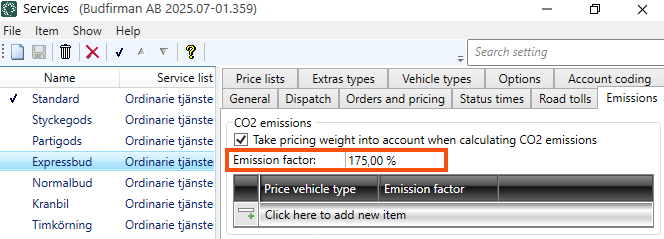
By default, the CO2 emission factor is 100% for all services. If you want a 100% CO2 emission factor for a service, you do not need to make any settings.
Example
-
For example, if the Express service usually consists of an empty run to pick up the delivery from the point of collection and then driving directly to the receiver, the CO2 emission factor can be set to 175%. This setting reflects the fact that the vehicle travels a longer distance to carry out the shipment than just the transport operation itself and no overlap/shared load takes place. This increases the climate impact of the transport.
-
If the “two-hourly service” usually has some overlap, i.e. several deliveries share the actual route travelled, and if the transport has for example been made more efficient by route optimisation, the CO2 emission factor can be set to 80%.
-
If the “five-hourly service” usually has some overlap, i.e. several deliveries share the actual route travelled, and if the transport has for example been made more efficient by route optimisation, the CO2 emission factor can be set to 35%. This setting reflects the fact that the “five-hourly service” usually has a lower carbon footprint than the “two-hourly service” and “Express service”.
The CO2 emission factor for the price vehicle type
The CO2 emission factor is set for the different services, but can also be set for the different price vehicle types on each service.
By default, the CO2 emission factor for all price vehicle types on a service is the same as the factor for the service. This means that it is not necessary to configure any settings for the price vehicle types on the service if the same CO2 emission factor as the service’s is required.
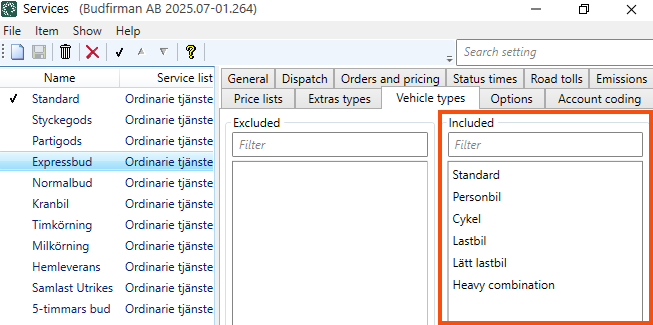
You can see which price vehicle types are linked to the service on the Vehicle types tab in the Services window. If you want to change which price vehicle types are linked to the service, you can double-click on a price vehicle type and it will move to the second column (Excluded/Included).
Example
-
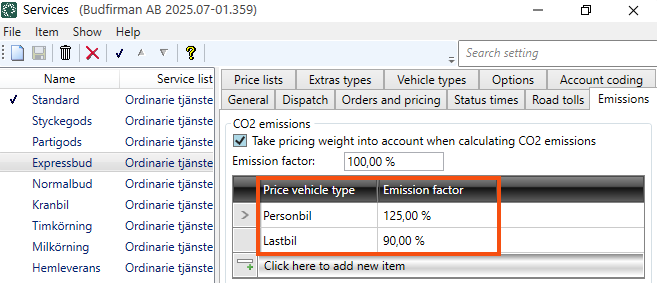
For example, if the Express service with the passenger car price vehicle type usually consists of an empty run to pick up the delivery from the point of collection and then driving directly to the receiver, the CO2 emission factor can, for example, be set to 125%. This setting reflects the fact that the vehicle travels a longer distance to carry out the shipment than just the transport operation itself and no overlap/shared load takes place. This increases the climate impact of the transport.
-
If the Express service with the truck price vehicle type usually has a certain overlap, i.e. several deliveries share the actual route travelled, and, for example, because the transport has been made more efficient by route optimisation, you can set the CO2 emission factor to 90%. This setting reflects the fact that the “Express service” with the “Truck” price vehicle type usually has a lower climate impact than the “Express service” with the “Passenger car” price vehicle type.
Take pricing weight into account when calculating CO2 emissions
You can decide if the pricing weight of the order compared to the capacity of the vehicle is to be taken into account, by using:
-
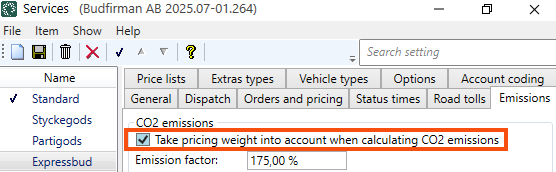
The Take pricing weight into account when calculating CO2 emissions checkbox in the Services window, on the Emissions tab.
-
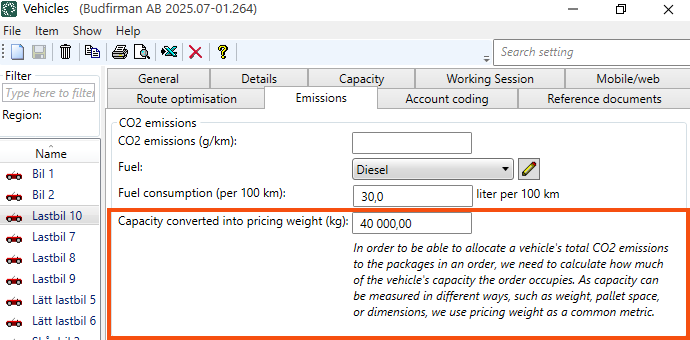
The Capacity converted into pricing weight (kg) field in the Vehicles, Vehicle types and/or Price vehicle types windows in the Emissions tab. The field Capacity converted into pricing weight (kg) is also available in the subcontractor register in Opter version 2025.12.00 and later.
In order to allocate a vehicle's total CO2 emissions to the packages that make up an order, Opter needs to calculate how much of the vehicle's capacity the order occupies. As capacity can be measured in different ways, such as weight, pallet space or dimensions, Opter uses pricing weight as a common measure. Pricing weight is stated in kilograms. For more information on pricing weights, see Calculating the pricing weight.
When Opter calculates CO2 emissions, the information on Capacity converted into pricing weight (kg) is firstly taken from the vehicle, secondly from the vehicle type and thirdly from the price vehicle type.
If the shipment is subcontracted, the information on Capacity converted into pricing weight (kg) is obtained firstly from the subcontractor and secondly from the price vehicle type.
Proceed to the next step
Settings for CO2 emission calculations.

