FAQs and troubleshooting, CO2 emissions
Last updated: 12 March 2026
In this article
Conditions
-
In order for Opter to calculate CO2 emissions, you must first make the settings described in Settings for CO2 emission calculations.
-
In order for Opter to display CO2 emissions, you must first make the settings described in View CO2 emissions in Opter and Show CO2 emissions for customers and resources.
More information on CO2 emissions can be found at CO2 emissions, overview.
Frequently asked questions and answers
|
Query |
Answer |
|---|---|
|
Does Opter have any default values for CO2 emissions? |
No. The fuel supplier should have information about the fuel’s CO2 emissions. (See also Settings for CO2 emission calculations.) The Vehicle manufacturer should have information on the fuel consumption of the vehicle. |
|
Do I have to enter values in all three fields CO2 emissions (g/km), Fuel and Fuel consumption (per 100 km)? |
No, you do not need to. It is enough to set CO2 emissions (g/km) or Fuel and Fuel consumption (per 100 km) in the windows Vehicles, Vehicle types, Price vehicle types and Subcontractors. If you enter values in all three fields CO2 emissions (g/km), Fuel and Fuel consumption (per 100 km), Opter uses the value in the CO2 emissions (g/km) field to calculate CO2 emissions. If you want Opter to use the values in the Fuel and Fuel consumption (per 100 km) fields, leave the CO2 emissions (g/km) field empty. For more information, see Settings for CO2 emission calculations. |
|
Can I see the values used in the calculation of CO2 emissions? |
Yes, if you hover over the following fields in the Order reception, the values used for the calculation will be displayed:
For more information, see View CO2 emissions in Opter and This is how Opter calculates CO2 emissions. |
|
Can I manually change the calculated CO2 emissions for an order? |
No. It is not possible to change the value shown in field Calculated CO2 emissions (g) in section Data of the order reception, as it is a total of the CO2 emissions for all shipments in the order. Instead, you can change the calculated CO2 emissions for one or more of the shipments included in the order, in which case the calculated CO2 emissions for the order will also change. For more information, see View CO2 emissions in Opter. |
|
Can I manually change the calculated CO2 emissions for a shipment? |
Yes. You can change the value shown in the CO2 emissions, calculated (g) field on the shipment in the order reception system. If you display the CO2 emissions, calculated (g) column in the mission overview, you can also change the calculated CO2 emissions for one or more shipments there. If you change the Calculated CO2 emissions for a shipment, the Calculated CO2 emissions for the order will also change. For more information, see View CO2 emissions in Opter. |
|
Can I manually change the estimated CO2 emissions for an order? |
Yes. If you want, you can change the value in the field Estimated CO2 emissions (g) (former CO2 emissions (g)) in the section Data in the Order reception. For more information, see View CO2 emissions in Opter. |
|
Can I change the estimated CO2 emissions to zero for an order? |
Yes. Type "0" in the Estimated CO2 emissions (g) field in the Data section of the Order reception and then save the order. For more information, see View CO2 emissions in Opter. |
|
Can the calculated CO2 emissions be changed? |
Yes. Calculated CO2 emissions can change when assigning vehicles or changing vehicles for example. |
|
I have changed CO2 emissions (g/km), Fuel and/or Fuel consumption (per 100 km) for a vehicle in the vehicle registry on the Emissions tab. Now I have one or more orders for which I would like to recalculate the CO2 emissions. Can I do that? |
Yes, you can recalculate CO2 emissions for orders that are not yet invoiced. For more information, see Recalculate CO2 emissions for orders. |
|
For example, if I change CO2 emissions (g/km) or Fuel consumption (per 100 km) for a price vehicle type or change Emission factor for a service, can I recalculate the CO2 emissions for an order? |
Yes, you can recalculate CO2 emissions for orders that are not yet invoiced. For more information, see Recalculate CO2 emissions for orders. |
|
We use subcontractors to carry out some shipments. Can we enter fuel and fuel consumption information in the subcontracting register? |
Yes, in Opter version 2025.12.00 and later, the fields CO2 emissions (g/km), Fuel, Fuel consumption (per 100 km) and Capacity converted into pricing weight (kg) are available in the Emissions tab of the Subcontractors window. For more information, see Settings for CO2 emission calculations. |
|
How do I make the customer aware of the carbon emissions of the different transport choices? |
It is possible to show the estimated CO2 emissions for the transport on the customer website. One idea is to allow customers to choose between different services and price vehicle types, and to make it clear to the customer how much CO2 emissions the different choices cause. See Show CO2 emissions for customers and resources. |
|
Can I show the CO2 emissions of the order (estimated and/or calculated) on the invoice? |
Yes. For more information, see Show CO2 emissions for customers and resources. |
Troubleshooting
If the function for calculating CO2 emissions is not working properly, the following tips can be used for troubleshooting:
-
Please check which version of Opter you are using. The functionality to calculate CO2 emissions is continuously improved, so if you have an early version, some functionality is missing. See CO2 emissions, overview to find out what's new in the different versions of Opter. Please contact support if you require a later version of Opter.
-
In order for Opter to calculate CO2 emissions, there must be a distance on the order. For more information, see Settings for CO2 emission calculations.
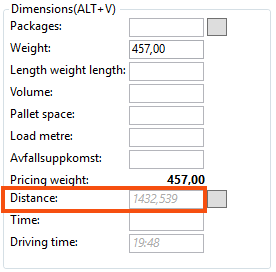
-
If no value is displayed in the field Estimated CO2 emissions (g) (previous CO2 emissions (g)) in the section Data in the Order reception, you can hover over the field. Then it is shown which dimensions and values have been used to calculate the CO2 emissions. If the column Value shows "0" for any of the dimensions, fix the problem by going to the instructions in Settings for CO2 emission calculations and entering the value for the dimension that shows "0".
For example, if it says "CO2 emissions from price vehicle type 0 g/km", follow Step 6 in Settings for CO2 emission calculations and make sure that all price vehicle types have values in the fields Fuel and Fuel consumption (per 100 km) or CO2 emissions (g/km).
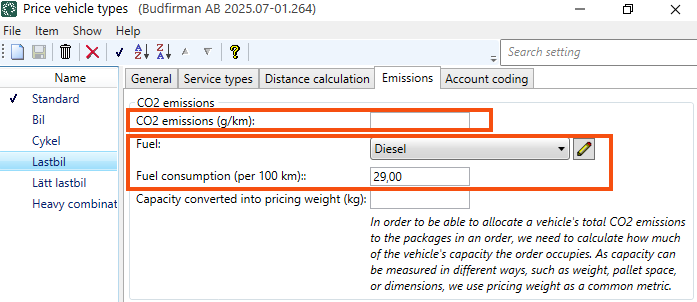
See also Step 7 in Settings for CO2 emission calculations, and check that you have set up everything as you wish. Once the values on which the CO2 emissions calculation is based have been changed, the CO2 emissions for the order need to be recalculated. For example, you can press the F3 key twice (in Order reception) to switch the sender and recipient of the order ("back and forth"), so that the distance on the order is recalculated. The CO2 emissions for the order will then be recalculated. For more information, see Recalculate CO2 emissions for orders.
-
If no value is displayed in the Calculated CO2 emissions (g) field in the Data section of the Order reception, you can troubleshoot by looking in the Shipments section and hovering over the CO2 emissions, calculated (g) field (see image below). You will then see the dimensions and values used to calculate the CO2 emissions for the shipment. If the column Value shows "0" for any of the dimensions, fix the problem by going to the instructions in Settings for CO2 emission calculations and entering the value for the dimension that shows "0". If Distance is not available, you can find information on how to get distance on orders in Distances, addresses and maps, overview.
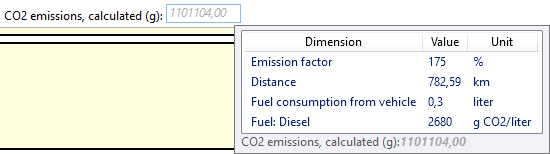
The calculated CO2 emissions of an order are a summation of the calculated CO2 emissions of the shipments in the order. This is why we look at the values used in the calculation of the CO2 emissions of the shipments when we do not have a value for the calculated CO2 emissions of the order.
-
If you get the text The emission values have changed. To list the emissions components, the CO2 value needs to be recalculated. when you hover over the field Estimated CO2 emissions (g) in the section Data or the field CO2 emissions, calculated (g) on the shipment in the Order reception, see View CO2 emissions in Opter. If you want the CO2 emissions of the order to be recalculated, instructions are available at Recalculate CO2 emissions for orders.
-
If the CO2 emissions values calculated by Opter do not seem reasonable, you can hover over the following field in the Order reception and the values used for the calculation will be displayed
-
The order’s estimated CO2 emissions:
The Estimated CO2 emissions (g) field in the Data section of the Order reception.
-
Calculated CO2 emissions of the shipment:
The CO2 emissions, calculated (g) field on the shipment in order reception (expand Details > General tab). (See picture above).
(The Calculated CO2 emissions of the shipments are totalled for the order and displayed in the Calculated CO2 emissions (g) field in the Data section of the Order reception, but if you hover over that field, nothing is displayed, as it is just a summation of the Calculated CO2 emissions of the included shipments).
You may find that the fuel consumption of the vehicle used is incorrect or that the emission factor should be changed, for example. For instructions, see Settings for CO2 emission calculations.
-

