Order status (order reception)
Last updated: 8 June 2026
In this article
 Order > Order reception
This section displays a variety of information about the order, including its status, type and when it was created. For example, you can mark the order as ready for dispatch, invoicing and supplier bills. There is also a button here to reactivate the order in the dispatch centre.
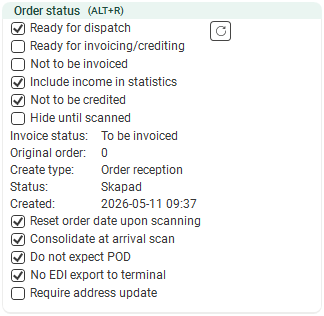
If the group Order status isn’t displayed, or if you’d like it to appear in a different place in the order reception area, you can adjust the settings. For more information, see Organising the groups in Order reception.
|
Function |
Description |
||||||||||||||||||||||||||||
|---|---|---|---|---|---|---|---|---|---|---|---|---|---|---|---|---|---|---|---|---|---|---|---|---|---|---|---|---|---|
|
Ready for dispatch |
|
||||||||||||||||||||||||||||
|
(button) |
Click the button if you wish to reactivate the order in the dispatch system. For more information, see Status management in dispatch. |
||||||||||||||||||||||||||||
|
Ready for invoicing/crediting |
If you want to tick (or untick) the Ready for invoicing/crediting checkbox for several orders at once, you can do so in the order check. For more information, see Order check (window).
|
||||||||||||||||||||||||||||
|
Not to be invoiced |
|
||||||||||||||||||||||||||||
|
Include income in statistics |
|
||||||||||||||||||||||||||||
|
Not to be credited |
|
||||||||||||||||||||||||||||
|
Hide until scanned |
|
||||||||||||||||||||||||||||
|
Invoice status |
The invoice status of the order, for example Invoiced, To be invoiced, NOT to be invoiced or Only crediting. |
||||||||||||||||||||||||||||
|
If the order was created automatically during POD registration, the original order number is displayed here; if the order has been consolidated, the consolidation order number is displayed. Report tag: DEL_Id_SpawnParent. |
|||||||||||||||||||||||||||||
|
Create type |
Talks about how the order has been created. Report tag: DCT_Name. It is also possible to use order type as a condition in reports. Example: condition="DCT_Id=1" displays the conditional row only if the order type is Scheduled.
|
||||||||||||||||||||||||||||
|
Status |
Shows the order status, for example Created, Assigned, Picked up, Delivered or Failed delivery. |
||||||||||||||||||||||||||||
|
Created |
Displays the date and time when the order was created. |
||||||||||||||||||||||||||||
|
Reset order date upon scanning |
|
||||||||||||||||||||||||||||
|
Consolidate at arrival scan |
For more information, see Consolidating upon arrival scanning at a terminal and Consolidating orders. |
||||||||||||||||||||||||||||
|
Do not expect POD |
|
 : The order is ready for dispatch. The order is displayed in the dispatch centre.
 : The order is not ready for dispatch and is therefore not displayed in the dispatch system.

