Set-off deductions as invoices
Last updated: 7 May 2025
In this article
Surcharges on or deductions from future supplier bills can be entered as predefined bill surcharges. Most predefined bill surcharges are in fact deductions, i.e. negative surcharges. These can be for work clothes or terminal rental, for example. The sum of the surcharges and deductions is then added to or deducted from the amount to be paid to the supplier. Deductions are recognised as sales and surcharges are recognised as expenses.
Settlement deductions can also be handled via orders invoiced to the haulier/subcontractor just like regular customer invoices. Invoices are paid by the haulier/subcontractor by automatically deducting the amount on the invoice from the next supplier bill. The invoice is automatically registered as paid when the invoice period closes.
One advantage of creating invoices instead of adding deductions to the supplier bill is that the haulier/subcontractor gets a clear breakdown. Another advantage of orders is that it is possible to load costs for hauliers/subcontractors from another system, like regular EDI orders.
Step 1: Add the haulier/subcontractor as a customer
In order to create an order and invoice it, the haulier/subcontractor must be a customer in the system, so start by adding the haulier/subcontractor as a customer and fill in all the required information.
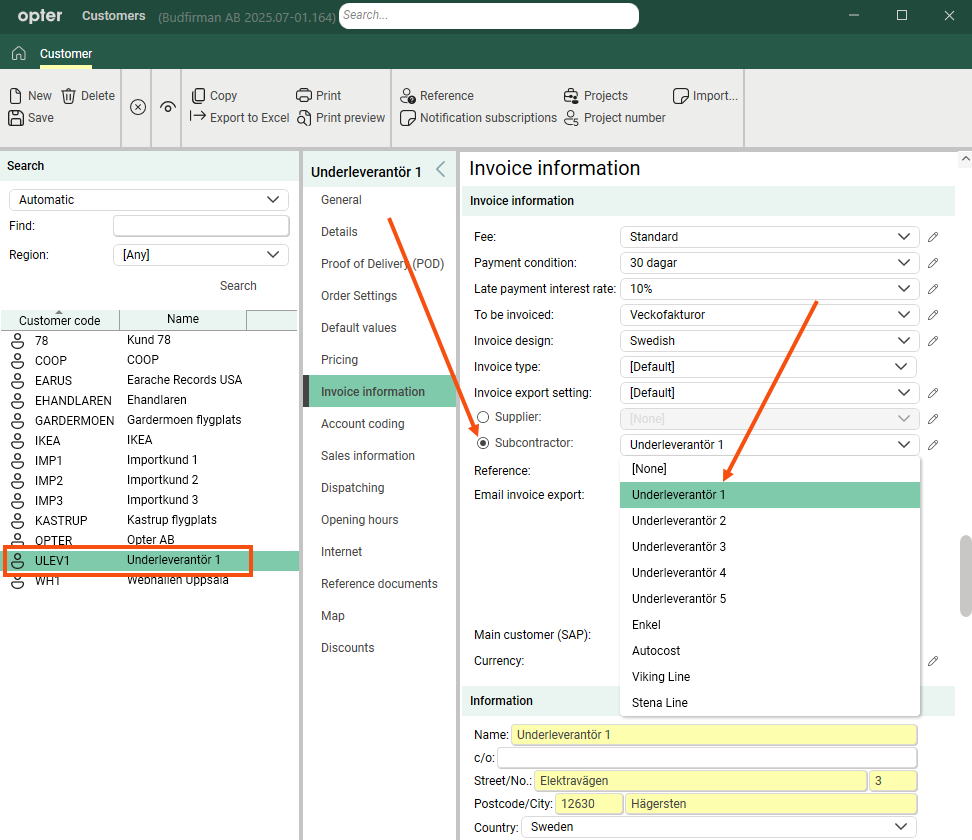
For the automation to work, you then go to the Invoice information tab and link the customer register and the haulier/subcontractor register by selecting the haulier/subcontractor from one of the drop-down lists Supplier/Subcontractor.
Step 2: Set up instalment deductions via invoice
Click on Settings > Offices and go to the Invoice payment tab. Then select a bill surcharge with 0% VAT in the drop-down menu Bill surcharge type. The sales account for the selected VAT rate shall be the balance sheet account to which the pending liabilities shall be posted.
Step 3: Register an order, invoice and credit
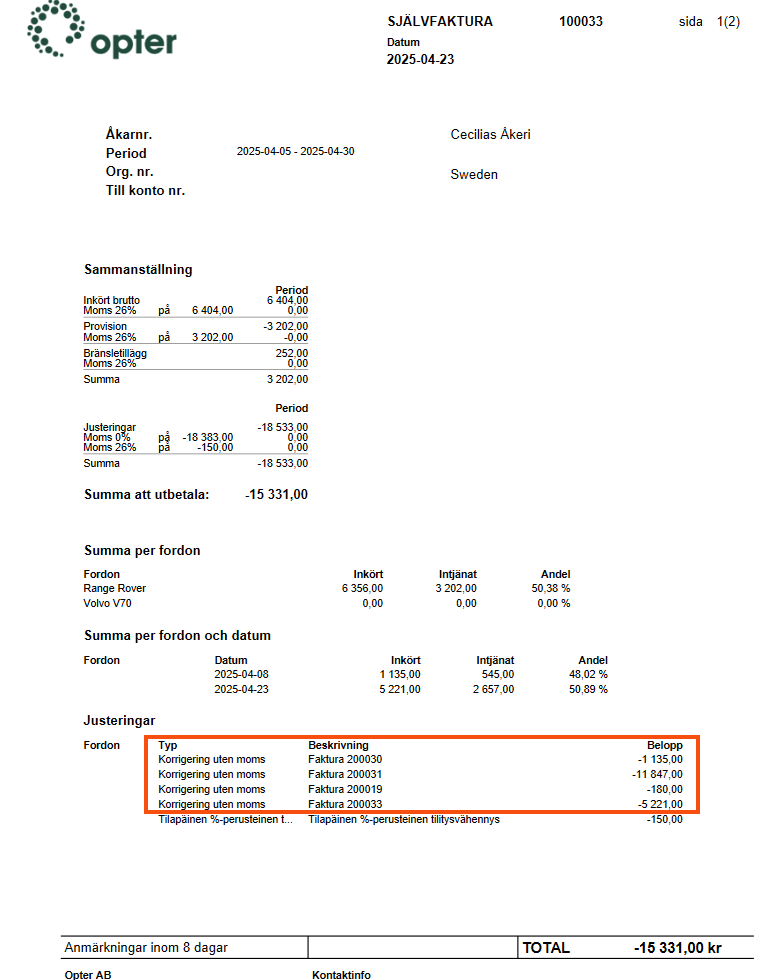
Register an order as usual with the haulier/subcontractor as customer. When the order is invoiced, a supplier bill adjustment is created with the amount on the invoice, and the invoice itself says "To be deducted from the supplier bill" instead of "To be paid" (or similar).
The next time the haulier/subcontractor is credited, the amount of the invoices will be deducted from the settlement with reference to the invoice numbers. The haulier/subcontractor does not need to take any active steps to pay the invoice, and the invoice is registered as paid automatically when the invoice period closes.
Step 4: Check the account coding
Examples of account coding for deductions via invoice, payment of deductions and supplier bills
Invoice
|
Account |
Debit |
Credit |
|---|---|---|
|
1511 Accounts receivable |
1,250 |
|
|
3010 Sales |
|
1,000 |
|
2611 Output VAT |
|
250 |
For customers who are hauliers or subcontractors, it is possible to select a different accounts receivable account in the customer register.
Payment
The account XXXX is selected on the bill surcharge (see step 2 above).
|
Account |
Debit |
Credit |
|---|---|---|
|
1511 Accounts receivable |
|
1,250 |
|
XXXX Debt balance |
1,250 |
|
Supplier bill
|
Account |
Debit |
Credit |
|---|---|---|
|
2400 Accounts payable |
|
10,000 |
|
2400 Accounts payable |
1,250 |
|
|
XXXX Debt balance |
|
1,250 |

