Kaalu arvutamine (window)
Last updated: 23 September 2025
 Seaded > Kaalu arvutamine
In this article
In this window you make settings for weight calculation. For more information, see Calculating the pricing weight.
The weight calculations can be set in the following registers. If the setting is [Vaikimisi], Opter moves on to the next option in the list:
-
Customer register (tab Tellimuse sätted).
-
Price list (tab Üldine).
-
The constants settings where you have to select a weight calculation (tab Kaal/kaugus).
Üldine
General
|
Function |
Description |
|---|---|
|
Nimi |
Enter the name of the weight calculation. |
|
Kirjeldus |
Free text field for internal notes. The description is not displayed anywhere else but here. |
|
Hinnastamise kaalu ümardamine |
Choose which set of Ümardamise reeglid to use. To create a new set of Ümardamise reeglid or modify an existing one, click on The default setting [puudub] means that there is no rounding. (In previous versions of Opter it says [Vaikimisi] instead of [puudub]. If you select [Vaikimisi] there is no rounding). |
|
Pikkuse kaalu arvutamine |
Choose which Pikkuse kaalu arvutamine to use. To create a new Pikkuse kaalu arvutamine or modify an existing one, click on The default setting [puudub] means that no long goods weight calculation takes place. (In previous versions of Opter it says [Vaikimisi] instead of [puudub]. If you choose [Vaikimisi], there is no long-haul weight calculation). |
|
Saadetiste arvutamisel eirake kogust |
Choose whether Opter should take into account or disregard what is written in the column Kogus in the section Pakkeüksused when calculating the pricing weight:
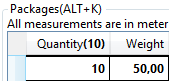
Select this option if you want to be able to enter, for example, "10 parcels weighing a total of 50kg" in a row in the section Pakkeüksused, but do not want what is in the column Kaal (and others) to be multiplied by what is in the column Kogus. (Because it would then be 10 x 50kg = 500kg, which is incorrect.)
The picture shows a part of the Pakkeüksused section of the Order reception.
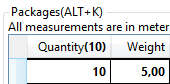
Select this option if you want to be able to enter, for example, "10 packages of 5 kg" on a line in the section Pakkeüksused and want the weight calculation to sum this up to 10 x 5 kg = 50 kg.
If you do not display the column Kogus in the section Pakkeüksused and instead enter information about one package per row, it does not matter what setting this checkbox has. Opter does the weight calculation based on there being one package per row. |
|
The default handling is that Opter sums all dimensions on the order, one by one. For example, all load metres for all packages on an order are added together in one total. If you work a lot with packages that have mixed units (e.g. some have volume or load metres, others do not), you can tick the checkbox Saadetise koondhinna hinnastamise kaal to get a correct pricing weight.
ExampleThis is how Opter calculates the pricing weight depending on the checkbox setting: Column 1: Weight: 70 kg, Volume: 1,0 m3. Column 2: Weight: 200 kg, Volume: No data available.
|
Kaalutegurid
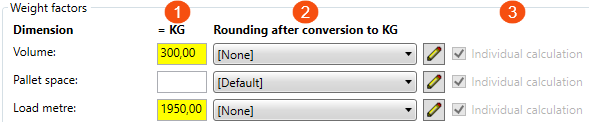
The weight factors are used to convert the current dimension to kg. For example, 1 m3 = 300 kg, and 1 load metre = 1950 kg.
-
In the = KG field, enter a weight factor for the dimension.
-
In the Ümardamine pärast ümberarvestamist KG-ks drop-down menu, you can choose one of the following:
-
[puudub].
The value you have entered in the = KG field is not rounded.
-
Standard.
The value is rounded according to standard rules, but if the decimal is 0.5, it is rounded to the nearest even integer. (This is to avoid systematically getting higher values after rounding.)
-
5.1 kg > 5.0 kg (normal rounding)
-
4.9 kg > 5.0 kg (normal rounding)
-
4,5 kg > 4,0 kg (nearest even integer)
-
5.5 kg > 6.0 kg (nearest even integer)
-
-
Rounding rules that you have created yourself in the window Ümardamise reeglid.
To create a new set of Ümardamise reeglid or modify an existing one, click on
 or
or  at the drop-down menu. For more information, see Ümardamise reeglid (window).
-
-
Checkbox Individuaalne arvestus:
If you use extra dimensions, you can choose whether an extra dimension is calculated individually or whether you want two or more to be added together. The checkbox works like this:
-
 : The dimension is calculated individually.
 The checkbox is automatically selected (and cannot be changed) for the dimensions Maht, Kaubaaluste koht and Laadimismeeter, as these dimensions are always calculated individually.
For extra dimensions, tick the checkbox if you want the extra dimension to be calculated individually.
-
 : The dimension is calculated individually.
 -
 : If you use extra dimensions, you can untick the checkbox for two or more extra dimensions. The extra dimensions will then be added together. See the example below.
 Example, extra dimensions
Lisamõõde 1 has a weight factor of 325 kg.
Lisamõõde 2 has a weight factor of 162.5 kg.
Lisamõõde 3 has a weight factor of 400 kg.
We want extra dimensions 1 and 2 to be added together, and extra dimension 3 to be calculated individually. So we uncheck the tick box Individuaalne arvestus for extra dimensions 1 and 2, and tick the tick box for extra dimension 3.
We have an order for 2 pieces of extra dimension 1, 2 pieces of extra dimension 2, and 2 pieces of extra dimension 3. Opter then calculates as follows:
Lisamõõde 1: 2 x 325 kg = 650 kg.
Lisamõõde 2: 2 x 162.5 kg = 325 kg.
Lisamõõde 3: 2 x 400kg = 800kg.
Opter sums Lisamõõde 1 and Lisamõõde 2: 650 kg + 325 kg = 975 kg.
This is more than the pricing weight from any other dimension (Lisamõõde 3 800kg), so the pricing weight will be 975kg.
-
|
Function |
Description |
|---|---|
|
Maht |
Here you can specify the weight factor Opter should use for weight calculation of the dimension Maht. For example, if you want to convert one cubic metre into 300 kg, enter "300" in the field = KG. The Ümardamine pärast ümberarvestamist KG-ks drop-down list will automatically select [puudub]. The checkbox Individuaalne arvestus is automatically ticked, as the dimension Maht should always be calculated individually. For instructions, see above the table. |
|
Kaubaaluste koht |
Here you can specify the weight factor Opter should use for weight calculation of the dimension Kaubaaluste koht. For instructions, see above the table. |
|
Laadimismeeter |
Here you can specify the weight factor Opter should use for weight calculation of the dimension Laadimismeeter. For instructions, see above the table. |
|
Lisamõõde 1-Lisamõõde 5 (Displayed if you use extra dimensions.) |
Here you can specify the weight factor Opter should use for weight calculation of extra dimensions and choose whether an extra dimension should be calculated individually or whether you want two or more to be added together. For instructions, see above the table. |
Automaatsed mõõdud
Maht
|
Function |
Description |
|---|---|
|
Arvutage maht automaatselt |
|
|
Arvutage mahtu ainult siis, kui saadetis on virnastatav |
The checkbox can only be ticked if the Arvutage maht automaatselt checkbox (above) is ticked.
You decide what you want 'stackable' to mean in your organisation. You can specify per package whether it is stackable or not. For example, if you are transporting flagpoles, you can use the surface several times (by loading several flagpoles on top of each other, or laying the flagpoles on top of other goods). Flagpoles are durable and not very heavy. Therefore, the length weight, and therefore the price, can be lower than if the entire width of the vehicle had been used. |
|
Ümardamine |
Select one of the following:
|
|
Maksimaalne pikkus |
Enter the maximum length of the package for the calculation of the volume to be performed. WCA_VolumeMaxLength |
|
Maksimaalne laius |
Enter the maximum width of the package for the calculation of the volume to be performed. |
|
Maksimaalne kõrgus |
Enter the maximum height of the package for the calculation of the volume to be performed. |
LDM
|
Function |
Description |
|---|---|
|
Arvutage LDM automaatselt |
|
|
Arvutage LDM kui maht puudub |
The checkbox can only be ticked if the Arvutage LDM automaatselt checkbox (above) is ticked.
|
|
The checkbox can only be ticked if the Arvutage LDM automaatselt checkbox (above) is ticked.
|
|
|
Ümardamine |
Select one of the following:
|
|
Maksimaalne pikkus |
Enter the maximum length of the package for the load metre calculation to be performed. |
|
Maksimaalne laius |
Enter the maximum width of the package for the load metre calculation to be performed. |
|
Maksimaalne kõrgus |
Enter the maximum height of the package for the load metre calculation to be performed. |
|
Ruutmeetrid LDM'i kohta |
Indicate how many square metres a load metre should correspond to, for example 2.40. |
Kaubaaluste koht
|
Function |
Description |
|---|---|
|
Arvutage aluseid automaatselt |
|
|
Arvutage aluseid ainult siis, kui neid on mitu |
The checkbox can only be ticked if the Arvutage aluseid automaatselt checkbox (above) is ticked.
Enter the length and width of a pallet in the fields:
|
|
Ümardamine |
Choose one of the following:
|
|
Maksimaalne pikkus |
Enter the maximum length of the package for the Pallet space calculation to be performed. |
|
Maksimaalne laius |
Enter the maximum width of the package for the Pallet space calculation to be performed. |
|
Maksimaalne kõrgus |
Enter the maximum height of the package for the Pallet space calculation to be performed. |
|
LDM- kaubaaluse kohta |
Indicate how many load metres a Pallet space should correspond to, for example 1.20. |
Näide
The Näide box shows how volume, load metres and Pallet space are calculated.
The calculation for load metres will change if you change the value in the Ruutmeetrid LDM'i kohta field in the LDM box above.
The calculation for Pallet space will change if you changed the value in the LDM- kaubaaluse kohta field in the Kaubaaluste koht box above.

