Kapatsiteedi tüübid (window)
Last updated: 26 August 2025
 Seaded > Kapatsiteedi tüübid
In this article
In this window you add load types (capacities) which are then displayed in the Vehicle and Vehicle Type registers. For example, "cargo cage" may be a cargo type that you may want to add here.
In the registers for vehicles and vehicle types, you then enter the maximum number of loads that the vehicle or vehicle type can carry. For example, they may be load cages and the vehicle/vehicle type may have a maximum of 8 load cages. See the tab Mahutavus and the box Mahutavus in the registers for vehicles and vehicle types. For more information, see Sõidukid (window) and Sõidukite tüübid (window).
Proceed as follows
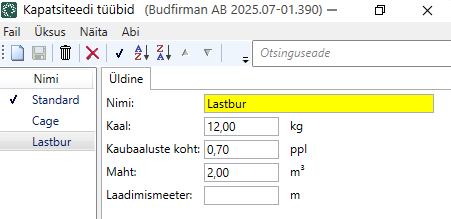
Add a new load type by clicking on  , give the load type a name and then enter the weight, Pallet space, volume and/or load metre for the load type. Click on Salvesta to save all changes.
Üldine
|
Function |
Description |
|---|---|
|
Nimi |
Give the load type a name, for example "Load cage". |
|
Kaal |
Enter the weight of the load type. Weight is given in kilograms (kg). |
|
Kaubaaluste koht |
Enter the number of Pallet spaces that the load type corresponds to, for example "0.4". |
|
Maht |
Enter the volume of the load type, i.e. indicate how much volume the load carrier occupies in the vehicle. Volume is expressed in cubic metres (m3). |
|
Laadimismeeter |
Indicate how many load metres the load type occupies in the vehicle. Load metres are given in metres (m). |

