Pikkuse kaalu arvutamine (window)
Last updated: 24 September 2025
 Seaded > Kaalu arvutamine and then click on
  or
or  at the drop-down menu Pikkuse kaalu arvutamine.
In this article
In the Pikkuse kaalu arvutamine window, you can set the rules for weight calculations of long goods. For more information, see Setting up weight calculation for long goods and Calculating the pricing weight.
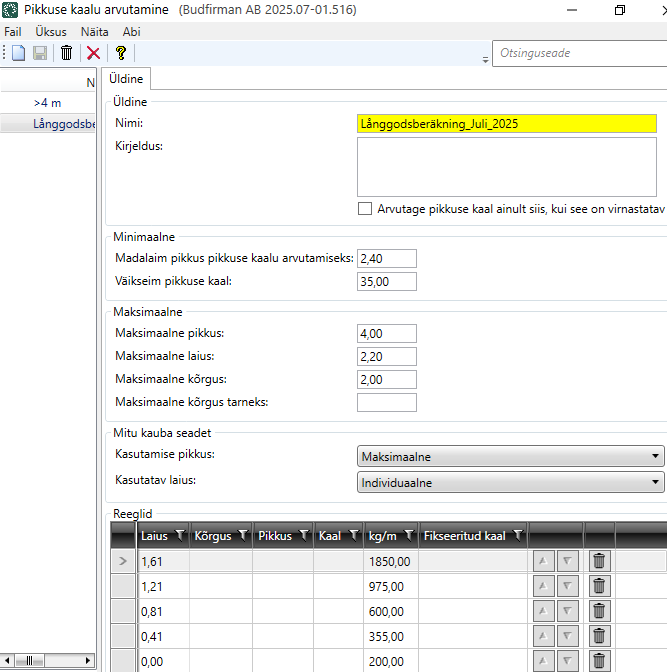
Üldine
General
|
Function |
Description |
|---|---|
|
Nimi |
Enter the name of the length weight calculation. |
|
Kirjeldus |
Free text field for internal notes. The description is not displayed anywhere else but here. |
|
You decide what you want 'stackable' to mean in your organisation. You can specify per package whether it is stackable or not. For example, if you are transporting flagpoles, you can use the surface several times (by loading several flagpoles on top of each other, or laying the flagpoles on top of other goods). Flagpoles are durable and not very heavy. Therefore, the length weight, and therefore the price, can be lower than if the entire width of the vehicle had been used. |
 : If you want goods to be considered as long goods only if they are stackable.
 : If you want goods to be considered as long goods regardless of whether they are stackable or not.
Minimaalne
|
Function |
Description |
|---|---|
|
Madalaim pikkus pikkuse kaalu arvutamiseks |
Enter the minimum length of the package for the long goods weight calculation to be performed. If the parcel is shorter than the specified minimum length, no length weight is calculated for the parcel. |
|
Väikseim pikkuse kaal |
Enter the minimum length weight that this calculation can return. For example, if you have entered 35kg in the field, and if the total of the long goods weight calculation is 22kg (i.e. less than 35kg), Opter will use 35kg as the result of the long goods weight calculation. |
Maksimaalne
|
Function |
Description |
|---|---|
|
Maksimaalne pikkus |
Enter the maximum length of the package for the long goods weight calculation to be performed. |
|
Maksimaalne laius |
Enter the maximum width of the package for the long goods weight calculation to be performed. |
|
Maksimaalne kõrgus |
Enter the maximum height of the package for the long goods weight calculation to be performed. |
|
Maksimaalne kõrgus tarneks |
Enter the maximum total height of the order for the long goods weight calculation to be performed. |
Mitu kauba seadet
Select how to perform the long goods weight calculation if the order contains more than one parcel.
|
Function |
Description |
|---|---|
|
Kasutamise pikkus |
Select the length to be used for the long freight bay calculation:
|
|
Kasutatav laius |
Select the width to be used for the long fold calculation:
|
Reeglid
In the table, enter the rules that will apply to the long goods weight calculation. Enter one line per row.
In the first four columns (Laius, Kõrgus, Pikkus and Kaal) you indicate which conditions apply. On each line, you can enter one or more terms, for example Laius and Kõrgus, or just Laius.
In the next two columns (kg/m and Fikseeritud kaal), enter the result you want. Choose whether to use a fixed length weight (Fikseeritud kaal) for a row, or whether to use a factor (kg/m) to multiply the number of metres by. For more information and examples, see Setting up weight calculation for long goods.
Opter checks the rules from top to bottom of the table, so it is important that you put the rules in the right order. You can use the arrow buttons  to move a line up or down, so that you get the rules in the order you want.
|
Function |
Description |
|---|---|
|
Laius |
Enter the condition for Laius in number of metres (m). For example, if you enter "1.61", it means that Opter checks if the width of the package is 1.61 metres or more, and if so, Opter uses the factor in the column kg/m or the value in the column Fikseeritud kaal for the weight calculation. If the width of the collit does not meet the requirement "1.61 metres or more", Opter moves on and checks the next row in the table. |
|
Kõrgus |
Enter the condition for Kõrgus in number of metres (m). |
|
Pikkus |
Enter the condition for Pikkus in number of metres (m). |
|
Kaal |
Enter the condition for Kaal in kilograms (kg). |
|
kg/m |
Indicate the factor you want to use for the long goods weight calculation on the relevant row. That is, specify how many kilograms one metre should correspond to. |
|
Fikseeritud kaal |
Enter the length weight you want the rules on the line to GIF. Enter Fikseeritud kaal in kilograms (kg). Enter Fikseeritud kaal or kg/m. |
|
|
You can use the arrow buttons to move a row up or down, so that you get the rules in the order you want. Opter checks the rules from top to bottom of the table. |
|
|
Click on |


