Design field for mobile (window)
Last updated: 21 May 2026
Applies to Opter Driver for iOS and Opter Driver Labs for Android.
 Seaded > Mobiilne andmeside > Design field for mobile
In this article
This window is used to set the fields to be displayed in Opter Driver for iOS on the shipment page, the detail view, the proof of delivery signature page, the scan page and the Scanning details page. Drag and drop the fields that are to be displayed in the Kaasas list and those that are not to be displayed in the Välistatud list. It is also possible to double-click on a field to move it to the other list. For more information, see Setting which fields are displayed in Opter Driver. To set which fields are to be displayed in the package view and package list, see Mobiilse andmeside seaded (window).
If you are using the XML file App.OpterDriver.Design, you can use the tables below to see which tags correspond to the various fields, and what those tags are called. The tags that can be used in App.OpterDriver.Design are shown in square brackets "[ ]". For example, STREETFROM shows the street name of the pick-up address in the app.
Select the fields that are useful for your organisation. It is not intended that all fields will be shown.
Click on the tab for the view for which settings are to be made, for example Shipment list, Detail view or Scanning view.
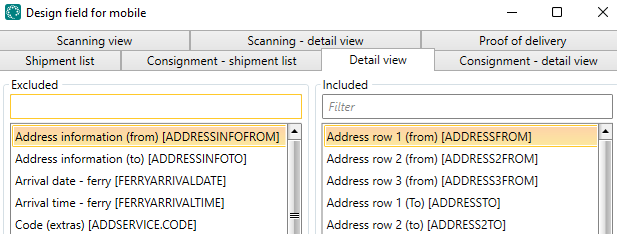
For the fields selected for display, the following applies:
-
Most of the fields and sections are only displayed if there is any information to display, i.e. if the shipment/order contains that information.
-
The following fields are displayed even if there is no information to display: Weight [WEIGHT], Volume [VOLUME], Pallet space [AREA], Load metres [LOADMETER], Time (minutes) [TIMEMINUTES], Distance (km) [DISTANCEKM], as well as Extra dimension 1 [EXTRADIMENSION1]-Extra dimension 5 [EXTRADIMENSION5] and Extra ID 1 [EXTRAID1]-Extra ID 5 [EXTRAID5]. That is, these fields show "0" if there is no value on the order.
 Fields that can be displayed in the shipment list, detail view and on the signature page for proof of delivery
The fields are located on the Shipment list, Detail view and Proof of delivery tabs.
If you use App.OpterDriver.Design, put the fields for the order list in the section summary, the fields for the detail view in the section expanded and the fields for the proof of delivery page in the section pod. For more information, see App.OpterDriver.Design.
The image shows how it might look in the mission list (on the mission page of the app).
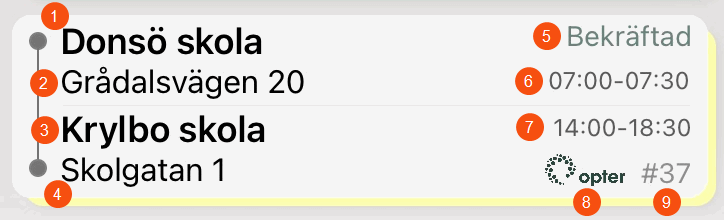
In the picture above we have chosen to show the fields Address row 1 (from) [ADDRESSFROM] (1), Street (from) [STREETFROM] (2), Street number (from) [STREETNOFROM] (2) and Address row 1 (To) [ADDRESSTO] (3) among others. The figures in the image are also shown in the table below.
|
Field in the app |
Field name in Design field for mobile |
|---|---|
|
Sender’s name, for example, a company name or a private individual. |
Address row 1 (from) [ADDRESSFROM] (1) |
|
The street name of the pickup address. |
Street (from) [STREETFROM] (2) |
|
The street number of the pickup address. |
Street number (from) [STREETNOFROM] (2) |
|
Receiver’s name, for example, a company name or a private individual. |
Address row 1 (To) [ADDRESSTO] (3) |
| The street number of the delivery address. |
Street (to) [STREETTO] (4) |
| The street number of the delivery address. |
Street number (to) [STREETNOTO] (4) |
|
The current status of the shipment. |
Status [CURRENTSTATUS] (5) |
|
Earliest pickup time, time of day. |
Earliest pickup time [EARLIESTPICKUPTIME] (6) |
|
Latest pickup time, time of day. |
Latest pickup time [LATESTPICKUPTIME] (6) |
|
Earliest delivery time, time of day. |
Earliest delivery time [EARLIESTDELIVERYTIME] (7) |
|
Latest delivery time, time of day. |
Latest delivery time [LATESTDELIVERYTIME] (7) |
|
Customer logo [CUSTOMERLOGOTYPE] (8) You can use the Mobile data settings App.CustomerLogoNameFallback to display the customer's name if there is no logo in the customer register. For more information, see Mobiilse andmeside seaded (window). |
|
|
Tellimuse number |
Order number [ORDERID] (9) |
|
Information on the sender/recipient address of the shipment |
Address information (from) [ADDRESSINFOFROM]/Address information (to) [ADDRESSINFOTO]. For more information, see Information linked to the customer’s address. |
|
Address row 2 of the pickup address. |
Address row 2 (from) [ADDRESS2FROM] |
|
Address row 2 of the delivery address. |
Address row 2 (to) [ADDRESS2TO] |
|
Address row 3 of the pickup address. |
Address row 3 (from) [ADDRESS3FROM] |
|
Address row 3 of the delivery address. |
Address row 3 (to) [ADDRESS3TO] |
|
The ferry’s arrival date. |
Arrival date - ferry [FERRYARRIVALDATE] |
|
The ferry’s arrival time. |
Arrival time - ferry [FERRYARRIVALTIME] |
|
The number of price items to which the price item row refers. |
Quantity (price item) [PRICEITEM.QUANTITY] |
|
The number of packages to which the package row relates. |
Quantity (package) [PACKAGE.QUANTITY] |
|
The number of extras to which the extras row refers. |
Quantity (extras) [ADDSERVICE.QUANTITY] |
|
Total number of price items. |
Number of price items [PRICEITEMCOUNT] |
|
Total number of deviations. |
Number of deviations [DAMAGECOUNT] |
|
Number of unit 1 for the price item. |
Quantity unit 1 (price item) [PRICEITEM.UNIT1QUANTITY] |
|
Number of unit 2 for the price item. |
Quantity unit 2 (price item) [PRICEITEM.UNIT2QUANTITY] |
|
The number of packages scanned so far. |
Number of packages [PACKAGECOUNT] To allow the Packages section to be displayed, Number of packages [PACKAGECOUNT] must be located in Kaasas. |
|
Number of proofs of delivery. |
Number of PODs [PODCOUNT] |
|
Number of loose items. |
Number of loose items [LOOSEITEMCOUNT] |
|
Number of scanned packages. |
Number of scanned packages [SCANNEDPACKAGES] See also the Package scanned [PACKAGE.SCANNED] field. |
|
Total number of extras. |
Number of extras [ADDSERVICECOUNT] |
|
Description of price item. |
Price item description [PRICEITEM.DESCR] |
|
Price item code. |
Price item code [PRICEITEM.CODE] |
|
Name of price item. |
Price item name [PRICEITEM.NAME] |
|
The ferry’s departure date. |
Departure date - ferry [FERRYDEPARTUREDATE] |
|
The ferry’s departure time. |
Departure time - ferry [FERRYDEPARTURETIME] |
|
Distance in kilometres. |
Distance (km) [DISTANCEKM] |
|
Sender reference |
Sender reference [SENDERREFERENCE] |
|
Estimated pickup time. |
Estimated pickup time [ESTIMATEDPICKUPTIME] |
|
Estimated delivery time. |
Estimated delivery time [ESTIMATEDDELIVERYTIME] |
|
Description of the ferry booking. |
Description - ferry [FERRYDESCRIPTION] If notes about the ferry booking have been made in dispatch, they are displayed here. |
|
Comment |
Description (deviation) [DAMAGE.COMMENT] |
|
Goods text on package. |
Description (package) [PACKAGE.TEXT] |
|
Description of extra. |
Description (extras) [ADDSERVICE.CODE] |
|
The reference’s (customer reference) mobile phone number. |
Reference - Mobile number [CUSTOMERREFERENCEMOBILEPHONE] |
|
The reference’s (customer reference) telephone number. |
Reference - Telephone number [CUSTOMERREFERENCEPHONE] |
|
The name of the reference. |
Reference [CUSTOMERREFERENCE] |
|
The width of the embankment in metres. |
Width (package) [PACKAGE.WIDTH] |
|
Email address of the shipment’s sender. |
Email (from) [EMAILFROM] |
|
Email address of the shipment’s receiver. |
Email (to) [EMAILTO] |
|
External ID. (External order number.) |
External ID [EXTERNALID] |
|
External message. |
External message [EXTERNALMESSAGE] |
|
Extra ID 1-5 for parcels. |
Extra ID 1 (package) [PACKAGE.EXTRAID1]–Extra ID 5 (package) [PACKAGE.EXTRAID5] |
|
Extra ID 1-8 for Price items. |
Extra ID 1 (price item) [PRICEITEM.EXTRAID1]–Extra ID 8 (price item) [PRICEITEM.EXTRAID8] |
|
Extra ID 1-5 for orders. |
Extra ID 1 [EXTRAID1]–Extra ID 5 [EXTRAID5] |
|
Extra dimension 1-5 for orders. |
Extra dimension 1 [EXTRADIMENSION1]–Extra dimension 5 [EXTRADIMENSION5] |
|
Extra dimension 1-5 for packages. |
Extra dimension1 (package) [PACKAGE.EXTRADIMENSION1]–Extra dimension5 (package) [PACKAGE.EXTRADIMENSION5] |
|
Extra message |
Extra message [MESSAGEEXTRA] |
|
Sender’s fax number. |
Fax (from) [FAXFROM] |
|
The receiver’s fax number. |
Fax (to) [FAXTO] |
|
Load metres of package. |
Load metres (package) [PACKAGE.LOADMETER] |
|
Load metres |
Load metres [LOADMETER] |
|
The number of the vehicle that reported the deviation. |
Vehicle (deviation) [DAMAGE.VEHICLE] |
|
The name of the vehicle that reported the deviation. |
Vehicle name (deviation) [DAMAGE.VEHICLENAME] |
|
Vehicle type |
Vehicle type [VEHICLETYPE] |
|
Vehicle type code. |
Vehicle type code [VEHICLETYPECODE] |
|
Freight bill number |
Freight bill [FREIGHTBILL] |
|
The sender's department/company. (Corresponds to the Firma field under Saatja in order reception). |
Company (from) [COMPANYFROM] |
|
The receiver's department/company. (Corresponds to the Firma field under Saaja in order reception). |
Company (to) [COMPANYTO] |
|
Goods type of package. |
Goods type (package) [PACKAGE.GOODSTYPE] |
|
Goods type |
Goods type [GOODSTYPE] |
|
Pickup date |
Pickup date [PICKUPDATE] |
|
Pickup time, time of day. |
Pickup time [PICKUPTIME] |
|
Height of package in metres. |
Height (package) [PACKAGE.HEIGHT] |
|
The deviation icon is displayed in the shipment list on shipments that have one or more deviations. |
Indicator (deviation) [INDICATORDAMAGE] |
|
The icon for attached files is displayed in the shipment list on shipments that have images and/or other files attached. |
Indicator (attachments) [INDICATORATTACHMENT] |
|
The package icon appears in the shipment list on shipments that have one or more packages. |
Indicator (package) [INDICATORPACKAGE] |
|
The pod icon is displayed in the shipment list for shipments that have one or more pods. |
Indicator (proof of delivery) [INDICATORPOD] |
|
The loose items icon appears in the shipment list on shipments that have one or more loose items. |
Indicator (loose item) [INDICATORLOOSEITEM] |
|
Authorised to deliver even if the recipient is not at home. If the icon appears on a shipment, it means that the recipient authorises the delivery of the shipment even if they are not at home. |
Indicator (the receiver does not need to be present) [INDICATORDELIVERYNOTHOME] |
|
The price item icon appears in the shipment list on shipments that have one or more price items. |
Indicator (price item) [INDICATORPRICEITEM] |
|
The extras icon is shown for shipments that have one or more extras. |
Indicator (extra) [INDICATORADDSERVICE] |
|
Internal message. |
Internal message [MESSAGE] |
|
Type of extra. |
Code (extras) [ADDSERVICE.CODE] |
|
Number of packages in the order. (Corresponds to the number in the Pakkeüksused field under Mõõtmed in order reception). |
Packages [PACKAGES] |
|
Package deactivated. |
Package abandoned [PACKAGE.ABANDONED].
|
|
Package scanned. |
Package scanned [PACKAGE.SCANNED].
|
|
Length of package in metres. |
Package length [PACKAGE.DEPTH] |
|
Package ID |
Package ID number [PACKAGE.PACKAGEID] |
|
Package type |
Package type [PACKAGE.PACKAGETYPE] |
|
Cost of the ferry booking. |
Cost - ferry [FERRYCOST]. If the cost of the ferry booking has been entered in dispatch, it will be displayed here. |
|
The customer’s main telephone number, for example a mobile number. |
Customer - mobile number 1 [CUSTOMERPHONE1] |
|
The customer’s secondary telephone number, such as a mobile number. |
Customer - mobile number 2 [CUSTOMERPHONE2] |
|
Customer’s name. |
Customer [CUSTOMER] |
|
Customer code |
Customer code [CUSTOMERCODE] |
|
Customer number. |
Customer number [CUSTOMERNUMBER] |
|
Customer’s Kliendi projekt/projekti nr. |
Customer project [CUSTOMERPROJECT] |
|
Mobile number of the customer reference. |
Reference - Mobile number [CUSTOMERREFERENCEMOBILEPHONE] |
|
Customer reference’s telephone number. |
Reference - Telephone number [CUSTOMERREFERENCEPHONE] |
|
References |
Reference [CUSTOMERREFERENCE] |
|
Country of the collection address. |
Country (from) [COUNTRYFROM] |
|
Country of the delivery address. |
Land (to) [COUNTRYTO] |
|
Delivery instruction |
Delivery notification [SENDERINSTRUCTION] |
|
Date of creation of the proof of delivery. |
Proof of delivery date [POD.DATE] |
|
The name of the person who signed the proof of delivery. |
Proof of delivery name [POD.NAME] |
|
Time of creation of the proof of delivery. |
Proof of delivery time [POD.TIME] |
|
The number of loose items at the end of the shipment (after unloading). |
Number of loose items (at end) [LOOSEITEM.ENDINGQUANTITY] |
|
The number of loose items at the start of the shipment (after loading). |
Number of loose items (at start) [LOOSEITEM.STARTINGQUANTITY] |
|
The description of the loose item. |
Loose item description [LOOSEITEM.DESCR] |
|
Receiver reference |
Receiver reference [RECEIVERREFERENCE] |
|
Message to the driver about the pickup. |
Driver message (from) [DRIVERMESSAGEFROM] |
|
Message to the driver about the delivery. |
Driver message (to) [DRIVERMESSAGETO] |
|
Message to the driver. |
Driver message [DRIVERMESSAGE] |
|
The name of the ferry. |
Name - ferry [FERRYNAME] |
|
Name of the type of loose item. |
Name (loose items) [LOOSEITEM.NAME] |
|
Name of extra. |
Name (extras) [ADDSERVICE.NAME] |
|
Name of the option. |
Names (option) [DELIVERYOPTIONNAMES] |
|
Name of unit 1 of price item. |
Name unit 1 (price item) [PRICEITEM.UNIT1NAME] |
|
Name of unit 3 of price item. |
Name unit 2 (price item) [PRICEITEM.UNIT2NAME] |
|
The next status in the life cycle. |
Next status [NEXTSTATUS] |
|
The sender's department/company on the order. (Corresponds to the Firma field under Saatja in order reception). |
Order - Address company (from) [DELIVERYADDRESSFROMCOMPANY] |
|
The receiver's department/company on the order. (Corresponds to the Firma field under Saaja in order reception). |
Order - Address company (to) [DELIVERYADDRESSTOCOMPANY] |
|
Information on the sender/recipient address on the order. |
Order - Address information (from) [DELIVERYADDRESSINFOFROM]/Order - Address information (to) [DELIVERYADDRESSINFOTO] |
|
Sender’s name, for example, a company name or a private individual. Applies to the order. |
Order - Address row 1 (from) [DELIVERYADDRESSFROM] |
|
Receiver’s name, for example, a company name or a private individual. Applies to the order. |
Order - Address row 1 (to) [DELIVERYADDRESSTO] |
|
Sender’s address line 2. Applies to the order. |
Order - Address row 2 (from) [DELIVERYADDRESS2FROM] |
|
Receiver’s address line 2. Applies to the order. |
Order - Address row 2 (to) [DELIVERYADDRESS2TO] |
|
Sender’s address line 3. Applies to the order. |
Order - Address row 3 (from) [DELIVERYADDRESS3FROM] |
|
Receiver’s address line 3. Applies to the order. |
Order - Address row 3 (to) [DELIVERYADDRESS3TO] |
|
Delivery options for the order. |
Order - Alternatives [DELIVERYOPTIONS] |
|
Order’s delivery date. |
Order - Date [DELIVERYDATE] |
|
The sender's email address. Applies to the order. |
Order - Email (from) [DELIVERYEMAILFROM] |
|
The recipient's email address. Applies to the order. |
Order - Email (to) [DELIVERYEMAILTO] |
|
External order number. |
Order - External order no. [DELEXTERNALID] |
|
Sender’s fax number. Applies to the order. |
Order - Fax (from) [DELIVERYFAXFROM] |
|
The receiver’s fax number. Applies to the order. |
Order - Fax (to) [DELIVERYFAXTO] |
|
Message to the driver about the delivery. Applies to the order. |
Order - Driver message (to) [DELIVERYDRIVERMESSAGETO] |
|
Sender’s street address. Applies to the order. |
Order - Street (from) [DELIVERYSTREETFROM] |
|
Receiver’s street address. Applies to the order. |
Order - Street (to) [DELIVERYSTREETTO] |
|
Sender’s street number. Applies to the order. |
Order - Street number (from) [DELIVERYSTREETNOFROM] |
|
Receiver’s street number. Applies to the order. |
Order - Street number (to) [DELIVERYSTREETNOTO] |
|
The trail ID. Applies to the order. |
Order - ID (trail) [DELIVERYTRAILID] |
|
Sender's country of origin. Applies to the order. |
Order - country (from) [DELIVERYADDRESSCOUNTRYFROM] |
|
Country of destination. Applies to the order. |
Order - country (to) [DELIVERYADDRESSCOUNTRYTO] |
|
Message to the driver. Applies to the order. |
Order - Driver message (from) [DELIVERYDRIVERMESSAGEFROM] |
|
The name of the trail. Applies to the order. |
Order - Name (trail) [DELIVERYTRAILNAME] |
|
Sender’s entry code. Applies to the order. |
Order - Entry code (from) [DELIVERYENTRECODEFROM] |
|
Receiver’s entry code. Applies to the order. |
Order - Entry code (to) [DELIVERYENTRECODETO] |
|
Sender’s postcode. Applies to the order. |
Order - Postcode (from) [DELIVERYZIPCODEFROM] |
|
Receiver’s postcode. Applies to the order. |
Order - Postcode (to) [DELIVERYZIPCODETO] |
|
The trail code. Applies to the order. |
Order - Trail code [DELIVERYTRAILCODE] |
|
Sender’s postal town. Applies to the order. |
Order - City (from) [DELIVERYCITYFROM] |
|
Receiver’s postal town. Applies to the order. |
Order - City (to) [DELIVERYCITYTO] |
|
Sender’s telephone number. Applies to the order. |
Order - Telephone (from) [DELIVERYPHONEFROM] |
|
Receiver’s telephone number. Applies to the order. |
Order - Telephone (to) [DELIVERYPHONETO] |
|
the name of the terminal if the terminal is shown as the sender on the order. |
Order - Terminal (from) [DELIVERYADDRESSHUBNAMEFROM] |
|
the name of the terminal if the terminal is shown as the receiver on the order. |
Order - Terminal (to) [DELIVERYADDRESSHUBNAMETO] |
|
the description of the departure terminal if the terminal is shown as the sender on the order. |
Order - Terminal description (from) [DELIVERYADDRESSHUBTEXTFROM] |
|
the description of the arrival terminal if the terminal is shown as receiver on the order. |
Order - Terminal description (to) [DELIVERYADDRESSHUBTEXTTO] |
|
Order’s delivery time. |
Order - Time [DELIVERYTIME] |
|
Sender’s Geograafiline tsoon/Hinnatsoon. Applies to the order. |
Order - Zone (from) [DELIVERYZONEFROM] |
|
Receiver’s Geograafiline tsoon/Hinnatsoon Applies to the order. |
Order - Zone (to) [DELIVERYZONETO] |
|
Order date. |
Order date [ORDERDATE] |
|
pallet space. |
Pallet space [AREA] |
|
Package pallet space. |
Pallet space [PACKAGE.AREA] |
|
Sender’s entry code. |
Entry code (from) [ENTRECODEFROM] |
|
Receiver’s entry code. |
Entry code (to) [ENTRECODETO] |
|
Postcode for the pickup address. |
Postcode (from) [ZIPCODEFROM] |
|
Postcode of the delivery address. |
Postcode (to) [ZIPCODETO] |
|
Price. Applies to the order. |
Price [ORDERPRICE] |
|
Products. |
Product sum [PRODUCTS] |
|
Project number. |
Project [PROJECTNUMBER] |
|
The number (call number) of the resource that reported the deviation. |
Resource (deviation) [DAMAGE.RESOURCE] |
|
The name of the resource that reported the deviation. |
Resource name (deviation) [DAMAGE.RESOURCENAME] |
|
The name of the route. |
Route name [ROUTENAME] |
|
The order number of the consignment. |
The consignment’s order number [CONSIGNMENTID] |
|
Latest pickup date. |
Latest pickup date [LATESTPICKUPDATE] |
|
Latest pickup time, time of day. |
Latest pickup time [LATESTPICKUPTIME] |
|
Latest delivery date. |
Latest delivery date [LATESTDELIVERYDATE] |
|
Latest delivery time, time of day. |
Latest delivery time [LATESTDELIVERYTIME] |
|
Shows if the package and/or the freight bill have been scanned for the shipment’s current status. |
Scanned [SCANNED]
|
|
Shows who created the order. |
Receiver [ORDERRECEIVER] The person who was logged into the Opter client when the order was created. If the order was created on the web, it says "Internet" (or a username you have changed it to). If the order was created via EDI, it says "EDI" (or whatever username you may have changed to). |
|
Postal town for the pickup address. |
City (from) [CITYFROM] |
|
Postal town of the delivery address. |
City (to) [CITYTO] |
|
The current status of the shipment. |
Status [CURRENTSTATUS] |
|
The status of the ferry. |
Status - ferry [FERRYSTATUS] For example, a ferry may have the Ajakavaga, Broneeritud or Tühistatud status. For more information about the status of ferries, see Parvlaevad (panel). |
|
The time (in hours and minutes) when the current status was set on the shipment. |
Status time [CURRENTSTATUSTIME] |
|
Contact information, the sender’s telephone number. |
telephone number from [PHONEFROM] |
|
Contact information, the receiver’s telephone number. |
telephone number to [PHONETO] |
|
Driving time in minutes. |
Time (minutes) [TIMEMINUTES] |
|
the name of the terminal from which the goods are to be sent. |
Terminal (from) [ADDRESSHUBNAMEFROM] |
|
the name of the terminal to which the goods are to be sent. |
Terminal (to) [ADDRESSHUBNAMETO] |
|
the description of the departure terminal. |
Terminal description (from) [ADDRESSHUBTEXTFROM] |
|
the description of the arrival terminal. |
Terminal description (to) [ADDRESSHUBTEXTTO] |
|
Earliest pickup date. |
Earliest pickup date [EARLIESTPICKUPDATE] |
|
Earliest pickup time, time of day. |
Earliest pickup time [EARLIESTPICKUPTIME] |
|
Earliest delivery date. |
Earliest delivery date [EARLIESTDELIVERYDATE] |
|
Earliest delivery time, time of day. |
Earliest delivery time [EARLIESTDELIVERYTIME] |
|
Service |
Service [SERVICETYPE] |
|
Service code |
Service code [SERVICETYPECODE] |
|
Number of package rows in the order. |
Total packages [PACKAGESTOTAL] |
|
Trailer registration number. |
Trailer reg. number [TRAILERREGNR] |
|
Trailer supplier. |
Trailer supplier [TRAILERSUPPLIER] |
|
Trailer name. |
Trailer name [TRAILERNAME] |
|
Trailer number |
Trailer number [TRAILERNUMBER] |
|
The name of the type of deviation. |
Type (deviation) [DAMAGE.TYPE] |
|
The trail ID. Applies to the shipment. |
Shipment - ID (trail) [SHIPMENTTRAILID] |
|
The trail code. Applies to the shipment. |
Shipment - code (trail) [SHIPMENTTRAILCODE] |
|
The name of the trail. Applies to the shipment. |
Shipment - name (trail) [SHIPMENTTRAILNAME] |
|
Tarnekuupäev |
Shipment date [SHIPMENTDATE] |
|
Shipment number |
Shipment ID [SHIPMENTID] |
|
Saadetise tüüp |
Shipment type [SHIPMENTTYPE] |
|
Package weight in kg. |
Weight (package) [PACKAGE.WEIGHT] |
|
Total weight of order. |
Weight [WEIGHT] |
|
Volume of package. |
Volume (package) [PACKAGE.VOLUME] |
|
Total volume of order. |
Volume [VOLUME] |
|
Geograafiline tsoon/Hinnatsoon for the pickup address. |
Zone (from) [ZONEFROM] |
|
Geograafiline tsoon/Hinnatsoon of the delivery address. |
Zone (to) [ZONETO] |


 "Properties" ending in "DIF" in the XML file App.OpterDriver.Design
In the complete example of the XML file App.OpterDriver.Design (see för 2025.12.00, 2026.01.00 och senare), there is "properties" ending in "DIF", for example "DELIVERYADDRESSHUBNAMEFROMDIF". In the standard layout, these are not displayed in the app, but are used in the code to determine whether there is any difference between, for example, DELIVERYADDRESSHUBNAMEFROM and ADDRESSHUBNAMEFROM. (If they are different, DELIVERYADDRESSHUBNAMEFROM will be displayed in the app, but if they are exactly the same, DELIVERYADDRESSHUBNAMEFROM will not be displayed in the app, as it is sufficient for ADDRESSHUBNAMEFROM to be displayed.)
So "DIF-properties" is not intended to be displayed in the app; they are meant to be used in "conditions" in the XML file.
In the table below, we can see that DELIVERYADDRESSHUBNAMEFROMDIF can be "True" or "False":
-
"True": If
DELIVERYADDRESSHUBNAMEFROMdiffers from ADDRESSHUBNAMEFROM.(For certain "DIF" properties, the code also checks whether the "DELIVERY" property has a value, i.e. is anything other than NULL, a space or an empty string. See, for example, DELIVERYSTREETFROMDIF in the table below.)
-
"False": If
DELIVERYADDRESSHUBNAMEFROMis exactly the same as ADDRESSHUBNAMEFROM.
This is what it might look like in App.OpterDriver.Design if we want DELIVERYADDRESSHUBNAMEFROM to be displayed if it differs from ADDRESSHUBNAMEFROM:
<row>
<item itemname="DELIVERYADDRESSHUBNAMEFROM" font="SMALL" condition="DELIVERYADDRESSHUBNAMEFROMDIF" />
</row>The result of the code above is that:
-
DELIVERYADDRESSHUBNAMEFROM is displayed in the app if it differs from ADDRESSHUBNAMEFROM, (since the condition for that row is then true, condition="DELIVERYADDRESSHUBNAMEFROMDIF" is "True").
-
DELIVERYADDRESSHUBNAMEFROM is not displayed if it is exactly the same as ADDRESSHUBNAMEFROM, (since the row condition is then false, condition="DELIVERYADDRESSHUBNAMEFROMDIF" is "False").
The table above contains descriptions of ADDRESSHUBNAMEFROM and DELIVERYADDRESSHUBNAMEFROM:
-
The name of the terminal from which the goods are being shipped, Terminal (from) [ADDRESSHUBNAMEFROM].
-
The terminal's name if the terminal is listed as the sender on the order, Order - Terminal (from) [DELIVERYADDRESSHUBNAMEFROM].
The "properties" listed in the table below are not displayed in the Design field for mobile window, but they can be used in the App.OpterDriver.Design XML file and are included in the complete example of App.OpterDriver.Design; see för 2025.12.00, 2026.01.00 och senare.
|
"Properties" |
Description |
|---|---|
|
DELIVERYADDRESSFROMDIF DELIVERYADDRESS2FROMDIF DELIVERYADDRESS3FROMDIF DELIVERY ADDRESS STODIF DELIVERYADDRESS2TODIF DELIVERYADDRESS3TODIF |
DELIVERYADDRESSFROMDIF can be "True" or "False":
DELIVERYADDRESS2FROMDIF and DELIVERYADDRESS3FROMDIF follows the same pattern. DELIVERYADDRESSTODIF, DELIVERYADDRESS2TODIF and DELIVERYADDRESS3TODIF also follow the same pattern. |
|
DELIVERY STREET FROM DIF DELIVERY STREET NO. FROM DIF DELIVERY STREET TO DIF DELIVERY STREET NOTODIF |
DELIVERYSTREETFROMDIF can be "True" or "False":
DELIVERYSTREETNOFROMDIF, DELIVERYSTREETTODIF and DELIVERYSTREETNOTODIF follow the same pattern. |
|
DELIVERY ZIP CODE FROM DIF DELIVERY ZIP CODE METHOD |
DELIVERYZIPCODEFROMDIF can be "True" or "False":
DELIVERYZIPCODETODIF follows the same pattern. |
|
DELIVERY CITY FROM DIF DELIVERYCITYTODIF |
DELIVERYCITYFROMDIF can be "True" or "False":
DELIVERYCITYTODIF follows the same pattern. |
|
DELIVERY ADDRESS COUNTRY FROM DIF DELIVERY ADDRESS COUNTRY TO |
DELIVERYADDRESSCOUNTRYFROMDIF can be "True" or "False":
DELIVERYADDRESSCOUNTRYTODIF follows the same pattern. |
|
DELIVERY ADDRESS, CITY NAME, FROM DIF DELIVERY ADDRESS HUB TEXT FROM DIF DELIVERYADDRESSHUBNAMETIF DELIVERYADDRESSHUBTEXTODIF |
DELIVERYADDRESSHUBNAMEFROMDIF can be "True" or "False":
DELIVERYADDRESSHUBTEXTFROMDIF, DELIVERYADDRESSHUBNAMETODIF and DELIVERYADDRESSHUBTEXTTODIF follow the same pattern.
|
|
DELIVERY ADDRESS INFORMATION FROM DIF DELIVERYADDRESSINFOTODIF
|
DELIVERYADDRESSINFOFROMDIF can be "True" or "False":
DELIVERYADDRESSINFOTODIF follows the same pattern. |
|
DELIVERYADDRESSFROMCOMPANYDIF DELIVERYADDRESSATCOMPANYDIF |
DELIVERYADDRESSFROMCOMPANYDIF can be "True" or "False":
DELIVERYADDRESSTOCOMPANYDIF follows the same pattern. |
|
DELIVERY DRIVER MESSAGE FROM DIF DELIVERY DRIVER MESSAGE TO DIF |
DELIVERYDRIVERMESSAGEFROMDIF can be "True" or "False":
DELIVERYDRIVERMESSAGETODIF follows the same pattern. |
|
DELIVERY EMAIL FROM DIF DELIVERYEMAILTODIF |
DELIVERYEMAILFROMDIF can be "True" or "False":
DELIVERYEMAILTODIF follows the same pattern. |
|
DELIVERY PHONE NUMBER FROM DIF DELIVERY PHONE METHOD DELIVERY CODE FROM DIF DELIVERY ENTRY CODE METHOD |
DELIVERYPHONEFROMDIF can be "True" or "False":
DELIVERYPHONETODIF, DELIVERYENTRECODEFROMDIF and DELIVERYENTRECODETODIF follow the same pattern. |
|
DELIVERY ZONE FROM DIF DELIVERY ZONE METHOD |
DELIVERYZONEFROMDIF can be "True" or "False":
DELIVERYZONETODIF follows the same pattern. |
Field for consignments in the order list and detail view
The fields below are only of interest if working with consignments. They can be found on the tabs Consignment - shipment list and Consignment - detail view.
If you are using App.OpterDriver.Design, please put the co-loading fields in the sections summaryconsignment (task list) and expandedconsignment (detail view). For more information, see App.OpterDriver.Design.
This is what the detail view for a consignment could look like if these fields, directional arrows and status buttons are displayed. You will probably choose to show only (A) or only (B).
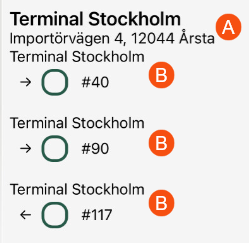
The letters (A) and (B) in the picture above are also in the table below, so it is possible to see which fields are displayed where in the app.
|
Field in the app |
Field name in Design field for mobile |
|---|---|
|
A list of addresses of the stops included in the consignment is displayed, i.e. pickup and delivery addresses. The content of the address list depends on the setting for the Looge uued aadressid, kui saatmisel sobivaid aadresse pole checkbox:
To have an arrow showing whether it is a pickup or delivery address, see Direction (consignment address) [DIRECTIONCONSIGNMENT] and Direction [ADDRESSDIRECTION] below.
|
Address [ADDRESS] (A) |
|
Note on consignment. (Corresponds to the Teave field under Saatja and Saaja in order reception). |
Address information (consignment) [ADDRESSINFOCONSIGNMENT] (B) |
|
Note. (Corresponds to the Teave field under Saatja and Saaja in order reception). |
Address information [INFO] (A) |
|
The address order (route sequence) for the driver. If the shipments have been given a route sequence by route optimising the resources, the route sequence numbers are displayed for all addresses (i.e. all stops). The route sequence number is shown in brackets to the right of the address. |
Address order [INDEX] (A) |
|
The Nimi field (address line 1) of the sender or receiver of the original order. (Corresponds to the Nimi field under Saatja and Saaja in order reception). |
Address line (original shipment) [ADDRESSCONSIGNED] (B) |
|
The Nimi field (address line 1) of the sender or receiver of the consignment. (Corresponds to the Nimi field under Saatja and Saaja in order reception). |
Address line (consignment) [ADDRESSCONSIGNMENT] (B) |
|
Address line 2 of the original order. |
Address line 2 (original shipment) [ADDRESS2CONSIGNED] (B) |
|
Address line 2 of the consignment. |
Address line 2 (consignment shipment) [ADDRESS2CONSIGNMENT] (B) |
|
Address line 2. |
Address line 2 [ADDRESS2] (A) |
|
Address line 3 of the original order. |
Address line 3 (original shipment) [ADDRESS3CONSIGNED] (B) |
|
Address line 3 of the consignment. |
Address line 3 (consignment) [ADDRESS3CONSIGNMENT] (B) |
|
Address line 3. |
Address line 3 [ADDRESS3] (A) |
|
Email address |
Email [EMAILADDRESS] (A) |
|
Fax number |
Fax [FAX] (A) |
|
The Firma field of the sender or receiver of the original order. (Corresponds to the Firma field under Saatja and Saaja in order reception). |
Company (original shipment) [COMPANYCONSIGNED] (B) |
|
The Firma field of the sender or receiver of the consignment. (Corresponds to the Firma field under Saatja and Saaja in order reception). |
Company (consignment) [COMPANYCONSIGNMENT] (B) |
|
The Firma field of the sender or receiver. (Corresponds to the Firma field under Saatja and Saaja in order reception). |
Company [COMPANY] (A) |
|
Street name of the original order. |
Street (original shipment) [STREETCONSIGNED] (B) |
|
Street name of the consignment. |
Street (consignment) [STREETCONSIGNMENT] (B) |
|
Street name |
Street [STREET] (A) |
|
Street number of the original order. |
Street no. (original shipment) [STREETNOCONSIGNED] (B) |
|
Street number of the consignment. |
Street no. (consignment) [STREETNOCONSIGNMENT] (B) |
|
Street number |
Street no. [STREETNO] (A) |
|
The icon shows whether the original order is handled by the driver or not. If the address is a pickup address, the following applies:
If the address is a delivery address, the following applies:
To have an arrow showing whether it is a pickup or delivery address, see Direction (consignment address) [DIRECTIONCONSIGNMENT] below. |
Handled - original shipment [HANDLEDCONSIGNED] (B) |
|
The icon shows whether the consignment shipment is handled by the driver or not. If the address is a pickup address, the following applies:
If the address is a delivery address, the following applies:
To have an arrow showing whether it is a pickup or delivery address, see Direction (consignment address) [DIRECTIONCONSIGNMENT] below. |
Handled - consignment shipment [HANDLEDCONSIGNMENT] (B) |
|
Country |
Country [COUNTRY] (A) |
|
The country of the original assignment. |
Country (original shipment) [COUNTRYCONSIGNED] (B) |
|
The land of consignments. |
Country (consignment) [COUNTRYCONSIGNMENT] (B) |
|
Latitude coordinate of the address, for example “59.29”. |
Latitude [LATITUDE] (A) |
|
Longitude coordinate of the address, for example “18.07”. |
Longitude [LONGITUDE] (A) |
|
Message to the driver. |
Driver message [DRIVERMESSAGE] (A) |
|
Order number of the original order. (The original shipment is part of a consignment). |
Order number - original shipment [ORDERIDCONSIGNED] (B) |
|
The order number of the consignment. |
Order number - consignment [ORDERIDCONSIGNMENT] (B) |
|
The order number of the shipment in the consignment. |
Order [ORDER] (B) |
|
Entry code |
Entry code [ENTRECODE] (A) |
|
Postcode for the original order. |
Postcode (original shipment) [ZIPCODECONSIGNED] (B) |
|
Postcode for the consignment. |
Postal code (consignment) [ZIPCODECONSIGNMENT] (B) |
|
Arrow showing the direction, i.e. indicating whether the address is a pickup or delivery address:
See also Address [ADDRESS] above. |
Direction (consignment address) [DIRECTIONCONSIGNMENT] (B) |
|
Arrow showing the direction, i.e. indicating whether the address is a pickup or delivery address:
See also Address [ADDRESS] above. |
Direction [ADDRESSDIRECTION] (A) Only displayed if you addresses are not shown for the consignment. |
|
Latest pickup time, time of day. |
Latest pickup time [LATESTPICKUPTIME] (A) |
|
Latest delivery time, time of day. |
Latest delivery time [LATESTDELIVERYTIME] (A) |
|
Postal town. |
City/town [CITY] (A) |
|
Postal town for the original order. |
City/town (original shipment) [CITYCONSIGNED] (B) |
|
Postal town for the consignment. |
City/town (consignment) [CITYCONSIGNMENT] (B) |
|
State (This may appear for addresses in the US, for example.) |
State/County [STATE] (A) |
|
The original shipment’s status. |
Status (original shipment) [STATUSCONSIGNED] (B) |
|
The consignment shipment’s status. |
Status (consignment) [STATUSCONSIGNMENT] (B) |
|
The current status of the shipment. |
Status [CURRENTSTATUS] (A) |
|
Status button for original shipment. The button shows whether the shipment has been handled or not, and the driver can press the status button to change the status of the shipment. If the address is a pickup address, the following applies:
If the address is a delivery address, the following applies:
To have an arrow showing whether it is a pickup or delivery address, see Direction (consignment address) [DIRECTIONCONSIGNMENT] above. |
Status button (original shipment) [STATUSBUTTONCONSIGNED] (B)
Can only be displayed in the detail view. |
|
Consignment shipment status button. The button shows whether the shipment has been handled or not, and the driver can press the status button to change the status of the shipment. If the address is a pickup address, the following applies:
If the address is a delivery address, the following applies:
To have an arrow showing whether it is a pickup or delivery address, see Direction (consignment address) [DIRECTIONCONSIGNMENT] above. |
Status button (consignment) [STATUSBUTTONCONSIGNMENT] (B)
Can only be displayed in the detail view. |
|
Telephone number |
telephone number [PHONE] (A) |
|
Name of the terminal. |
Terminal [HUBNAME] (A) |
|
Description of the terminal. |
Terminal description [HUBTEXT] (A) |
|
Earliest pickup time, time of day. |
Earliest pickup time [EARLIESTPICKUPTIME] (A) |
|
Earliest delivery time, time of day. |
Earliest delivery time [EARLIESTDELIVERYTIME] (A) |
|
Trailer name. |
Trailer name [ADDRESSTRAILERNAME] |
|
The shipment number of the original shipment. (The original shipment is part of a consignment). |
Shipment ID - original shipment (consignment address) [SHIPMENTIDCONSIGNED] (B) |
|
The shipment number of the consignment shipment. |
Shipment ID - consignment shipment (consignment address) [SHIPMENTIDCONSIGNED] (B) |
|
Geograafiline tsoon/Hinnatsoon. |
Zone [ZONE] (A) |
 : Addresses of all the stops for the consignment are displayed.
 : The addresses of all the stops for the original order are displayed. (In other words the original shipments that make up the consignment).
 the status of the shipment is
  means that the status of the shipment is
  Selected (filled) button means that the status of the shipment is
  Not selected (not filled) means that the status of the shipment is earlier than Fields that can be shown on the scan page and the Scanning details page
The fields are set on the Scanning view (scan page) and Scanning - detail view (Scanning details page) tabs.
If you use App.OpterDriver.Design, put the fields for the scan page in the scanrows section and the fields for the Scanning details page in the scandetailrows section. For more information, see App.OpterDriver.Design.
|
Field in the app |
Field name in Design field for mobile |
|---|---|
|
Sender’s name, for example, a company name or a private individual. |
Address row 1 (from) [ADDRESSFROM] |
|
Receiver’s name, for example, a company name or a private individual. |
Address row 1 (To) [ADDRESSTO] |
|
This shows the order number of the next stop according to the route optimisation. The last stop’s route sequence number is also displayed here. Example “2/5”, i.e. the next stop is number two and the last stop is number five in the route sequence. (So there are a total of four stops left). |
Address order (scanning) [ADDRESSINDEX] |
|
The number of packages scanned so far. |
Number of packages [PACKAGECOUNT] |
|
We recommend that Quantity (package - scanning) [PACKAGEQUANTITY] is not used, as it belongs to an older design. |
Quantity (package - scanning) [PACKAGEQUANTITY] |
|
The number of packages to which the package row relates. |
Quantity (package) [PACKAGE.QUANTITY] |
|
Goods text on package. |
Description (package) [PACKAGE.TEXT] |
|
We recommend that Width (package - scanning) [PACKAGEWIDTH] is not used, as it belongs to an older design. |
Width (package - scanning) [PACKAGEWIDTH] |
|
Width of package in metres. |
Width (package) [PACKAGE.WIDTH] |
|
Displays the text and the package dimensions set for the mobile data setting PackageDimensionsString in the scan block, for example “Weight: 20 kg”. For more information, see Mobiilse andmeside seaded (window). |
Dimensions (package - scanning) [DIMENSIONSSTRING] |
|
Extra dimension 1-5 for packages. |
Extra dimension1 (package) [PACKAGE.EXTRADIMENSION1]–Extra dimension5 (package) [PACKAGE.EXTRADIMENSION5] |
|
We recommend that Load metres (package - scanning) [PACKAGELOADMETER] is not used, as it belongs to an older design. |
Load metres (package - scanning) [PACKAGELOADMETER] |
|
Load metres of package. |
Load metres (package) [PACKAGE.LOADMETER] |
|
Load metres |
Load metres [LOADMETER] |
|
The street name of the pickup address. |
Street (from) [STREETFROM] |
|
The street number of the delivery address. |
Street (to) [STREETTO] |
|
The street number of the pickup address. |
Street number (from) [STREETNOFROM] |
|
The street number of the delivery address. |
Street number (to) [STREETNOTO] |
|
Goods type of package. |
Goods type (package) [PACKAGE.GOODSTYPE] |
|
Height of package in metres. |
Height (package) [PACKAGE.HEIGHT] |
|
Freight bill number or package ID, depending on what is being scanned. |
Input (scanning) [SCANINPUT] |
|
Package ID |
Package ID number [PACKAGE.PACKAGEID] |
|
Number of packages in the order. (Corresponds to the number in the Pakkeüksused field in the Mõõtmed section in order reception). |
Packages [PACKAGES] |
|
Package deactivated. |
Package abandoned [PACKAGE.ABANDONED]
|
|
Package scanned. |
Package scanned [PACKAGE.SCANNED]
|
|
We recommend that Package height (package - scanning) [PACKAGEHEIGHT] is not used, as it belongs to an older design. |
Package height (package - scanning) [PACKAGEHEIGHT] |
|
We recommend that Package length (package - scanning) [PACKAGEDEPTH] is not used, as it belongs to an older design. |
Package length (package - scanning) [PACKAGEDEPTH] |
|
Length of package in metres. |
Package length [PACKAGE.DEPTH] |
|
Package type. |
Package type [PACKAGE.PACKAGETYPE] |
|
The comment from the most recent scan. |
Comment (scanning) [PACKAGE.SCANCOMMENT] |
|
Customer’s name. |
Customer [CUSTOMER] |
|
Customer code. |
Customer number [CUSTOMERNUMBER] |
|
Mobile number of the customer reference. |
Reference - Mobile number [CUSTOMERREFERENCEMOBILEPHONE] |
|
Customer reference’s telephone number. |
Reference - Telephone number [CUSTOMERREFERENCEPHONE] |
|
Country of the collection address. |
Country (from) [COUNTRYFROM] |
|
Country of the delivery address. |
Land (to) [COUNTRYTO] |
|
Receiver reference. |
Receiver reference [RECEIVERREFERENCE] |
|
The next status in the life cycle. |
Next status [NEXTSTATUS] |
|
Sender’s telephone number. Applies to the order. |
Order - Telephone (from) [DELIVERYPHONEFROM] |
|
Receiver’s telephone number. Applies to the order. |
Order - Telephone (to) [DELIVERYPHONETO] |
|
Order date |
Order date [ORDERDATE] |
|
Tellimuse number |
Order number [ORDERID] |
|
We recommend that Pallet space (package - scanning) [PACKAGEAREA] is not used, as it belongs to an older design. |
Pallet space (package - scanning) [PACKAGEAREA] |
|
Pallet space |
Pallet space [AREA] |
|
Postcode for the pickup address. |
Postcode (from) [ZIPCODEFROM] |
|
Postcode of the delivery address. |
Postcode (to) [ZIPCODETO] |
|
The results of the scan, i.e. if Opter found one shipment, several shipments, no shipment, duplicates, or if the scan is taking too long or if something goes wrong. |
Result (scanning) [RESULT] |
|
The resource that last scanned the package. |
Resource (package) [PACKAGE.RESOURCE] |
|
Scan direction, i.e. pickup scan or delivery scan. |
Direction (scanning) [DIRECTION] |
|
The name of the route. |
Route name [ROUTENAME] |
|
Date and time when the package was last scanned. |
Scan time (package) [PACKAGE.SCANTIME] |
|
Postal town for the pickup address. |
City (from) [CITYFROM] |
|
Postal town of the delivery address. |
City (to) [CITYTO] |
|
The current status of the shipment. |
Status [CURRENTSTATUS] |
|
The package’s latest status. |
Status (package) [PACKAGE.STATUS] |
|
The name of the terminal at which the package was last scanned. |
Terminal name (package) [PACKAGE.HUBNAME] |
|
Type of scan, i.e. freight bill or package label. |
Type (scanning) [SCANTYPE] |
|
Tarnekuupäev |
Shipment date [SHIPMENTDATE] |
|
Shipment number |
Shipment ID [SHIPMENTID] |
|
We recommend that Weight (package - scanning) [PACKAGEWEIGHT] is not used, as it belongs to an older design. |
Weight (package - scanning) [PACKAGEWEIGHT] |
|
Package weight in kg. |
Weight (package) [PACKAGE.WEIGHT] |
|
Total weight of order. |
Weight [WEIGHT] |
|
We recommend that Volume (package - scanning) [PACKAGEVOLUME] is not used, as it belongs to an older design. |
Volume (package - scanning) [PACKAGEVOLUME] |
|
Volume of package. |
Volume (package) [PACKAGE.VOLUME] |
|
Total volume of order. |
Volume [VOLUME] |

