Giving up shipments in Opter Driver
Last updated: 30.03.2023
Applies to Opter Driver for iOS and Opter Driver Labs for Android.
In this article
You can give away shipments that you have accepted if for some reason you are then unable to carry them out, or if it is more convenient for another resource to do them. Whether or not you are allowed to give away shipments depends on a decision made by the dispatcher. If the Give away menu option is visible in the app, you can give away shipments.
Giving away a shipment
-
Tap the menu (
 ) in the top right corner of the shipment’s detail view .
 -
Tap Give away and select the resource (driver or vehicle) to which the shipment is to be given. Only resources from your own supplier appear in the list.
The shipment is assigned the status Revoked and appears in the shipment list under Revoked.
-
Tap Shipments at the bottom of the page.

-
Tap the block below Revoked.
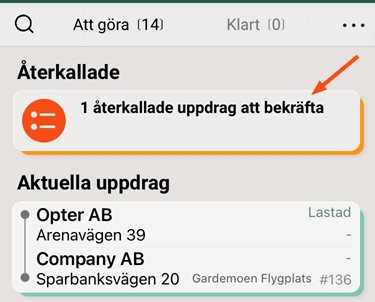
-
Click on the Confirm shipments button to confirm that you are giving away the shipment.
The change is synchronised with dispatch and can be seen by dispatchers.
The shipments that are given away are given the Assigned status for the party to which they have been given, and are shown on the Todo tab in that driver’s app.
Giving several shipments to the same driver/vehicle
-
If you are not already on the shipment page in Opter Driver, tap Shipments at the bottom of the page.
-
Tap the menu (
) in the top right corner of the shipment page. Tap Select. -
Select the shipments you want to give away by clicking on them in the shipment list.
A shipment can also be selected by dragging it to the left. If you then want to select more shipments, simply drag them to the left or tap them in the shipment list. If you have selected a shipment but want to deselect it, tap it or swipe it to the left.
-
Tap Give away and select the resource (driver or vehicle) to which the shipments are to be given. Only resources from your own supplier appear in the list.
The status of the shipments is set to Revoked and they are located in the shipment list under Revoked.
-
Click on the section under Revoked at the top of the shipment page.
-
Click on the Confirm shipments button to confirm that you are giving away the shipments.
The change is synchronised with dispatch and can be seen by dispatchers.
The shipments that are given away are given the Assigned status for the party to which they have been given, and are shown on the Todo tab in that driver’s app.

