Allowing price items to be added and deleted in Opter Driver
Last updated: 18 February 2025
In this article
You can allow drivers to remove Price items that should not be included in the shipment directly in Opter Driver. Proceed as follows:
-
Click on Seaded > Mobiilne andmeside > Mobiilse andmeside seaded.
-
Click on an empty row in the Nimi column and then on the down arrow in that field.
-
-
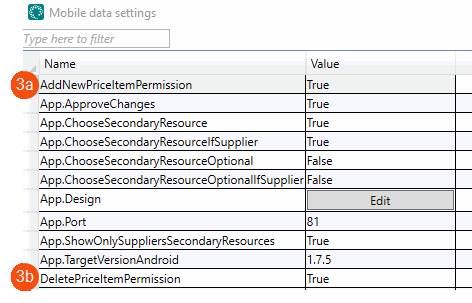
Allow price items to be added: Select AddNewPriceItemPermission from the list and type "True" in the Väärtus column.
-
Allow price items to be deleted: Select DeletePriceItemPermission from the list and type "True" in the Väärtus column.
If ArticlesPermission is set to "False", it is not possible to add or remove Price items in Opter Driver regardless of the settings for AddNewPriceItemPermission and DeletePriceItemPermission.
-
-
Click on Salvesta.
Approval in dispatch
If you have not made any setting, or set "True", for App.ApproveChanges in the Mobile data settings, an authorisation in the dispatch is required when a driver changes a shipment in Opter Driver. However, it can be set up so that approval is not required to add or delete a price item. Proceed as follows:
-
Click on Seaded > Mobiilne andmeside > Saadetise muutmise elemendid.
-
Select Kustuta hinnaartikkel from the list and deselect the Nõua heakskiitu checkbox.
If App.ApproveChanges is set to "False", no changes at all in Opter Driver need to be authorised in the dispatch.

