Terminalid (window)
Last updated: 9 October 2025
 Register > Terminalid
In this article
Üldine
Aadress
|
Function |
Description |
|---|---|
|
Teave |
Information that always applies to the Terminal. The text is downloaded to the Teave column of the address list in Order reception, and to Saatja/Saaja if the Terminal is the sender or the recipient. The text can be displayed in Opter Driver with the fields Address information (from) [ADDRESSINFOFROM] and Address information (to) [ADDRESSINFOTO] (the tags ADDRESSINFOFROM/ADDRESSINFOTO if you use App.OpterDriver.Design). For more information, see Information linked to the customer’s address and Design field for mobile (window). |
Hinnakujundus ja jagamine
On this tab, you can configure how task shares and resources are handled during splitting.
Hinnakujundus
|
Function |
Description |
|---|---|
|
Käsitlemisajad (minutid) |
Handling time for shipments transshipped at the terminal. Used for auto dispatch. For example, if goods are unloaded at the terminal at 2.00 pm, and the handling time is set to 10 minutes, the goods can be loaded at 2.10 pm at the earliest. The handling time does not affect the price. |
|
Piirkond jagamisel |
Select the region to which the new shipment will be assigned when splitting shipments at terminals. This region does not apply if, after splitting, auto dispatch chooses a route with a different preset region, i.e. if a region has been preset under Tellimus > Marsruudid for a route that auto dispatch chooses, that region applies instead of the one specified here. |
|
Jagatud kaubad |
Select the checkbox if the terminal may be used to tranship goods in the event of the automatic splitting of shipments at terminals (auto dispatch). Deselect the checkbox if the terminal must only be used as a sender or receiver in the event of automatic splitting. |
|
Ressursi hinnakujundus |
Select the checkbox if you want to have a price for the subcontractor with which the terminal is associated. If the checkbox is selected, a credit unit is created for the terminal. Deselect the checkbox if you do not want to have a price for the subcontractor with which the terminal is associated. |
|
Raha jagamise punktid |
Enter the number of points the terminal should receive for money sharing. The points specified here are only valid if the Ressursi hinnakujundus checkbox is selected. The points are used for automatic splitting, if the Kasutage automaatse jagamise ajal käsitsi jagatud jagamistegurit checkbox is deselected. |
|
Käsitsi jagatud jagamistegur |
Indicate the percentage share to be allocated to the terminal when manually splitting shipments at terminals. The percentage indicated here only applies if the Ressursi hinnakujundus checkbox is selected. If the Kasutage automaatse jagamise ajal käsitsi jagatud jagamistegurit checkbox is selected, the percentage is also used for automatic splitting of shipments (auto dispatch). |
|
Kasutage automaatse jagamise ajal käsitsi jagatud jagamistegurit |
Select the checkbox if you also want to use the manual split sharing factor for the automatic splitting of shipments at terminals. The checkbox only applies if the Ressursi hinnakujundus checkbox is selected. If the checkbox is deselected, the points are used to calculate the percentage share for the automatic splitting of shipments. |
|
Alltöövõtja |
Indicate the subcontractor with which the terminal is associated. It is only possible to enter a subcontractor if the Ressursi hinnakujundus checkbox is selected. |
Hoidke ressurss pärast jagamist alles ja määrake sama ressurss järgmistele saadetistele
|
Function |
Description |
|---|---|
|
Juht |
The terminal can be a standard terminal or part of a ferry:
|
|
Sõiduk |
The terminal can be a standard terminal or part of a ferry:
|
|
Haagis |
The terminal can be a standard terminal or part of a ferry:
|
|
Alltöövõtja |
The terminal can be a standard terminal or part of a ferry:
|
Mobiil/veeb
Internet
|
Function |
Description |
|---|---|
|
Interneti-tellimuse seaded |
The Terminal's internet order settings. [Vaikimisi]: Falls back on the office setting (tab Internet). |
Opteri terminal
|
Function |
Description |
|---|---|
|
Kasutajanimi |
Used as a username on the terminal web and when resources log in as a terminal in Opter Terminal. |
|
Parool |
Opter does not save passwords and they cannot be recovered. If a user forgets their password, you must create a new one by clicking on Vaheta parool. |
|
Logige Opteri terminalis terminalina sisse (Kontori seade) |
For information only, to make it easier to see whether users are logging into Opter Terminal as a terminal or with personal user accounts. The setting cannot be changed here, it is done on the Skaneerimine tab in the office settings (Logige Opteri terminalis terminalina sisse). |
|
Opteri terminali seaded |
The functions and layout of Opter Terminal are controlled by Mobile data settings Terminal.Settings. Here you can make separate settings for a single Terminal by switching to Kohandatud and adding a variant of Terminal.Settings. For more information, see Separate Opter Terminal settings for individual terminals. |
Lahtiolekuajad
The opening hours and off-time opening hours can be regarded as shift 1 and shift 2 and are used for auto dispatch. The service takes into account the times entered here, so that the orders fit into the right routes depending on when the terminal is open to handle goods.
The general opening hours applicable every day are listed on the Kõik päevad row. If any day has different opening hours, these can be entered in the row for that day. If no opening hours are entered, the terminal is considered to be open 24 hours a day, i.e. auto dispatch is not restricted by any opening hours.
Choose whether to use the opening hours or the off-time opening hours by selecting the checkboxes on the Dispatch tab for the service.
-
No checkboxes marked: The times under Lahtiolekuajad are used.
-
Any of the checkboxes marked: The times under Väljaspool lahtiolekuaegasid are used for that option.
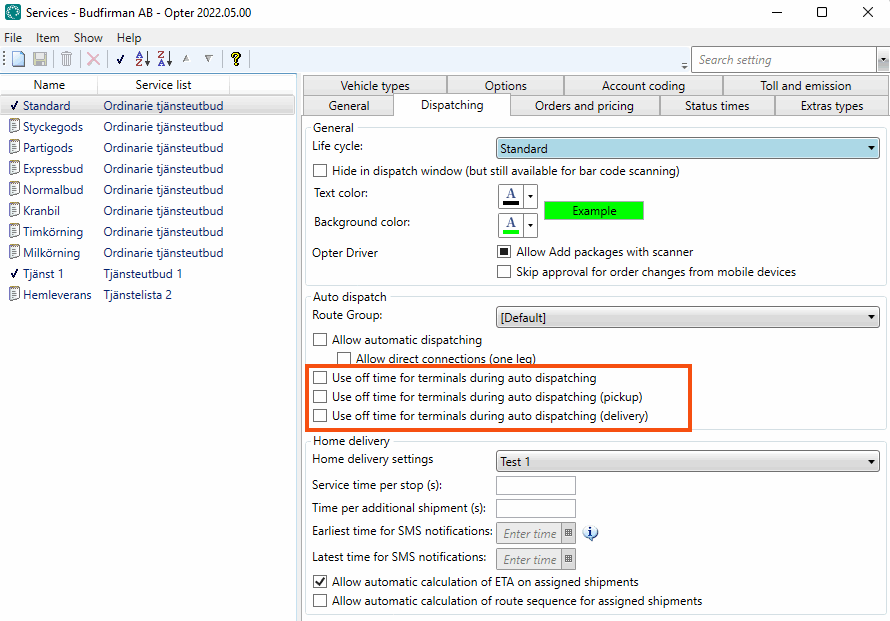
To use the off-time opening hours as off-times, enter both the basic opening hours (those entered under Lahtiolekuajad) and the additional opening hours under Väljaspool lahtiolekuaegasid, as the service takes into account either Lahtiolekuajad or Väljaspool lahtiolekuaegasid, not both at the same time.
Manused
On the Manused tab, files that can be opened on other computers can be added. The files that are added are not attached to orders, instead the function works as a file server and is intended for exchanging information. The files are saved in the database.
|
Function |
Description |
|---|---|
|
Uus |
Adds a file that is on the computer. It is only possible to add one file at a time. |
|
Kustuta |
Deletes files from the registry. It is only possible to delete one file at a time. |
|
Avatud |
Opens the selected file in the list. |
|
Faili nimi (column) |
The file name. |
|
Loodud |
When the file was added as a document in Opter. |
|
Faili nimi (field) |
The file name of the selected file. You can rename the file by typing the new name and clicking Salvesta on the menu. Remember to keep the same file extension (for example “.docx”), otherwise the application to use has to be selected when the file is opened. |
|
Kommentaar |
Free text. Information about the file. The information is only shown here. |
Scanning
This tab can be used to set up what is applicable to scanning with Opter Driver and Opter Terminal at this terminal.
POD
|
Function |
Description |
|---|---|
|
No POD on arrival |
Drivers and terminal employees cannot register a POD during an arrival scan at the terminal. |
|
Optional POD on arrival |
Drivers and terminal employees can, but are not required to, register a POD during an arrival scan at the terminal. Database fields: HUB_OptionalPODOnArrival |
|
Force POD on arrival |
Drivers and terminal employees are required to register a POD during an arrival scan at the terminal. Database fields: HUB_ForcePODOnArrival |

