Explanation of symbols – map
Last updated: 9 August 2024
In this article
On the Kaart menu tab in dispatch, select the information to be displayed on the symbols on the map. Depending on the information you choose to display, the symbols will look different and their colours will differ.
If you change the settings for what you want to display, the map will not update immediately. You have to click somewhere in dispatch to update the map.
|
Symbol |
Explanation |
|---|---|
|
|
Address for assigned shipment (Kuva valitud ressursi jaoks määratud saadetised). |
|
|
Address for shipments selected in dispatch (Kuva valitud saadetised). If you select both Kuva valitud ressursi jaoks määratud saadetised and Kuva valitud saadetised, Kuva valitud saadetised is prioritised. The address icons for selected shipments will therefore be greyed out whether they are assigned or not. |
|
|
Address for shipments for which the estimated arrival time has passed (Kuva viivitused). If you select Kuva valitud ressursi jaoks määratud saadetised, Kuva valitud saadetised and Kuva viivitused, Kuva viivitused is prioritised. The address icons for shipments that are delayed will therefore be orange, regardless of whether they are assigned or selected in dispatch. |
|
|
Pickup address (Näita korje/tarne indikaatorit). |
|
|
Delivery address (Näita korje/tarne indikaatorit). |
|
|
Route (Näita jooni). In the Marsruudi optimeerimine window, the line is the same colour as the resource to which the shipments are assigned. If route optimisation has not been carried out on the resource, no lines are displayed. |
|
––––– |
Ferry line. |
|
|
The starting or ending point of the ferry line, i.e. port or terminal. |
|
|
Resource. The letters are the resource code. The line indicates the direction and speed at which the vehicle is moving. The longer the line, the higher the speed. The background colour indicates how many shipments have been assigned to the resource, whether the resource is logged in and whether the position has been updated. See the Resource icon section below for an explanation of the colours. |


The address icon
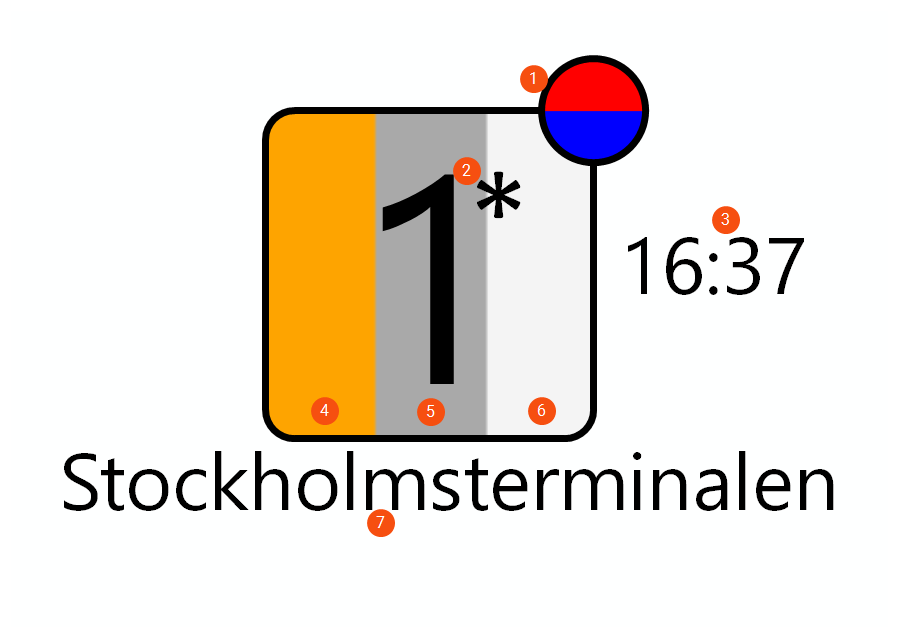
You choose what information is displayed on the address icon via the options in the Saadetised and Aadressi märge groups on the Kaart menu tab.
-
Näita korje/tarne indikaatorit: Red circle = pickup address. Blue circle: delivery address.
-
Kuva sorteerija: The number shows where the address is in the route sequence. An asterisk (*) is displayed if there are multiple pickups/deliveries at the same address. More information can be shown by hovering the mouse over the address icon, see below.
-
Näita ETA: Estimated arrival time.
-
Kuva viivitused: If the estimated arrival time of the shipment has passed, the background is orange.
-
Kuva valitud saadetised: If the shipment is highlighted in dispatch, the background is grey.
-
Kuva valitud ressursi jaoks määratud saadetised: If the shipment is assigned to a resource, the background is white.
-
Näita aadressi teavet: The name of the sender or receiver.
Example involving multiple deliveries and multiple collections at the same address
If there are multiple pickups/deliveries at the same address, an asterisk is shown. If there are both deliveries and pickups at the same address, they are separated by the symbol "|", the delivery and pickup with the lowest route sequence number is displayed in the box, and both a blue and a red circle are shown.
For example, if a box on the map says "2* | 4*", and a blue circle appears above the 2 and a red circle appears above the 4, it means that:
-
There is more than one delivery at the address and the first delivery has the route sequence number 2.
-
There is more than one pickup at the address and the first pickup has the route sequence number 4.
There could be two deliveries with route sequence numbers 2 and 3, and two pickups with route sequence numbers 4 and 5. More information can be shown by hovering the mouse over the address icon, see below.
See also Map in the dispatch centre.
Hover your mouse pointer over the address icon to view more information
Hovering the mouse over the address icon (A) to make the information box (B) appear.
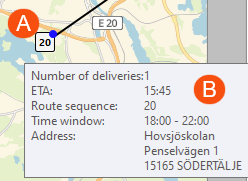
The image above shows the following:
-
A: The address icon shows that the route sequence number is 20, and the blue circle shows that it is a delivery address.
-
B: The information box shows the following:
-
Number of deliveries at this address: 1. (If the circle next to the address icon is red instead, Number of pickups will appear here).
-
ETA: Estimated arrival time is 3.45 pm.
-
Sorteerimisjärjekord: The address has the route sequence number 20.
-
Ajaaken: From 6 pm to 10 pm.
-
Aadress: The delivery address. (If the circle next to the address icon is red instead, the delivery address is shown here).
-
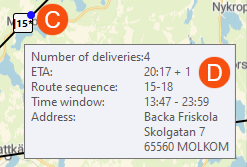
The image above shows the following:
-
C: The address icon shows that the route sequence number is 15, and the blue circle shows that it is a delivery address. The asterisk (*) shows that there is more than one delivery at the address and that the first delivery has the route sequence number 15.
-
D: The information box shows the following:
-
Number of deliveries at this address: 4. (If the circle next to the address icon is red instead, Number of pickups will appear here).
-
ETA: Estimated arrival time is 8.17 pm, plus one hour.
-
Sorteerimisjärjekord: 15-18. In other words, there are four deliveries at this address and they have the route sequence numbers 15, 16, 17 and 18.
-
Ajaaken: From 1.47 pm to 11.59 pm.
-
Aadress: The delivery address. (If the circle next to the address icon is red instead, the delivery address is shown here).
-
Resource icon
The colour of the resource icon indicates how many shipments are assigned to the resource, whether the position has been updated and whether the resource is logged in.
|
Colour |
Explanation |
|---|---|
|
|
Dark green: 0 shipments. |
|
|
Light green: 1-2 shipments. |
|
|
Yellow: 3-4 shipments. |
|
|
Red: 5-6 shipments. |
|
|
Salmon coloured: 7 shipments. |
|
|
Pink: 8 shipments. |
|
|
Light pink: 9 or more shipments. |
|
|
Grey: the position of the resource has not been updated for n minutes. Controlled by the Minutid juhi inaktiveerimiseni field on the Üldised tab in dispatch. |
|
|
White: the resource is not logged in. |


Pop-up descriptions
If you hover the cursor over a symbol on the map, more information about the address or resource is displayed.
Address:
-
Number of stops (pickups or deliveries) at the address.
-
Estimated arrival time according to route optimisation.
-
Which stop in the sequence it is (route sequence).
-
The time interval for the pickup or delivery according to information in order reception.
-
Address.
Resource:
-
Resource code and name.
-
Date and time of last position.
-
The speed at which the vehicle is moving.

