Selecting addresses when printing a freight bill
Last updated: 21 March 2023
In this article
A freight bill normally shows the order’s pickup and delivery addresses. When you print a freight bill, the system does not know which shipment you are printing from, only which order it is. If you want to print a freight bill with the pickup and delivery address for one of the shipments on the order, this can be done in dispatch. Proceed as follows:
-
In dispatch, select the order or shipment whose freight bill should be printed.
-
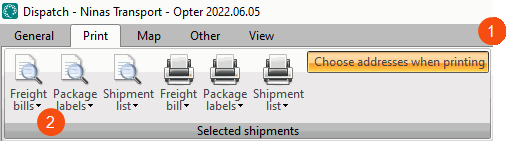
Click on the Prindi menu at the top of dispatch and then select Valige printimisel aadressid (1).
-
Click on the down arrow under Veokirjad (2) and select the freight bill template (report) to be used. The Valige aadressid window opens.
-
Select the address to be printed as the pickup address under Alates.
-
Select the address to be printed as the delivery address under To.
-
Click on OK at the bottom of the window. The freight bill is displayed so that it can be previewed.
-
Click on Prindi to print the freight bill with the addresses you have selected. It can also be opened as a PDF by clicking on Vaata PDF-ina, or saved as a PDF by clicking on Salvesta.

