Customise the menu in Opter Driver (classic)
Last updated: 14 October 2025
In this article
You can set which menu items are displayed on the menu ( ) in both the list view and the detail view. This means you can control what drivers can do in the app. The settings are made using a number of Mobile data settings. For more information on what the different menu items do, see Tabs and menu in Opter Driver (classic).
There are two types of settings:
-
XyzPermission: Show/hide the field ("true"/"false").
-
XyzOrder: Location of the field. The lower the number, the higher up the menu it is.
The menu in the list view
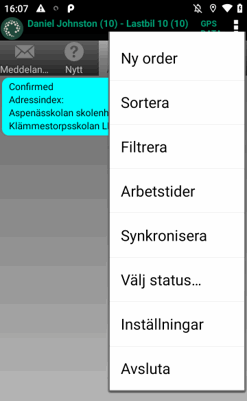
By default, all menu items are displayed. If you want to hide any of them, set it to "false".
|
Menu options |
Mobile data settings |
|---|---|
|
Uus tellimus |
CreateNewOrderPermission CreateNewOrderOrder |
|
Sorteeri |
SortPermission SortOrder |
|
Filter |
FilterPermission FilterOrder |
|
Tööajad |
WorkingTimesPermission WorkingTimesOrder |
|
Valige olek… |
SetArbitraryStatusPermission SetArbitraryStatusOrder |
|
Seaded and Välju |
Always shown at the bottom of the menu. Cannot be changed. |
The menu in the detail view
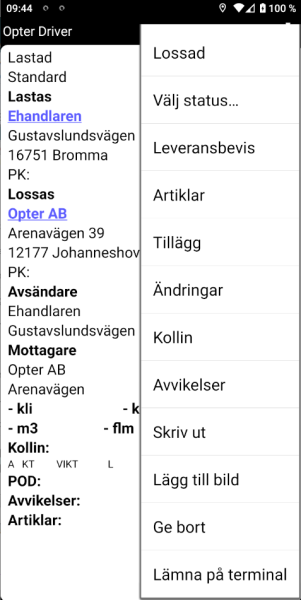
By default, all menu items are displayed (except Lisage pakkeüksus skannimise teel). If you want to hide any of them, set it to "false".
|
Menu options |
Mobile data settings |
|---|---|
|
Next status |
Always displayed at the top of the menu and cannot be changed. |
|
Valige olek… |
SetArbitraryStatusPermission SetArbitraryStatusOrder |
|
Laadimise kinnitus (POD) |
ProofOfDeliveryPermission ProofOfDeliveryOrder |
|
Hinnaelemendid |
ArticlesPermission ArticlesOrder Saadaval mobiilseadmes must be selected on the Manuaalse hinnaga kaubad tab of the price list for the Price items to be selectable in the app. |
|
Extras |
AddServicePermission AddServiceOrder |
|
Muudatused |
ChangesPermission ChangesOrder |
|
Pakkeüksused |
PackagesPermission PackagesOrder |
|
Kahjud |
DamagesPermission DamagesOrder Saadaval mobiilseadmes must be selected in the Kahjustuse liigid window for the deviations to be selected in the app. |
|
Prindi |
PrintPermission PrintOrder |
|
Lisa pilt |
AddImagePermission AddImageOrder |
|
Lisage pakkeüksus skannimise teel |
AddPackageByScanningPermission AddPackageByScanningOrder "False" by default and will not be displayed unless you set AddPackageByScanningPermission to "true". |
|
Anna ära |
GiveAwayPermission GiveAwayOrder |
|
Jäta terminali |
ShipmentDeliveryAtTerminalPermission ShipmentDeliveryAtTerminalOrder |
Troubleshooting
 It is not possible to add or change Price items
This may be due to the fact that no Price items in the current price list may be used in Opter Driver. Check which price list the order you are viewing in the app uses. Then go to Majandus > Hinnakirjad > Hinnakirjad > Manuaalse hinnaga kaubad tab and check that the checkbox Saadaval mobiilseadmes is ticked for at least one Price item. If no Price items are selected, it is not possible to add any items, although it is possible to fill in the form.
It also looks like it is possible to change existing Price items, but
If you don't want any Price items to be added or changed in the app, we recommend that you hide the menu item completely by setting ArticlesPermission to "false".
It is not possible to add any deviations
This may be because no deviation types can be used in Opter Driver. The menu option Kahjud is still displayed because it is possible to view existing deviations on the order in the app that have been added to the Order reception or via EDI. Go to Seaded > Kahjud > Kahju tüübid and check that the checkbox Saadaval mobiilseadmes is ticked for at least one deviation type.

