Late payment interest and reminder fee
Last updated:
To be able to invoice a reminder fee, you must have created a payment reminder. For more information, see Invoice reminders.
In this article
The interest rates in Opter are annual rates.
Late payment interest is the interest charged on an invoice that the customer does not pay on time. Late payment interest is calculated as follows in Opter:

The number of days is calculated from the due date of the original invoice until either the date on which the invoice was paid or the date specified when interest is calculated.
The annual interest rate is indicated on the original invoice.
Settings for late payment interest and reminder fees
The settings that have to be configured in order to invoice customers for late payment interest and reminder fees are:
 Specifying general late payment interest rates and reminder fees
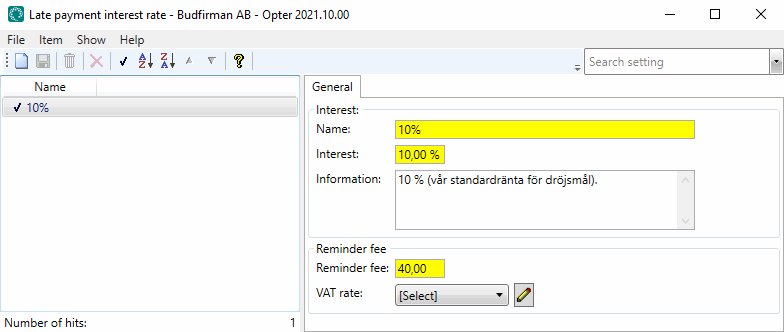
Click on Majandus > Arved > Viivise määr.
The list on the left shows which late payment interest rates are available for your company.
-
Set the late payment interest rates you want to use and create more if required.
-
Enter a reminder fee and VAT rate for the charge, if applicable.
- Click on Salvesta to save all changes.
Choosing the default interest rate and how to invoice late payment interest and reminder fees
2. a) Click on Seaded > Kontorid.
-
Go to the Arve seaded tab.
-
Select the default late payment interest rate for your company from the drop-down list.
- Click on Salvesta to save all changes.
2. b) Choose whether you want to invoice directly or have late payment interest and reminder fees included on the next invoice to the customer
Deselect the checkboxes to include created interest and reminder fees on invoices. To include late payment interest and reminder fees on the next invoice sent to the customer, select them instead.
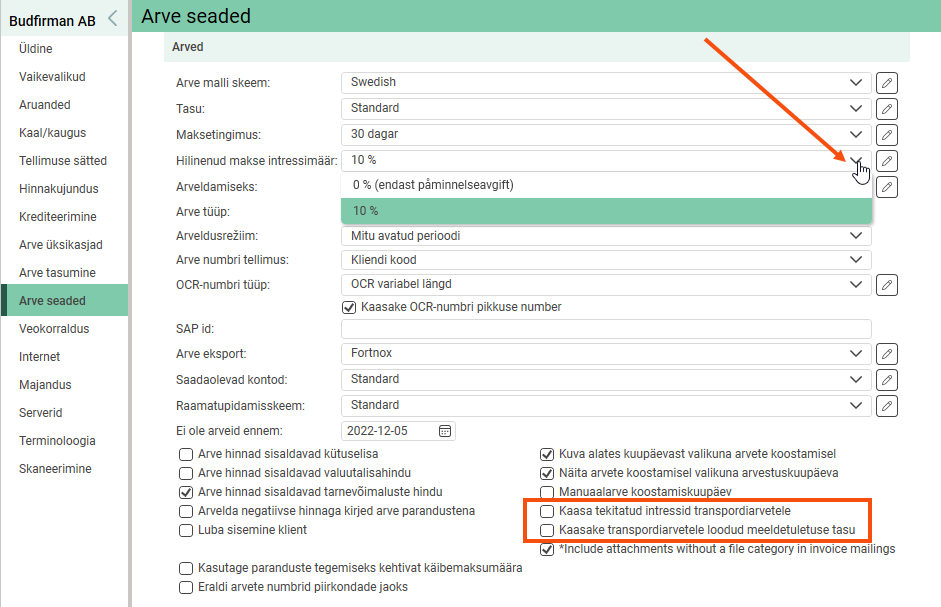
The chosen interest rate is valid from now on. This choice does not affect invoices that have already been created.
To use different interest rates for late payments and reminder fees for different customers, you also need to configure settings for that.
Choosing penalty interest for customers
-
Click on Register > Kliendid.
-
Select a customer from the list on the left and go to the Arveteave tab.
-
Select the required late payment interest rate from the Hilinenud makse intressimäär drop-down list.
The chosen interest rate is valid from now on. This choice does not affect invoices that have already been created.
Calculating and invoicing late payment interest and reminder fees
To calculate late payment interest and reminder fees, proceed as follows:
1. Calculate interest and reminder fees
For more information on how interest on late payments is calculated, see .
Click on Majandus > Arved > Arved > Fail > Intressiarve.
-
Select the Arvutage intressid and Loo meeldetuletustasud checkboxes on the Loomine tab and configure the settings for late payment interest and reminder fees.
-
Deselect Koostage intressiarved.
-
Click on OK.
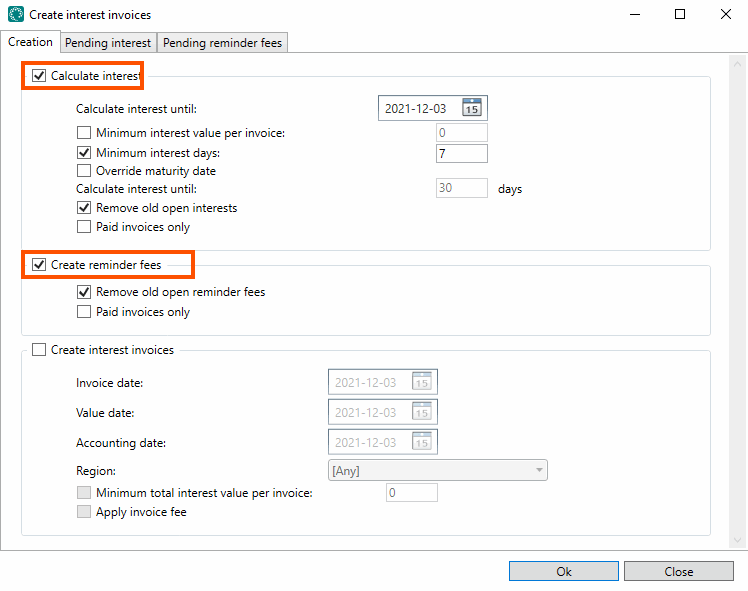
Explanations of settings for Arvutage intressid
|
Function |
Description |
|---|---|
|
Arvutage intressi kuni |
Select the date up to which interest should be calculated. The date is used in cases in which the invoice has not been paid. |
|
Minimaalne intressi väärtus arve kohta |
Select the checkbox if you do not want to calculate interest on very small amounts. Specify the minimum amount on which interest should be calculated. |
|
Minimaalsed intressipäevad |
The number of days a payment has to be late for interest to be charged on the overdue invoice can be defined here. |
|
Tähtaja üle kirjutamine |
Select this checkbox if you do not want to calculate interest based on the due date stated on the overdue invoice. |
|
Eemaldage vanad avatud huvid |
Select this checkbox to ensure that no old, uninvoiced interest sums are included in the calculation results. |
|
Ainult tasutud arved |
Select this checkbox to calculate interest only for overdue but paid invoices. |
Explanations of settings for Loo meeldetuletustasud
|
Function |
Description |
|---|---|
|
Eemaldage vanad avatud meeldetuletuse tasud |
Select this checkbox to ensure that no old, uninvoiced reminder fees are included in the calculation results. |
|
Ainult tasutud arved |
Select this checkbox to create reminder fees only for overdue but paid invoices. |
2. Clear pending interest and reminder fees
Go to the Ootel huvi and Ootel meeldetuletuse tasud tabs and delete invoices that you do not want to create at the moment.
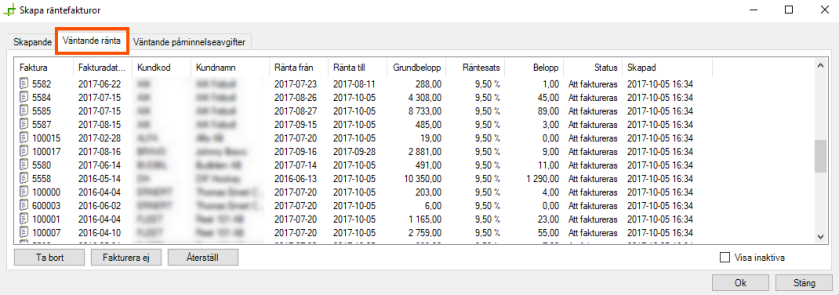
Explanations of action options for Ootel huvi and Ootel meeldetuletuse tasud
The action options explained here are for Ootel huvi, but the same applies to Ootel meeldetuletuse tasud.
|
Function |
Description |
|---|---|
|
Select a row |
Click on the row. |
|
Select several rows. |
Click on a row, hold down the mouse button and drag across the rows you want to select. Release the mouse button. or Click on a row and release the mouse button, hold down the shift key and click on another row. The two rows and everything in between are then selected. |
|
Kustuta |
By clicking on Kustuta, the invoice disappears from the list and a question appears about making it a no-interest invoice. If Jah is selected, the invoice will not have interest applied in the future. It will not appear in the list the next time interest is calculated. If Ei is selected, the invoice will have interest applied in the future. It will appear in the list the next time interest is calculated. |
|
Ärge esitage arvet, Näita mitteaktiivseid and Taasta |
Click on Ärge esitage arvet to deactivate the selected invoice. It will then not appear in the list and the customer will not be invoiced for interest this time. To activate the invoice again, select the Näita mitteaktiivseid checkbox, highlight the invoice and click on Taasta. |
3. Create interest invoices
Create interest invoices as follows:
-
Go to the Loomine tab.
-
Deselect the Arvutage intressid and Loo meeldetuletustasud checkboxes.
-
Select the Koostage intressiarved checkbox and adjust the corresponding settings.
-
Click on OK.
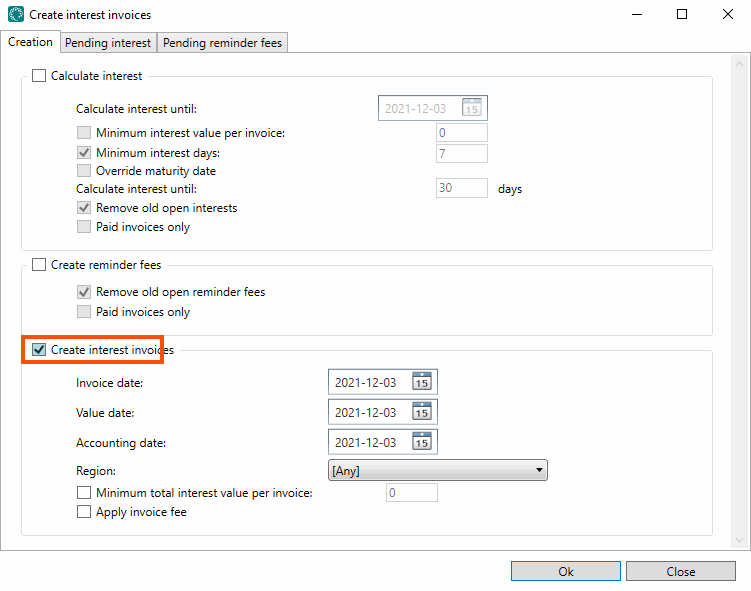
Explanations of settings for Koostage intressiarved
|
Function |
Description |
|---|---|
|
Arve kuupäev |
The date on the invoice, which is normally used as the accounting date. |
|
Väärtuskuupäev |
The date from which the due date of the invoice is calculated. |
|
Arveldamise kuupäev |
To use a date other than the invoice date in the accounts, this can be entered here. |
|
Piirkond |
If you work based on regions, select here the regions for which the interest invoice is to be created. |
|
Minimaalne intressi koguväärtus arve kohta |
Choose not to invoice for amounts that are too small. Enter the minimum amount for which to create an invoice. |
|
Rakenda arve tasu |
Select whether an invoice fee is to be added to the invoice. |
Exiting invoicing
If you want to invoice the created interest invoices directly, close the Arved window if it is open and then open it again. Check that there is an invoice period of the Intressiarve type and close it.
Closing an invoice period
To close an invoice period and send the invoices to the customers, proceed as follows:
-
Right-click on the invoice period and select Sulge in the context menu.
-
Select the account coding scheme and click on OK.
-
Select the desired invoice export and click on Eksportida ja saata.
If you want late payment interest and reminder fees to be added to the next invoice sent to your customer, you do not need to do anything else and can close the window.

