Invoice reminders
Last updated: 11 March 2022
In this article
To create an invoice reminder, the following criteria must be met:
-
The invoice is available in Opter.
-
Payments are registered in Opter.
Invoice reminders in Opter are just reminders, containing the same amounts as the original invoices about which they are providing a reminder. Any reminder fees are created separately along with late payment interest rates. For more information, see Late payment interest and reminder fee.
Create invoice reminders
To create invoice reminders for invoices, proceed as follows:
-
Click on Majandus > Arved > Arve meeldetuletused.
-
Click on
 Loo. Set what reminders should be created and the number of days after which they should be created.
Once there are three reminders, no new ones will be created. If you want to send the third reminder again, select Create reminder 3 even if already exists and click on Loo. You can create the third reminder as many times as you want.
-
Click on Loo at the bottom to create the reminders.
 The settings in the window Loo meeldetuletusi
|
Function |
Description |
|---|---|
|
Kuupäev |
Reminder date, a record of when the reminder was created. |
|
Piirkond |
To create reminders for a specific region, select the region. |
|
Loo meeldetuletus 1 |
To create Meeldetuletus 1, make sure the checkbox is selected and specify the number of days after which the reminder should be created. For example, if Meeldetuletus 1 should be created 10 days after the due date of an invoice, enter “10” in the field. Normally, a few days are allowed after the due date to allow for technical or administrative delays in payment. |
|
Loo meeldetuletus 2 |
To create 2. meeldetuletus, make sure the checkbox is selected and specify the number of days after which the reminder should be created. For example, if 2. meeldetuletus should be created 20 days after the due date of an invoice, enter “20” in the field. The reminders are created in order, i.e. 2. meeldetuletus is not created if Meeldetuletus 1 does not already exist. |
|
Loo meeldetuletus 3 |
To create Reminder 3, make sure the checkbox is selected and specify the number of days after which the reminder should be created. For example, if Reminder 3 should be created 30 days after the due date of an invoice, enter “30” in the field. The reminders are created in order, i.e. Reminder 3 is not created if 2. meeldetuletus does not already exist. Reminder 3 is often used as a basis for sending the invoice to a debt collection agency rather than to the customer. |
|
Create reminder 3 even if already exists |
Select the checkbox if you want to create Reminder 3 again. Reminder 3 can be created as many times as you want. The reminders are created in order, i.e. this checkbox has no meaning unless Meeldetuletus 1, 2. meeldetuletus and Reminder 3 have already been created. |
|
Loo |
Creates the reminders. |
|
Sulge |
Closes the window without saving the changes. |
Review invoice reminders
The reminders are created in a folder, a reminder batch. As long as the session is not closed, you can create and also delete reminders that you do not want to send. You can also delete the entire session as long as it is not closed. In other words, it is possible to create reminders for testing purposes, and then to completely delete them.
Reminder batches are listed in the upper part of the window. The lower part of the window lists the reminders included in the selected batch.
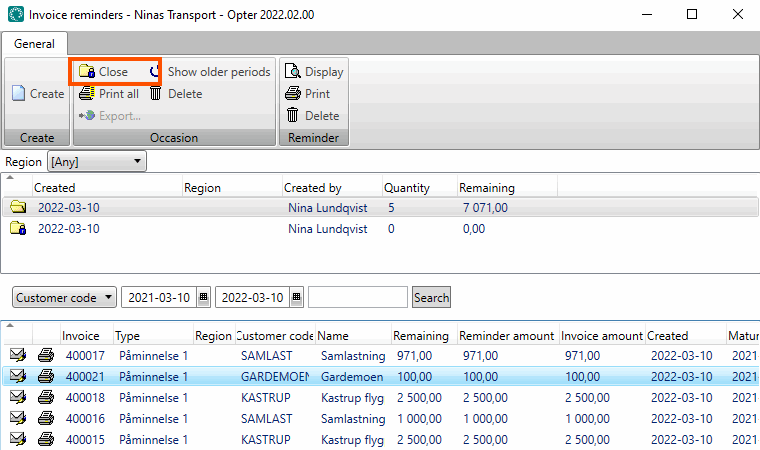
Once you have reviewed the invoice reminders and deleted those that are not to be sent, you can close the session by clicking on Sulge. Then you can no longer delete the reminders and the function to export invoice reminders becomes available.
Exporting and printing payment reminders
In order to export invoice reminders, the Ärge saatke meeldetuletusi (mida saab saata mõne ekspordi puhul) checkbox in the Arve eksport window must be deselected.
The exports that can be carried out depend on the invoice export settings. Exporting invoice reminders works in the same way as exporting invoices and credit notes.
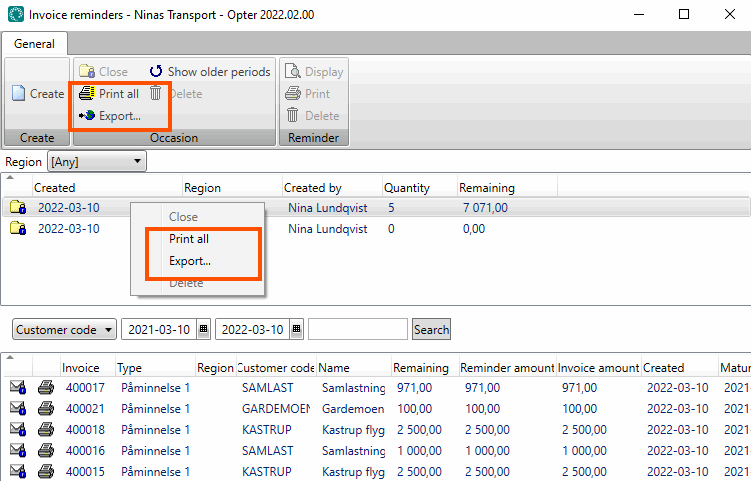
To export all reminders at the same time, select a session and click on Ekspordi or Prindi kõik, depending on what you want to do. You can also right-click on the batch and choose what you want to do from the context menu.
If the same customer has a lot of overdue invoices, you can send one invoice summary instead of sending a lot of separate invoice reminders.
Click on Majandus > Arved > Arve kokkuvõtted. You can download invoice summaries there. These can be designed as invoice reminders by editing the invoice summary.

