Customs information (order reception)
Last updated: 14 September 2026
 Order > Order reception
In this article
Applies from Opter version 2026.06.00.
Group Customs information contains information such as the declaration number, customs representative, delivery terms, border crossing point, the carrier’s company name and EORI number, the registration number and country of registration of the vehicle transporting the goods across the border, and the driver’s name and telephone number.
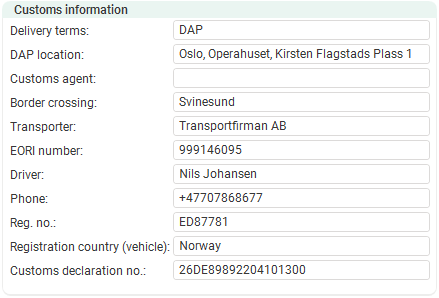
Group Customs information is used in conjunction with groups Consignor and Consignee to collate the order’s customs information. Further information on how to handle customs information can be found in Customs information. The fields in groups Consignor and Consignee are described in Consignor/Consignee (order reception).
If the group Customs information is not displayed, or if you would like it to appear in a different place in the order reception area, you can configure this. For more information, see Organising the groups in Order reception.
The fields in group Customs information are free-text fields.
|
Function |
Description |
|---|---|
|
Delivery terms |
Specify the terms of delivery, such as who is responsible for what during transport, who pays import duties, for example, and when responsibility for the goods passes to the buyer. Terms of delivery may be specified as, for example DAP (“Delivered At Place”), DPU (“Delivered at Place Unloaded”), DDP (“Delivered Duty Paid”) or FCA (“Free Carrier”), if you use “Incoterms”. |
|
DAP location |
Specify the place where responsibility for the goods passes from the seller to the buyer. DAP is an abbreviation standing for “Delivered At Place”. |
|
Customs agent |
Please specify the representative or agent responsible for handling customs information, such as declarations and supporting documents. |
|
Border crossing |
Enter the location where the vehicle (carrying the goods) crosses the border between two countries, or, for example, between the EU and Norway. For example, Svinesund. |
|
Transporter |
Enter the name of the company whose vehicles are transporting the goods across the border between two countries, or, for example, between the EU and Norway. |
|
EORI number |
The carrier’s EORI-number. (The carrier is the company that transports the goods across the border.) EORI is an abbreviation standing for “Economic Operators Registration and Identification“ and is a registration number required for all businesses engaged in customs-related commercial activities. |
|
Driver |
Enter the name of the driver taking the vehicle across the border. |
|
Phone |
Enter the telephone number of the driver who is driving the vehicle across the border. |
|
Reg. no. |
Enter the registration number of the vehicle transporting the goods across the border. |
|
Registration country (vehicle) |
Please specify the country of registration of the vehicle transporting the goods across the border. |
|
Customs declaration no. |
The customs declaration number. The unique number assigned to the declaration by the customs information management system. The customs declaration number must be included on the freight bill so that customs officials at the border can match the goods to the correct customs declaration. |

