Examples of routes
Last updated: 11 March 2026
In this article
Here are a few examples of common routes.
Direct transports from one postcode area to another
We want to create a route from the area of Stockholm where postcodes begin with 12 to the area where postcodes begin with 11. It is to be a distribution route.
Summary:
Name | Type | From | To |
|---|---|---|---|
Stockholm 12*–11* | Distribution | Postcode 12* | Postcode 11* |
To set the route, do the following:
-
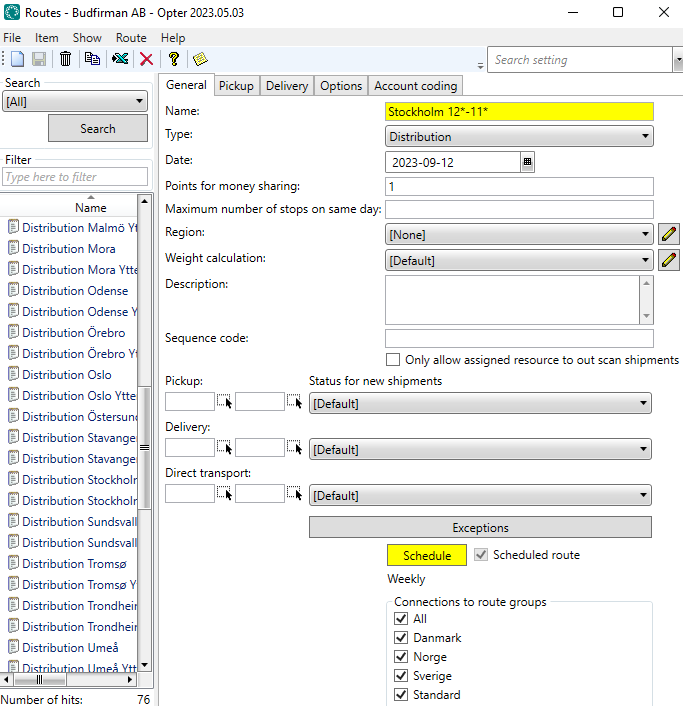
Click Tellimus > Marsruudid > Uus to create a new route. We’re calling the route “Stockholm 12*–11*”.
-
In the drop-down menu Tüüp, we select Jaotus.
-
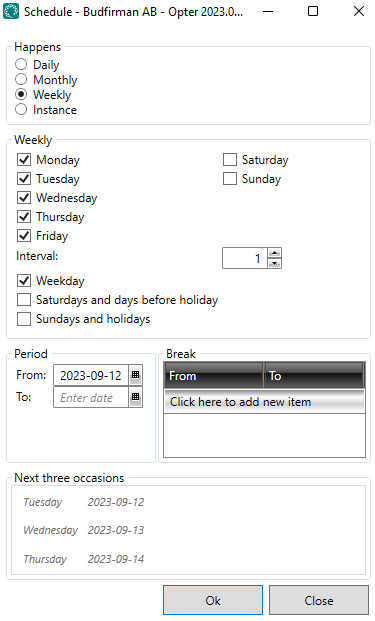
We open the route Ajakava and set it to Iganädalane. We select the days of the week on which the route is to operate; in our case, Monday to Friday. For more information, see Ajakava, routes (window).
-
We click on the Korje tab and create a new row below Sihtnumbritelt. We select Riik “Sweden” and enter “12*” in the field Postiindeks.
We are selecting esmaspäev to pühapäev inclusive, as we want the postcode area “12*” to be served for collections on those days.
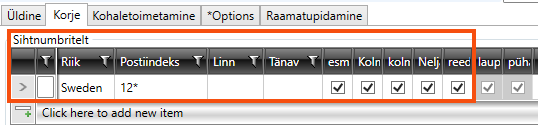
The columns for laupäeval and pühapäev are greyed out, as the route does not operate on those days of the week according to the timetable we have just set. This means that it doesn't matter whether laupäeval and pühapäev are selected or not. The schedule takes precedence over these settings.
-
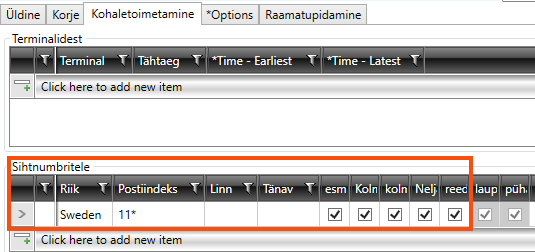
On the Kohaletoimetamine tab, we create a new row below Sihtnumbritele. There, we also select Riik “Sweden” but enter “11*” in the field Postiindeks.
We are selecting esmaspäev through to pühapäev, as we want the postcode area “11*” to be served on those days.
-
Click Salvesta to save all changes.
-
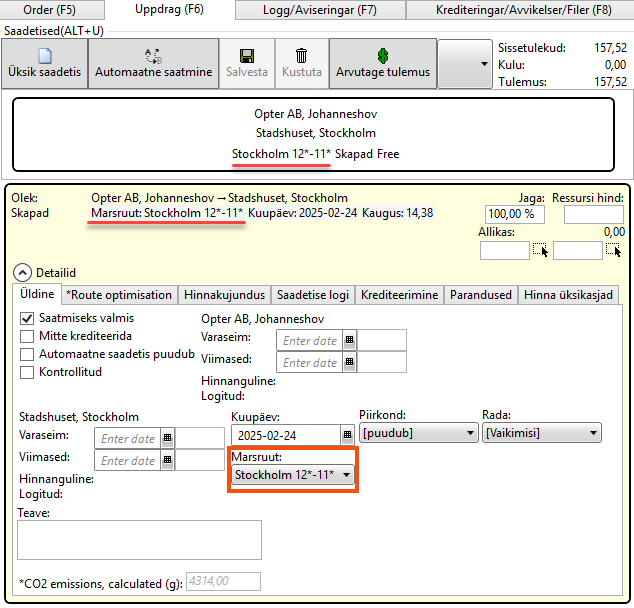
Under Saadetised in the order reception section, we can now see that an order from a sender with the postcode “120 07” to a recipient with the postcode “111 52” has been assigned to the route “Stockholm 12*–11*”.
-
On the Marsruudid panel in the dispatch centre, we can see how many shipments are on the “Stockholm 12*–11*” route.
Comments
In this example, there are no intermediate stops, so the route is a direct transport. To assign this route to a shipment, we need to go to Majandus > Hinnakirjad > Services, select the service to be used, and on the Dispatch tab, tick Luba automaatset veokorraldust and Luba otseühendused (otsevedu).
The pick-up or drop-off area could also be a terminal. For the route to be selected, the address on the order must be a terminal selected from the terminal register.
An order is split into several shipments
Routes can best be likened to train timetables, where the departures are routes and the stations are terminals.
This example illustrates a route where goods can be transported from Stockholm to Gothenburg and Malmö via transhipments at terminals along the way.
-
From: Akademigränd 3, 111 52 Stockholm
-
To: 2 Storgatan, 211 41 Malmö
The sender is matched via their postcode to the “Stockholm Collection” route, which transports the goods to the terminal in Stockholm. A scheduled lorry then transports the goods to the terminal in Jönköping, where they are reloaded. Another scheduled bus takes the goods to the terminal in Malmö. Finally, the goods are delivered to the recipient’s address via the “Malmö Delivery” route, which is selected based on the recipient’s postcode.
A total of four shipments are created for the order, each to be carried out by a separate vehicle.

For this to work, the following applies:
-
Luba automaatset veokorraldust must be selected for the service to be used. Majandus > Hinnakirjad > Services > tab Dispatch.
-
The terminals shown in the image above must be present in the terminal registry. Register > Terminalid.
-
The following routes must be created.
Name
Type
From
To
Pick-up in Stockholm
Distribution
Postcode: 11*
Stockholm Terminal
Delivery to Gothenburg
Distribution
Gothenburg Terminal
Postcode: 41*
Delivery to Malmö
Distribution
Malmö Terminal
Postcode: 21*
Stockholm–Jönköping
Regular transport
Stockholm Terminal
Jönköping Terminal
Jönköping–Gothenburg
Regular transport
Jönköping Terminal
Gothenburg Terminal
Jönköping–Malmö
Regular transport
Jönköping Terminal
Malmö Terminal
We won’t go into detail about how all these routes are created; instead, we’ll simply show you how to create a distribution route and a line route.
The “Stockholm Collection” delivery route
Here’s how we create one of the required distribution routes:
-
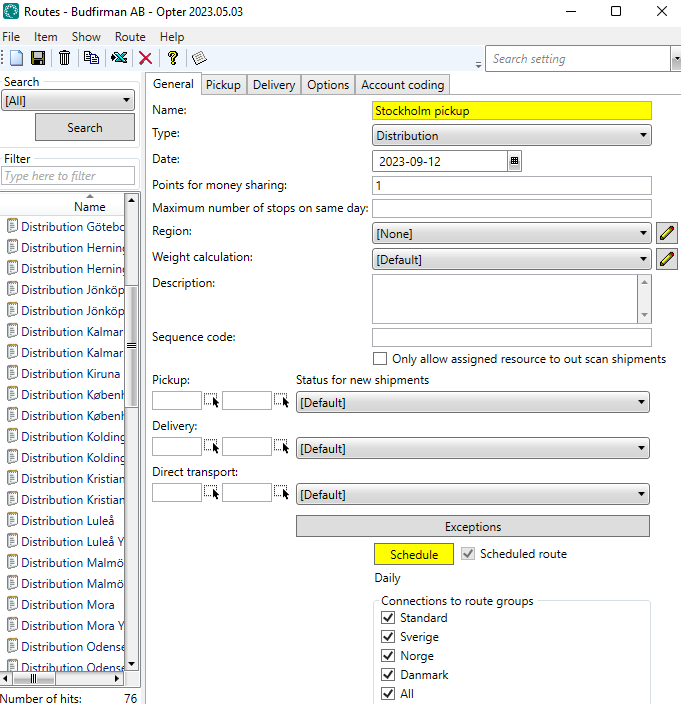
We click Tellimus > Marsruudid > Uus to create a new route, which we’ll call “Stockholm Pick-up”.
-
In the drop-down menu Tüüp, we select Jaotus.
-
We open the route Ajakava and set it to Iganädalane. We select the days of the week on which the route is to operate; in our case, Monday to Friday. For more information, see Ajakava, routes (window).
-
Go to tab Korje and create a new row below Sihtnumbritelt, where you select Riik “Sweden” and enter “11*” in the column Postiindeks. We are selecting esmaspäev through to pühapäev, as we want the postcode area “11*” to be served for collection on those days.
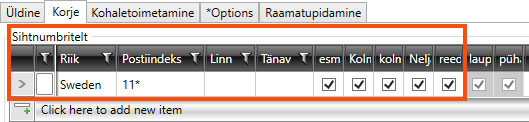
The columns for laupäeval and pühapäev are greyed out, as the route does not operate on those days of the week according to the timetable we have just set. This means that it doesn't matter whether laupäeval and pühapäev are selected or not. The schedule takes precedence over these settings.
-
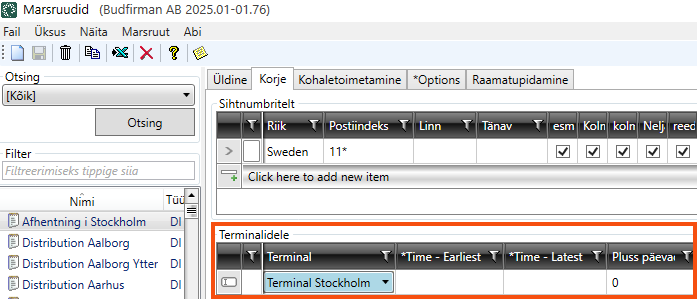
Select the terminal “Terminal Stockholm” in the row under Terminalidele and click Salvesta to save all changes.
Create a route between Stockholm and Jönköping
Here’s how we create one of the required route lines.
-
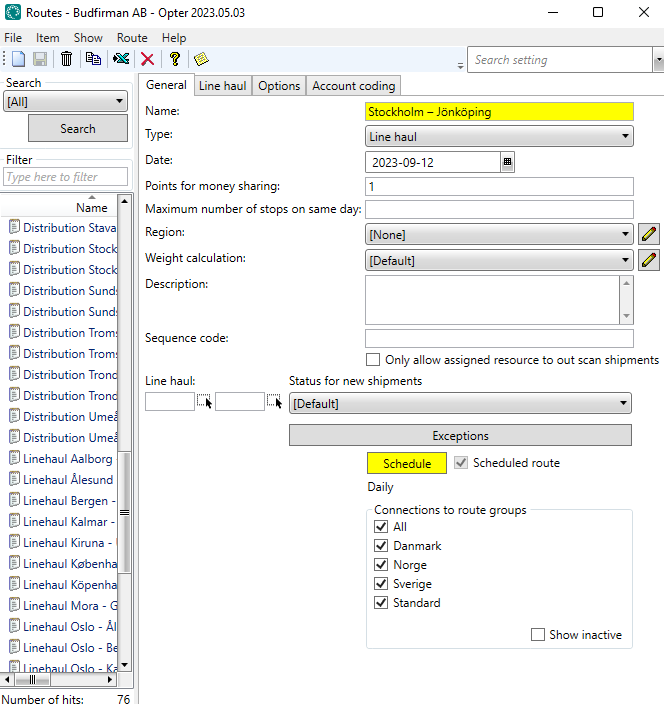
We click Tellimus > Marsruudid > Uus to create a new route called “Stockholm–Jönköping”.
-
In the drop-down menu Tüüp, we select Liinivedu.
-
We open the route Ajakava and set it to Iganädalane. We select the days of the week on which the route is to operate; in our case, Monday to Friday. For more information, see Ajakava, routes (window).
-
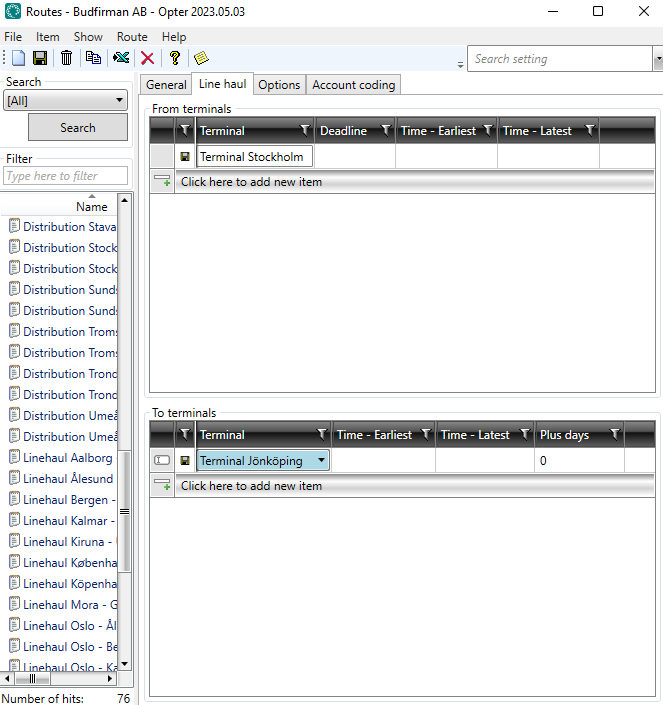
Go to the Liinivedu tab and select “Terminal Stockholm” from the list below Terminalidest.
-
We then select “Terminal Jönköping” from the list under Terminalidele and click Salvesta to save all changes.
Once you have selected Luba automaatset veokorraldust for the service, all terminals are in place and all routes have been created, we can test how the routes work.
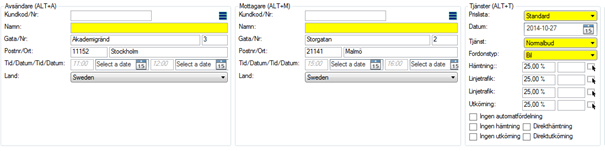
Create an order with the sender’s address “Akademigränd 3, 111 52 Stockholm” and the recipient’s address “Storgatan 2, 211 41 Malmö”.
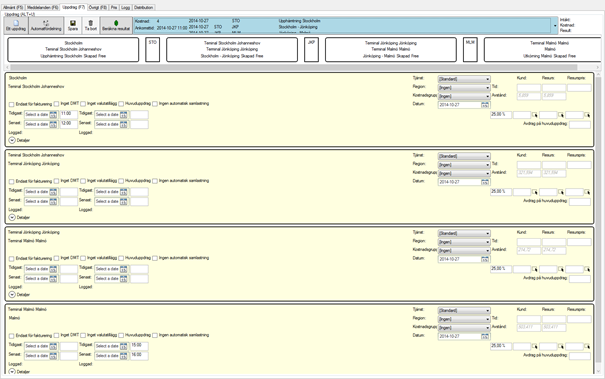
Opter then splits the order into four shipments, which we can see under Saadetised in the order reception. One for pick-ups, two for line haul and one for deliveries.
Delivery route with collections from different postcode areas on different days of the week
If the route is to collect from the postcode area “82*” on Mondays, “84*” on Tuesdays, “86*” on Wednesdays, “87*” on Thursdays and “88*” on Fridays, do the following:
-
Set the route schedule in Iganädalane, and select Monday to Friday. For more information, see Ajakava, routes (window).
-
Go to the Korje tab and add a row for each postcode area under Sihtnumbritelt. Select the day of the week on which each postcode area is to be served.
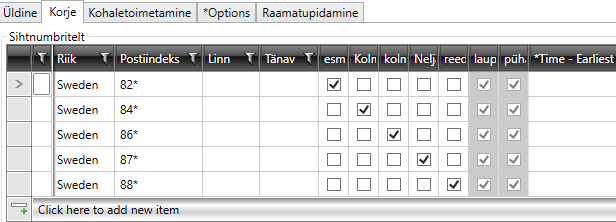
The columns for laupäeval and pühapäev are greyed out, as the route does not operate on those days of the week according to the timetable we have just set. This means that it doesn't matter whether laupäeval and pühapäev are selected or not. The schedule takes precedence over these settings.
-
Click on Salvesta to save all changes.
If the route also involves deliveries to different postcode areas on different days of the week, see the next example.
Delivery route with deliveries to different postcode areas on different days of the week
If the route is to cover the postcode areas “82*” on Mondays, “84*” on Tuesdays and Fridays, “86*” on Wednesdays, “87*” on Thursdays and “88*” on Fridays, do the following:
-
Set the route schedule in Iganädalane, and select Monday to Friday. For more information, see Ajakava, routes (window).
-
Go to the Kohaletoimetamine tab and add a row for each postcode area under Sihtnumbritele. Select the day of the week on which each postcode area is to be served.
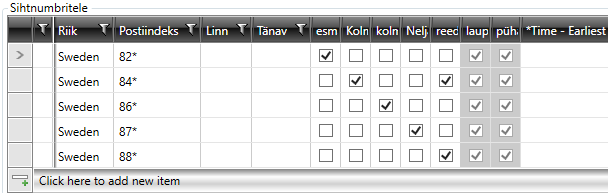
The columns for laupäeval and pühapäev are greyed out, as the route does not operate on those days of the week according to the timetable we have just set. This means that it doesn't matter whether laupäeval and pühapäev are selected or not. The schedule takes precedence over these settings.
-
Click on Salvesta to save all changes.
If you wish to change this at a later date so that the postcode area “82*” is served on both Mondays and Thursdays, simply tick Laupäev for the postcode area “82*”.
If you then wish to change the schedule so that the postcode area “82*” is served on Mondays, Thursdays and Saturdays, select laupäeval for the postcode area and then amend the schedule so that the route is also served on Saturdays. Unless you change the timetable, there will be no service on Saturday.
Distribution route involving large volumes of goods to and from the same street
If you have large volumes of goods to and from the same street, it may be useful to enter the street number on tabs Korje and Kohaletoimetamine. If you enter a house number, we recommend that you also enter the street name, and preferably the country, postcode and/or town.
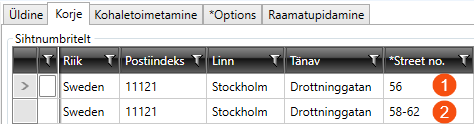
You can enter a single house number (1) or a range (2). You cannot use “*” in this column.

