Linking vehicles or drivers to routes
Last updated: 17 November 2021
In this article
If so desired, the system can be configured to ensure that a certain vehicle and/or a certain driver are assigned shipments connected to a route. It is also possible to define that a specific subcontractor is to be assigned shipments connected to a route.
How to allocate shipments that are linked to a route to certain resources:
-
Click on Tellimus > Marsruudid.
-
Select the route for which settings are to be configured from the list on the left.
-
Depending on the type of route, choose one of the instructions below:
 For distribution routes
On the Üldine tab, select in the Korje, Kohaletoimetamine and Otsevedu fields the subcontractor, vehicle and/or driver to connect to the route by right-clicking on the left-hand one of the two
 , and selecting Sõidukid/Autojuhid or Alltöövõtjad. If desired, a secondary resource can also be connected by right-clicking on the right-hand and selecting Sõidukid/Autojuhid or Alltöövõtjad.
If Sõidukid is used as the primary resource, Sõidukid and Alltöövõtjad are displayed in the left-hand
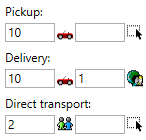
, and Autojuhid in the right-hand . If Autojuhid is used as the primary resource, Autojuhid and Alltöövõtjad are displayed in the left-hand , and Sõidukid in the right-hand .For example, it is possible to connect a certain driver with Korje and connect a certain vehicle to Kohaletoimetamine. It is also possible to connect a certain driver and a certain vehicle to Korje. The image below shows that vehicle “10” has been connected to Korje, vehicle “10” and driver “1” have been connected to Kohaletoimetamine and subcontractor "2" has been connected to Otsevedu on the route.
It is also possible to define which status new shipments should have, at Korje, Kohaletoimetamine and Otsevedu under Uute saadetiste olek, for example Määratud or Kinnitatud.
For line haul routes
On the Üldine tab, select in the Liinivedu field the subcontractor, vehicle and/or driver to connect to the route by right-clicking on the left-hand one of the two
, and selecting Sõidukid/Autojuhid or Alltöövõtjad. If desired, a secondary resource can also be connected by right-clicking on the right-hand and selecting Sõidukid/Autojuhid or Alltöövõtjad.If Sõidukid is used as the primary resource, Sõidukid and Alltöövõtjad are displayed in the left-hand
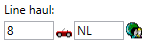
, and Autojuhid in the right-hand . If Autojuhid is used as the primary resource, Autojuhid and Alltöövõtjad are displayed in the left-hand , and Sõidukid in the right-hand .For example, it is possible to connect a certain driver and a certain vehicle to Liinivedu, or a certain subcontractor. The image below shows that vehicle “8” and driver “NL” have been connected to Liinivedu on the route.
It is also possible to define which status new shipments should have, at Liinivedu under Uute saadetiste olek, for example Määratud or Kinnitatud.
-
Click on Salvesta to save all changes.

