How Opter prioritises routes
Last updated: 11 March 2026
In this article
You can configure Opter to prioritise routes based on points (cost) or earliest arrival time. Here's how to do it:
-
Click Seaded > Kontorid and go to the tab Veokorraldus.
-
Select the order of priority from the drop-down list Kulude arvutamine below Automaatne saatmine:
-
Saabumisaeg siis hind: Opter generally chooses the route with the earliest arrival time.
-
Kulu siis saabumisaeg: Opter primarily selects the route with the lowest score.
-
Further information on how Opter scores shipments can be found in Split the revenue between the shipments on an order.
If you have selected Luba otseühendused (otsevedu) for a service, such routes will usually always be chosen first, as both the arrival time and the score (cost) are generally lowest on such routes.
How Opter prioritises different legs of the same route
Areas
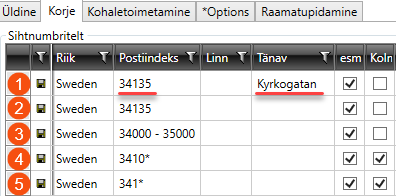
The areas along the routes may vary in terms of their specific characteristics. Opter selects the row containing the most detailed address information and matches it to the address on the order:
-
Both street and postcode.
-
Full postcode.
-
A range of postcodes.
-
The first few digits of a postcode, followed by an asterisk instead of the last digit.
-
Start with the first few digits of a postcode, then use an asterisk instead of the last few digits, and so on.
Areas and times
The rows may also contain times in columns Time - Earliest and Time - Latest. Opter will then select, as a priority, the row that is most detailed and matches the order.
-
Both postcode areas and times.
-
Postcode area only.

Days and times
If we have a postcode area with different days and times, for example postcode 3413*, which is served on Wednesdays from 17:00 to 19:00 and Thursdays from 13:00 to 15:00, Opter will follow the setting in drop-down menu Kulude arvutamine in the office settings, i.e. whichever route gives the earliest arrival time or the lowest score.


