Email notifications of shipments to subcontractors
Last updated: 11 February 2025
In this article
There is a special email notification that can be sent to subcontractors when a shipment is given the Määratud status or later. The email message is sent in the following three cases:
-
When a shipment is dragged and dropped onto the subcontractor in dispatch.
-
When an order that has the subcontractor as a resource is saved in order reception, if you have set orders up to be assigned when they are saved.
-
When a subcontractor has been selected as a resource on an order in order reception, and then the status of the order is changed to Määratud or later in dispatch.
It is not possible to send the notification manually.
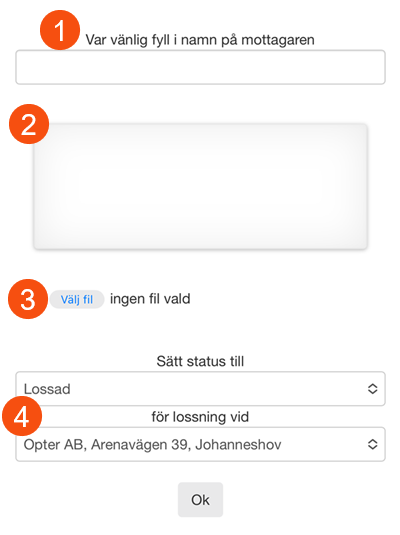
The email message contains links for changing the shipment’s status. The links lead to a web page where the subcontractor can choose the status (Korjatud or Kohale toimetatud) and address on the shipment to which it applies. The options are preset depending on which link in the notification the subcontractor clicks on, so they usually only need to approve the status change by clicking on Okei on the web page.
When the subcontractor updates the status to Kohale toimetatud, a POD is created on the order. The POD can be signed on the website and a picture can also be uploaded.

How to edit the email and activate the notification:
Check you have entered the basic URLs for the webs
In order for the links to be correct in the email, the basic URL for the webs must have been entered in the office settings (Seaded > Kontorid). Go to the Internet tab and fill in the Baasaadress field with the address you use for the customer website, for example “https://www.courierservices.com/opter”.
Edit the report (optional)
The report can be edited to include exactly the information that you want to send out.
-
Click on Seaded > Aruanded.
-
Select Shipment to subcontractor, email (English) in the list and click on Kuva muutja.
-
Make the changes, click on Salvesta and close the report editor. For more information about the tag syntax, see Syntax - text reports.
Choose to use the report for the message
-
Click on Seaded > Sõnumid and select the message group that is set as the default (marked with
 ).
). -
Select the report Shipment to subcontractor, email (English) for the message type Alltöövõtja teatis in the table.
- Click on Salvesta to save all changes.
Activate the notification subscription in the subcontractor registry
-
Click on Register > Alltöövõtjad and select the subcontractor to which notifications are to be sent, from the list.
-
Check that there is an email address under Kontaktinfo. This field must be filled in when the notification is activated.
-
Go to the Detailid tab and select theSaatke määramise kohta teade (e-post) checkbox. To attach freight bills to the notifications, select the Lisage veokiri checkbox.
-
Click on Salvesta to save all changes.
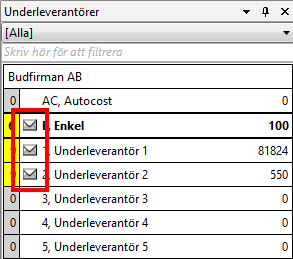
An icon indicating that the notification is activated is displayed on the Alltöövõtjad panel in dispatch.
Setting up the website
You can set which fields on the POD must be filled in on the webpage. You do this on the POD-type that you have as your default POD.
The POD applied to the order when the status is changed to Kohale toimetatud is the one selected by default in the window Veokirja tüüp. No account is taken of sub-POD-types.
For the function to work as intended, you must have Kohale toimetatud as your default POD. For example, if you have Kedagi pole kodus as the default POD, the status of the order will be Tühisõit, but the web page will say that the status has been set to Kohale toimetatud.
Go to Seaded > Veokiri (POD) > Veokirja tüüp and select Kohale toimetatud in the list on the left. The following three settings have an impact on what is displayed on the web page:
-
Nõua nime: Show/hide the name field.
-
Nõua allkirja: Show/hide the signature field. The signature is saved as an attachment to the order.
-
Nõua pilti: Show/hide Select file. The image is saved as an attachment to the order. You can only upload one image. If you upload another one, the first one will be removed. It is not possible to upload files other than images.
-
The status and address drop-down lists are always displayed.