Kaart (window)
Last updated: 15 May 2024
In this article
 In order reception:
  under Saatja or Saaja (1)
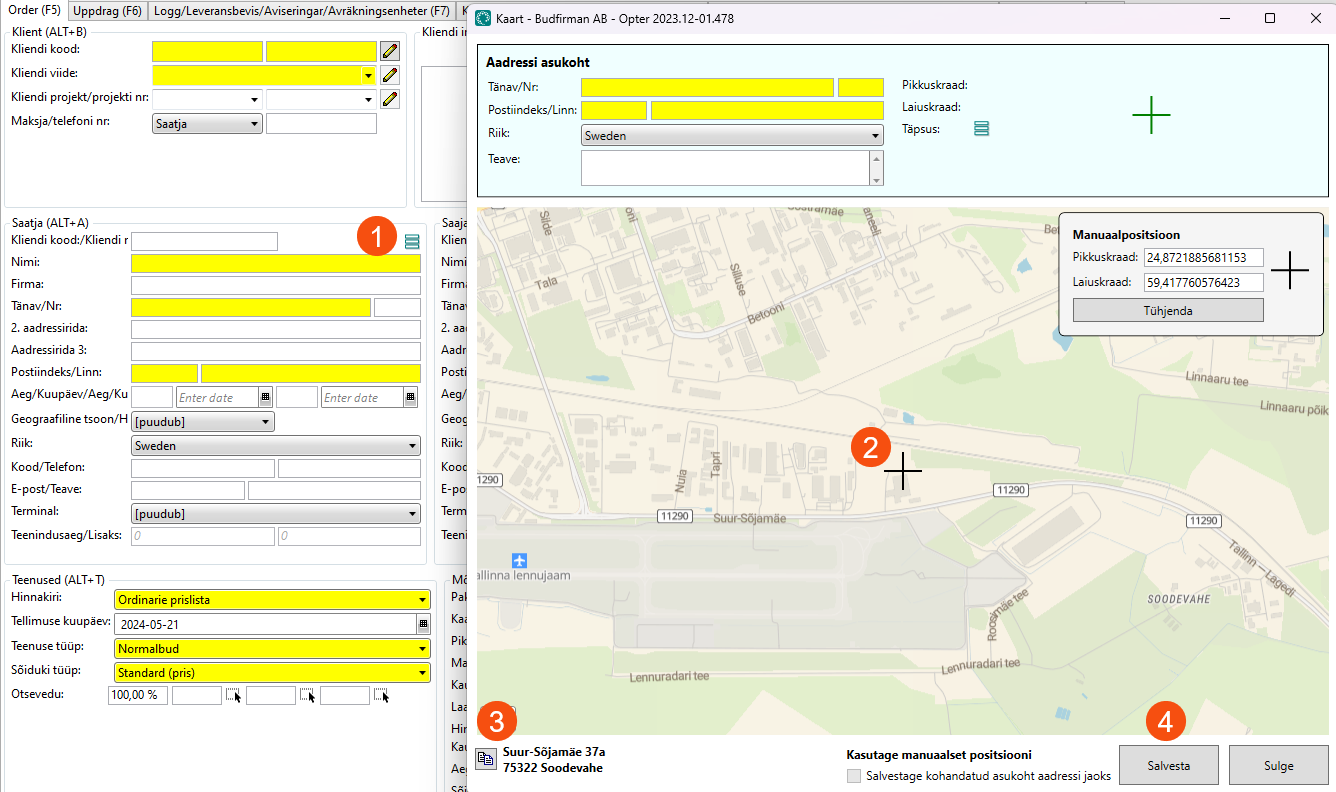
Aadressi asukoht
This shows the sender/receiver's address from order reception (marked with a green cross on the map). If you click anywhere else on the map (2), that address will appear at the bottom of the window (3). To switch to that address, copy it up to Aadressi asukoht with  . If you then click on Salvesta (4), the new address is transferred to order reception.
More information on accuracy can be found in Addresses and address positions.
Manuaalpositsioon
The exact coordinates of the address can be entered here. This can be useful, for example, if the entrance is on the other side of the property.
The commands at the bottom of the window
|
Function |
Description |
|---|---|
|
|
If you click anywhere on the map, the address for that position appears here. Click on |
|
Salvestage kohandatud asukoht aadressi jaoks |
|
|
Salvesta (4) |
Saves any changes to addresses and positions and closes the map. If the address has been changed, the new address is transferred to order reception. |
|
Sulge |
Closes the map without saving any changes. |
 : The position of the address is saved in the address registry
  : The manually adjusted position is only used for this order.
