Subcontractor web user accounts
Last updated: 5 March 2026
In this article
Here's how to create login details for the subcontractor web:
-
Click Register > Alltöövõtjad and select a subcontractor from the list on the left. Go to the Detailid tab.
-
In the drop-down list Interneti-tellimuse seaded, select which internet order setting the subcontractor should have on the subcontractor web.
-
If you want the subcontractor to be able to place orders on the subcontractor web, you must enter a Interneti-tellimuse klient here. The Internet order customer is therefore listed as the reference on the order.
Click on the button (
 ) on the right. Find a customer and click Kasuta valitud.
 -
Depending on which version of Opter you are using:
-
For Opter version 2025.12.00 and later:
Enter the Kasutajanimi to be used to log in to the subcontractor web. If the subcontractor is new to the register, click
 Salvesta to create a password.
Click on Vaheta parool (1), enter the same password in fields Uus salasõna (2) and Kinnita parool (3). Then click Okei (4) to save the password.
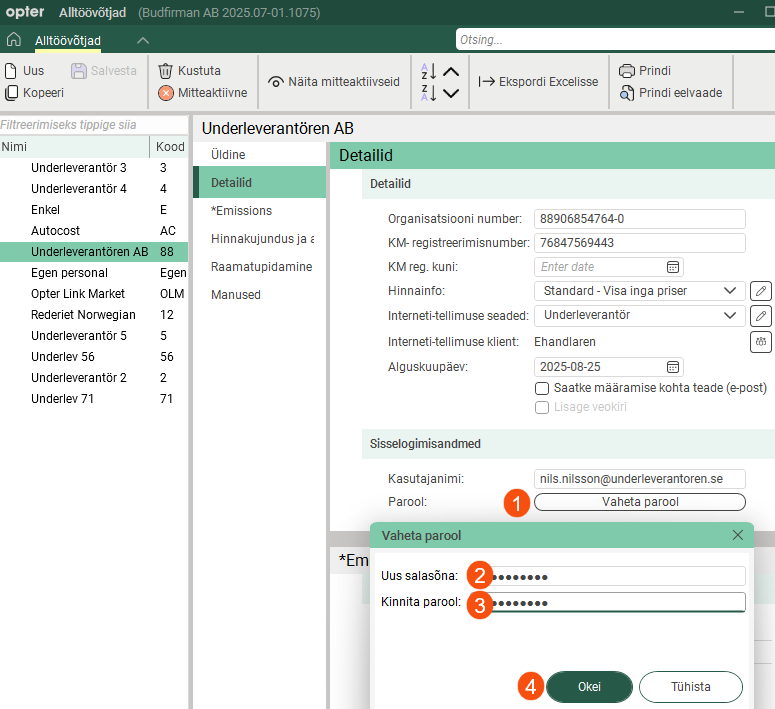
Passwords are case sensitive, i.e. Opter distinguishes between upper and lower case letters. For example, "PASSWORD&!999" and "Password&!999" are seen by Opter as two different passwords.
Passwords are not displayed in the registry. If someone has forgotten their password, you can create a new password by clicking on the Vaheta parool button and entering the new password.
-
For Opter version 2025.06.00 and earlier, enter Kasutajanimi and Parool in the fields and then click Salvesta.
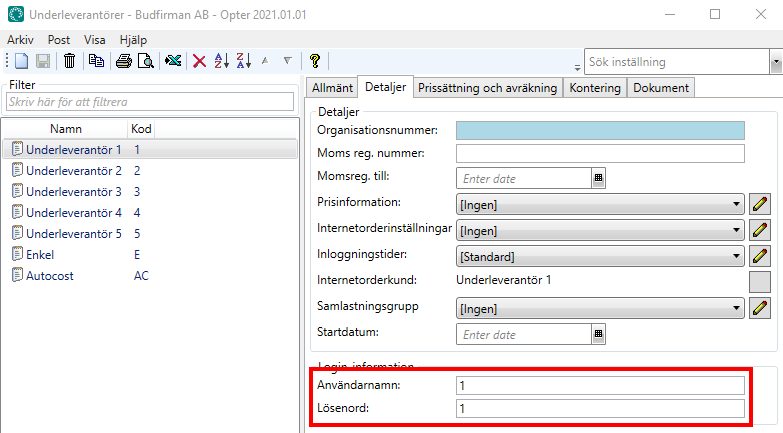
If the user enters the wrong password five times when logging in to the web portal, they will have to wait 15 minutes before the next attempt.
See also
-

