User accounts for The driver web
Last updated: 5 March 2026
In this article
The username and password are the same as those used to log in to Opter Driver as a driver. If you change them, they also apply to Opter Driver.
If the user enters the wrong password five times when logging in to the web portal, they will have to wait 15 minutes before the next attempt.
Version 2025.12.00 and later
-
Click on Register > Töötajad and select a driver from the list on the left. Employees with a call number in the list are drivers. Go to the Mobiil/veeb tab.
-
Enter the username to be used to log in to The driver web. If the driver is new to the register, click
 Salvesta to create a password.
 -
Click on Vaheta parool (1), then enter your password in fields Uus salasõna (2) and Kinnita parool (3). Then click on Okei (4) and the password will be saved.
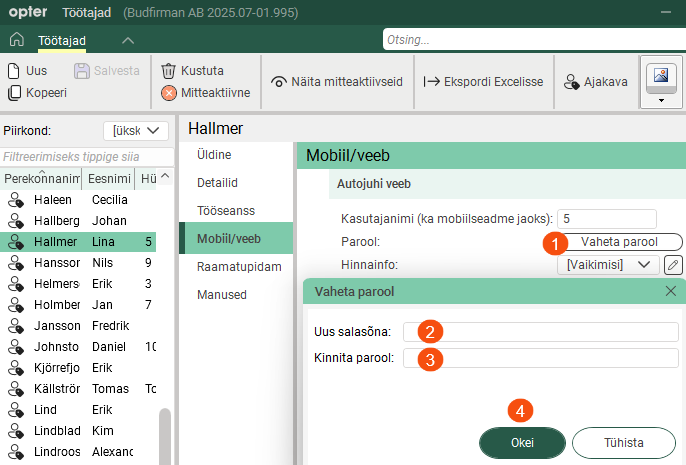
The passwords are not displayed in the registry and cannot be recovered by Opter. If someone has forgotten their password, you can create a new one by clicking Vaheta parool (1) and entering the new password.
Version 2025.06.00 and earlier
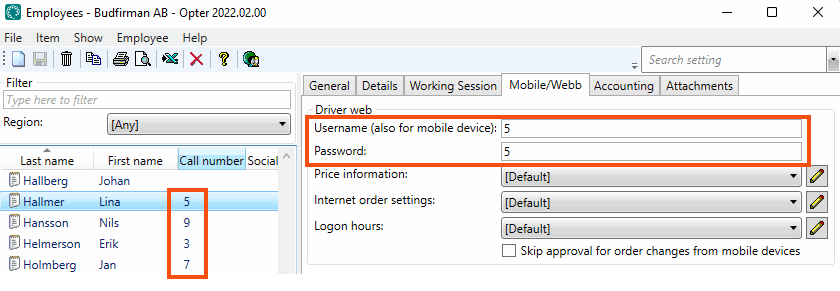
Click on Register > Töötajad and select a driver from the list on the left. Employees with a call number in the list are drivers. Enter the username and password that are to be used to log into the driver web, on the Mobiil/veeb tab.