Home delivery, overview
Last updated: 9 October 2025
In this article
Home delivery is essentially normal distribution, but the receiver is a person instead of a company. This places higher demands on precise timing and tracking, which means that certain settings are required that are not normally configured when delivering to companies. However, there is nothing to prevent the same information from being sent out for deliveries to companies. Another difference is that communication is with the receiver and not the person paying for the transport, and it is possible to give the receiver the option to choose the delivery date and time slot, for example, via Track & Trace.
Two main tasks need to be carried out for home delivery:
This is how it works
The settings for communication with the recipient are made in four different places.
Kojuveo seaded
Settings for estimated delivery times and what the recipient can do on Track & Trace. For more information, see Kojuveo seaded (window).
PTV calculates an exact arrival time for each pick-up and delivery. You can add margins to the estimated time of arrival so that, for example, you can send a notification to the recipient that "we will deliver the parcel to you between 17:00 and 17:30" instead of writing an exact time ("17:12"). This is done at Saabumise aeg in the home delivery settings.
Other settings in the home delivery settings apply to what the recipient can do on Track & Trace.
Interneti-tellimuse seaded
Settings for what the recipient can see on Track & Trace on the tab Saadetise jälgimine.
Teenused
Home delivery configurations are linked to a service. It allows for different levels of service, e.g. a standard service with delivery within a certain time window, and a premium service with delivery within a tighter time window, by having different settings for the rounding of the arrival time. Route optimisation takes into account the different services when calculating the route sequence. The times shown under Saaja in order reception are the time interval in which the delivery should be scheduled.
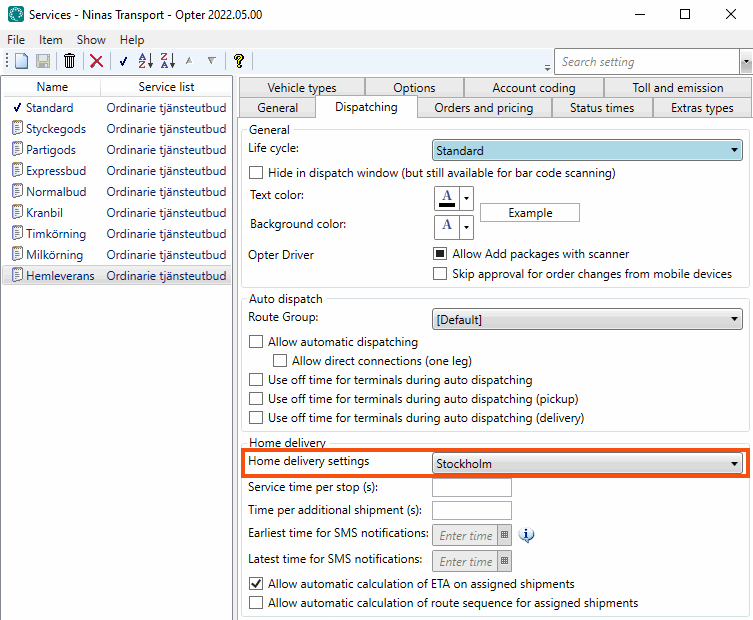
Click on Majandus > Hinnakirjad > Services, select a service in the list, go to the Dispatch tab and select a home delivery configuration for the service from the Kojuveo seaded drop-down list.
Sõnumid
Six messages must be configured for the notifications (three each for email and SMS). However, they may have all or part of the same content:
-
Eelteavituse eeldatav aeg (e-post)/Eelteavituse eeldatav aeg (SMS)
-
Eelteatise muutmise kuupäev (e-post)/Eelteatise muutmise kuupäev (SMS)
-
Eelteate edastamise aken (e-post)/Eelteatise edastamise aken (SMS)
The messages are sent to the receiver and not to the paying customer registered in Opter. Recipients' contact details are stored in a temporary register and automatically deleted after a certain period of time.
Logging
The settings changed by the recipient via Track & Trace are recorded in the order log:
-
Allow delivery if the receiver is not at home.
-
Do not allow delivery if the receiver is not at home.
-
Change of entry code.
-
Choice of delivery date.
-
Change of delivery date.
Columns in dispatch
To view information about the home deliveries in dispatch, you can display the Lubage tarne, kui pole kodus and Sõnum – valmis kojutoomiseks columns.
-
Lubage tarne, kui pole kodus shows whether the recipient has selected that option on Track & Trace, provided you have made the selection available with the corresponding checkbox (see above).
-
Sõnum – valmis kojutoomiseks can display different types of information depending on the home delivery settings you have made, and the choices the recipient has made on Track & Trace.
Kuupäeva muutmine kohustuslik
Lubatud kuupäeva muuta
Deadline for making a choice has passed
The receiver has selected a date
Sõnum – valmis kojutoomiseks in dispatch shows

–
–
Jah

Yes/No
No
Ei (date not selected)
Yes/No
Yes
Jah
No
No
Ei (date not selected)
No
Yes
Jah(can be changed)
Yes
Yes
Jah
No
Yes/No
Jah(can be changed)
Yes
Yes/No
Jah

