Routes and Auto dispatch, overview
Last updated: 13 October 2026
In this article
A route acts as a timetable for transport services, with departures (the times on the routes) and stops (terminals). Auto dispatch is used to split an order into shipments that fit with the departures in the timetable.
You create routes which, together, form a distribution network; for example, collections from a number of different postcode areas, line hauls between three terminals where the goods are transhipped, and finally delivery to a specific location.
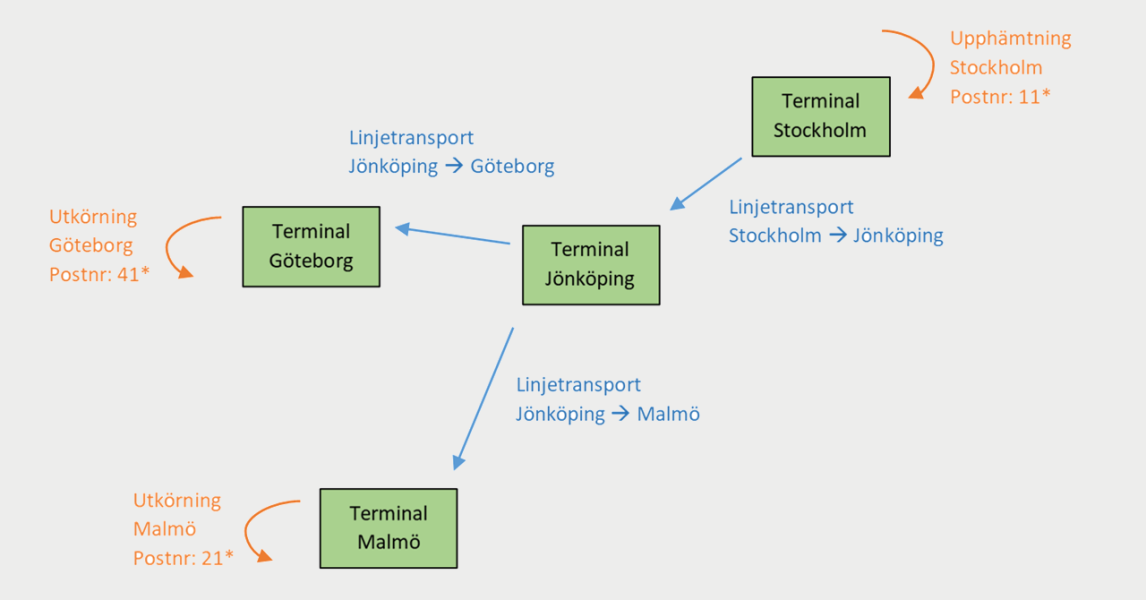
To use this feature, three things need to be in place:
-
The terminals must be listed in the terminal register.
-
The routes and their departure times must be listed in the route register.
-
Allow automatic dispatching (and, where applicable, Allow direct connections (one leg)) must be selected for the service used on the order.
Two types of routes
There are two types of routes that can be combined to form a comprehensive distribution network.
Distribution routes
Delivery routes consist of a collection stage and a delivery stage. Collections are made from an area to a terminal, and deliveries are usually made in the opposite direction, from the terminal to the same area as the collection. Pick-up and drop-off areas can be specified by postcode, but may also be a town or a country.
You can enable direct transport for distribution routes, which means that the goods are transported directly from the sender (in the collection area) to the recipient (in the delivery area), without stopping at the intermediate terminal.
Line haul
Routes that run between two terminals are known as line routes. They are used to link distribution routes in different locations. You may have scheduled routes that depart from one terminal and stop at several terminals to load and unload goods on the way to their final destination, and routes that depart from several terminals and arrive at a final terminal at the same time.
Arrival times, departure times and plus days
The arrival and departure times on the routes are used to calculate delivery dates and delivery times for the orders matched to those routes. If the pickup takes place on day 1, the line haul and delivery can be automatically scheduled for the subsequent days using the times on the routes. It can be likened to a train timetable, where it is possible to work out connections and arrival dates using the trains’ departures and arrivals.
Plus days
‘Plus days’ are used to indicate on which day of the week a particular journey on the route is to take place in relation to previous stops. Plus days can only be used within one route and cannot be used for date relationships between different routes.
You set the extra days for the various stops in the timetables for the routes.
Example
This is how Opter calculates the arrival time of 17:00 on day 2.
|
Name |
Departure time |
Arrival time |
Day |
|---|---|---|---|
|
Distribution Stockholm |
8.00 am |
4.00 pm |
Day 1 |
|
Line haul Stockholm–Jönköping |
6.00 pm |
10.00 pm |
Day 1 |
|
Linehaul Jönköping–Malmö |
11.00 pm |
4.00 am +1 |
Departure on day 1, arrival on day 2) |
|
Distribution Malmö |
8.00 am |
4.00 pm |
Day 2 |
|
Last delivery time |
|
4.00 pm |
Day 2 |
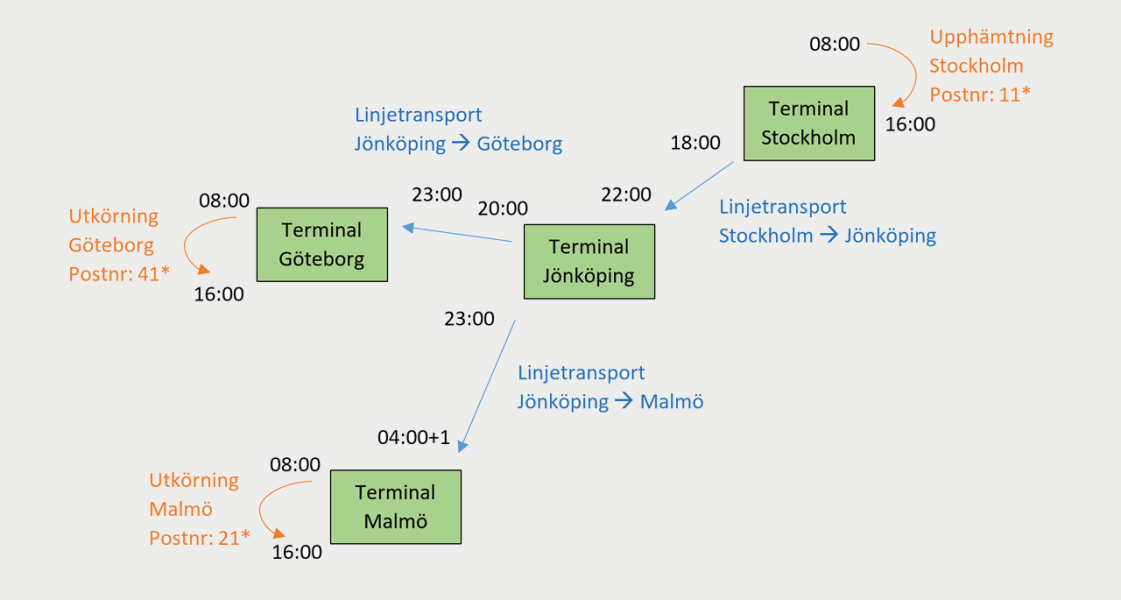
The scheduled service between Jönköping and Malmö departs at 23:00 on day 1 from the terminal in Jönköping. The arrival time in Malmö is 4 am the following morning, i.e. on day 2 of the route. The arrival at the terminal in Malmö should therefore be marked with a ‘1’ in the column Plus days.
Concepts and benefits of routes
|
Concepts and benefits |
Comment |
|---|---|
|
Distribution and line haul routes |
You can use postcodes, cities/towns or countries as pickup and delivery areas in what are known as distribution routes. Between terminals it is possible to set up line haul routes. |
|
Default resource and status |
Set it so that a particular delivery route or line is always carried out by a specific driver/vehicle or subcontractor. You can also set the status of the shipment to Assigned (for example). The shipments are then automatically allocated to the resource when the order is matched with that route. Hence the term ‘auto dispatch’. |
|
Allocate revenue using points |
Allocate the revenue on a percentage basis amongst the shipments on the order, weighted against the costs of the routes, using a points system. For example, these can be used to automatically allocate a smaller or larger share of the income to a pickup or line haul service. |
|
Determine arrival and departure times |
You can set the arrival and departure times for the routes. These are used to calculate delivery times and delivery dates for the shipments being transported on the routes. |
|
Let Opter choose the route based on arrival time or cost |
If an order fits several routes, you can choose whether Opter should select the route with the earliest arrival time or the one with the lowest cost, based on the points system. |
|
Default region |
If you make a region the default for a route, that region will be automatically assigned to the shipment when the route is selected. This makes it possible to filter by region in dispatch. It also makes it possible to control the account coding and economic units for the shipment's share of revenue and costs, based on the region. |
|
Link shipments to routes in dispatch |
You can filter a route in dispatch and see how many and which shipments are linked to it. |
Preparation
If you want to start working on routes, it’s a good idea to begin by sketching out the route or routes you have in mind on paper, something like this:
Consider the following:
-
What type or types of routes do you need?
-
Should pick-up and delivery areas for distribution routes be based on street name, street number, postcode, town or country?
-
Do you need to add any new terminals to the terminal registry or do you already have all the ones you need?
-
What times are applicable to the route?
-
Do you want shipments that are matched to the route to belong to a specific region?
-
Do you have regular drivers, vehicles or subcontractors who cover certain routes? In that case, can you set a status and allocate the shipments when an order is matched with a route (auto dispatch)?
-
Should customer revenue be allocated as a percentage with different weightings, using Opter’s points system?
-
Would you like Opter to choose between routes based on the lowest number of points (cost) or the shortest journey time?
Ask a deployment consultant for assistance
If you have any questions or need help getting started, contact to make an appointment with an installation expert.

