Activating the assignment of shipments on the supplier web
Last updated: 23 August 2021
In this article
You can make it possible for the suppliers to assign orders themselves on the supplier web. This can be done in two ways. On the main page and when an order is created on the order page.
Distribution of tasks on the main page
This function activates a checkbox on the supplier web that makes it possible to select multiple shipments at once by holding down Ctrl or Shift and clicking on the shipments. This makes it possible to assign several shipments to a resource at the same time. The supplier can select and deselect the checkbox as required.
Proceed as follows to allow suppliers to assign shipments on the main page:
-
Click on Seaded > Internet > Interneti-tellimuse seaded.
-
Select the supplier web in the list on the left and go to the Juurdepääs tab.
-
Select Luba ressurss saadetiste määramiseks under Juurdepääs ressurssidele.
-
Click on Salvesta to save all changes.
The checkbox will appear when the main page of the supplier web is next loaded.
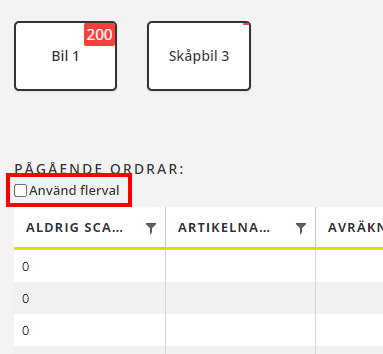
When this function is activated, double-clicking on the order shows a preview.
Allocation of shipments when an order is created
The purpose of this function is to allow the supplier to select a resource when the order is registered so that you do not have to manage the order in dispatch. When the order is approved in order reception (which can be done automatically), it is immediately given the Määratud status.
This function must be combined with the Ressurss field being displayed in the order form when the order is registered. We recommend making that field mandatory. If the supplier does not select a resource on the order, the order will not appear on their supplier web and you will have to assign the shipment in dispatch instead.
Proceed as follows to allow suppliers to assign orders that they create themselves on the order page of the supplier web:
-
Click on Seaded > Internet > Interneti-tellimuse seaded.
-
Select the supplier web in the list on the left and go to the Juurdepääs tab.
-
Go to the Tellimuse registreerimine tab and add the Ressurss field to the Kaasas list.
-
Select the Ressurss field and check the Kohustuslik checkbox at the bottom of the Kaasas list.
-
Click on Salvesta to save all changes.

