Notifications when ordering on the customer web
Last updated: 16 January 2023
In this article
When an order is placed on the customer web, the customer is free to choose the events in the order for which notifications will be received, and how these will be sent. The notification subscriptions created in the Teavitamise eelistused window are displayed by default.
Once you have made the settings below, the Märguanded section of the customer web will be displayed, where customers can choose which notifications they want to receive about the order. For more information, see Setting up notifications on the customer web.
These instructions apply to notifications that the customer can configure on the customer web. To create automatic notifications that appear by default, see Sending notifications automatically.
Step 1: Activate notifications on the customer web
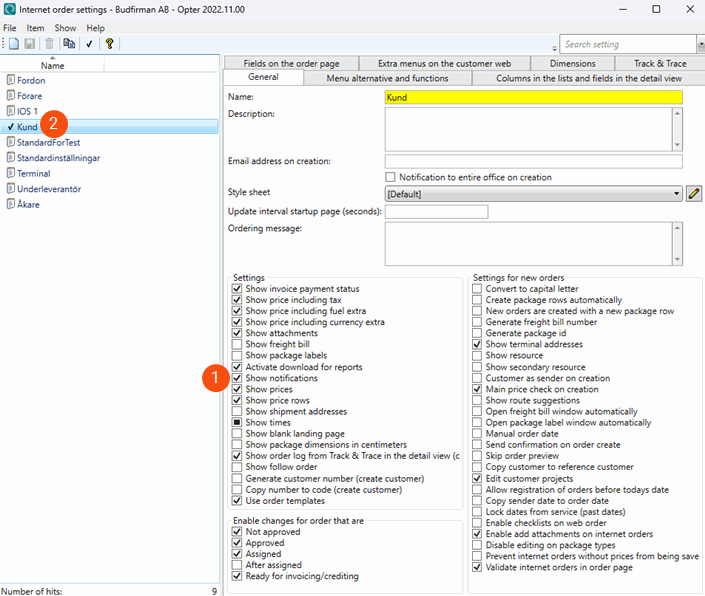
Click on Seaded > Internet > Interneti-tellimuse seaded and select Kuva märguanded (1) on the Üldine tab for the customer’s internet order configuration (2).
Step 2: Make the statuses available for internet orders
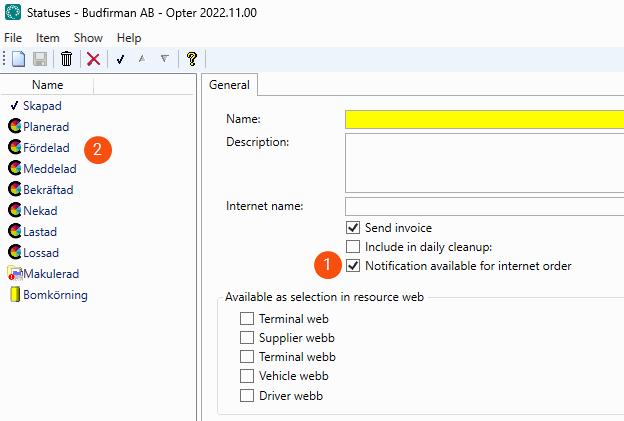
The statuses for which the customer can choose to receive notifications must be made available for internet orders. Click on Seaded > Elutsüklid ja olekud > menu Staatused > Olekud and select Interneti tellimisel on teatis saadaval (1) for each status (2) that it should be possible to select on the customer web.
The customer can now choose how they want to be notified on the customer web. For information on how they do this, see Setting up notifications on the customer web.

