Searching for registered payments
Last updated: 14 April 2023
In this article
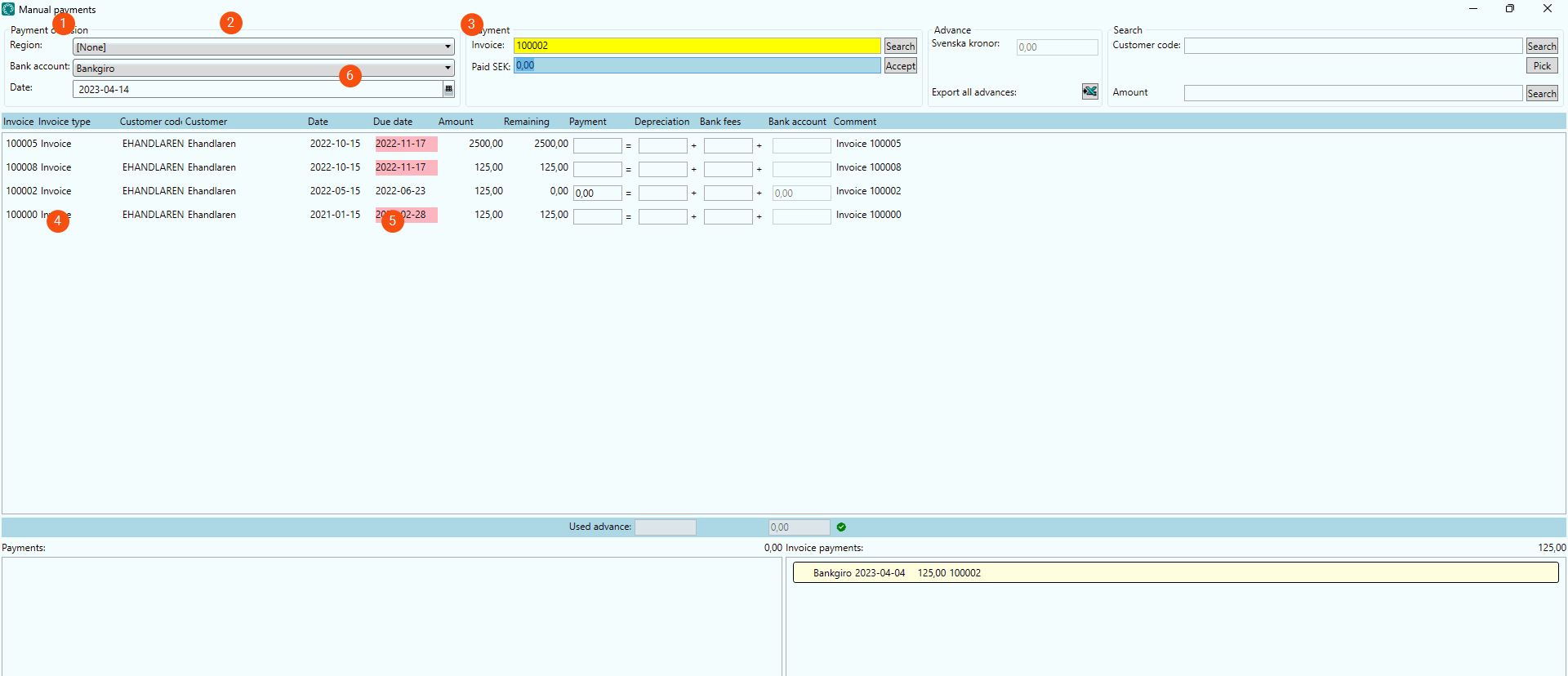
Click on Majandus > Manuaalmaksed. It is possible to search for payments in the Maksete registreerimine window in different ways as follows:
 Bank account and date under Tasumise kord (1)
If there are any payments registered that match the search criteria, they are listed under Maksed at the bottom left of the window (4). Deleted payments are also listed. They are displayed in pink and labelled  . Click on a payment to see its details.
Invoice number under Makse (2)
Enter the invoice number in the Arve field and click on Otsing or tap Enter. If there are any payments registered for the invoice, they are displayed under Arvete maksed at the bottom right of the window (5). Deleted payments are also displayed. They are displayed in pink and labelled . Click on a payment to see its details.
The searched for invoice is displayed in the invoice list in the middle of the window (6). If the same customer has invoices that have not yet been paid in full, they are also shown in the list.
Customer code and amount under Otsing (3)
Enter the customer code and the amount and click on Otsing. If there are invoices that are not yet fully paid that match the amount and the customer, they are displayed in the invoice list (6). It is also possible to search for customers by name, address and corporate ID number by clicking on Vali. For more information, see Otsige kliente (window).