Options
Last updated: 5 December 2023
In this article
An option can be considered to be a property that an order can have, such as“Refrigeration” or “Dangerous Goods”. It adds an additional description to the order to enable it to be carried out correctly. The options can be displayed and added to orders in order reception and dispatch, and on the order form on the customer and resource webs.
Options can also be used to adjust the price of an order.
The options to be included in the system can be created by clicking on Seaded > Valikud and specifying the settings that apply to the option. For information about what the various options mean, see .
The difference between options, extras and expenses
Options and extras are similar and both of them can be used to adjust the price of orders. However, the extra is often linked to a specific cost that the carrier has, and which it wants to pass on to the customer, such as waiting time. Extras are added to the order by the carrier and are often not known in advance, whereas options are parameters chosen by the customer. An extra can have a quantity (for example 15 minutes), while options can only be on or off. However, the options are usually linked to a price item that can be priced (this is done in the Valikud tab of the price list, see Hinnakirjad (window)). Drivers can add extras in Opter Driver, whereas the options can only be viewed in the app, not added.
Expenses are another type of extra, which can be described as extra sales. For more information, see Prices and price lists, overview.
Resources with capacity for different options
The options can also be made available to vehicles, employees and subcontractors and then selected in the respective registry (except in the registry for employees) to provide information stating that the resource can carry out shipments with those options. The options that are selected in the vehicle registry are displayed in the resource information in dispatch.
Options in dispatch
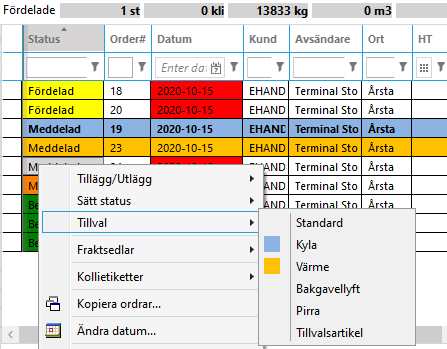
The options work in two ways in dispatch. You can right-click on an order and choose an option for the order, or you can get support for transport planning in various ways:
-
The options selected in the vehicle registry are displayed on the Allikateave tab when a resource box is selected.
-
An option can be used as a filter in the Valikud column, for example in order to assign all the shipments with a certain option to a certain resource.
-
Shipments with options can be colour-coded. The colours are defined in the Valikud (window) window. In the image below, background colours have been set for the “Refrigeration” and “Heating” options.
Options on orders
In order to be able to select options in the Order reception, Saadaval tellimuste jaoks must be selected in the options register.
If the option has been linked to a price item in the price list, a price item row is automatically added to the order when the option is selected under Valikud in order reception, or in an order on one of the web portals (see also below).
For more information, see Hinnakirjad (window). Examples of how to set up an optional article can be found in Examples of pricing.
Options on the web portals
In order to be able to select options on orders placed via any of the web portals, the following applies:
-
The options must be displayed on the order page. Go to the Tellimuse registreerimine tab in the internet order settings and check that Valikud (rühm) is in the Kaasas list.
-
The options must be available for orders and on the web portals. Check that Saadaval tellimuste jaoks and Saadaval Internetist tellimiseks are selected in the Valikud window for the options to be selected.
Example
If you transport goods that sometimes have to wait somewhere, for example in a customs warehouse, you can use options to hide the shipments in dispatch until they are ready to be carried out. Create the “Customs storage” option and select the Ootab valmimist checkbox and the shipments will not appear in dispatch until the order is ready to be transported (i.e. when you select the Lõpetatud checkbox for the “Customs storage” option in order reception).

