Geograafilise tsooni kogud (window)
Last updated: 18 July 2024
 Majandus > Hinnakirjad > Geo-zones
In this article
In this window, the geo-zones on which the price zones are based can be managed. The settings apply to the collection of geo-zones or the geo-zone selected in the list on the left, and look slightly different depending on whether a geo-zone collection or a geo-zone is selected.
Geo-zone collection
|
Function |
Description |
|---|---|
|
Nimi |
Name of the zone collection. The name is a collective name for the zones the collection shall contain, for example "Stockholm" or "Helsinki". |
|
Ekspordi tsooniandmed |
Exports all geo-zones in the geo-zone collection to a CSV file that can be edited in, for example, Excel. The edited CSV file can then be imported back into Opter. |
|
Impordi tsooniandmed |
Importing a CSV file of geo-zones into the geo-zones collection.
|
Geo-zone
Üldine
|
Function |
Description |
|---|---|
|
Nimi |
The name of the geo-zone, for example “Kungsholmen” or “Kampen”. For example, a geo-zone can be a city district. |
|
Kirjeldus |
Free text field. The description is not displayed anywhere else but here. |
|
Kood |
Short code for the geo-zone, e.g. “STO-KU” for the district of Kungsholmen in Stockholm. The code can be displayed in, for example, dispatch, so it is useful to keep it short to save space. |
|
Suund |
The position of the geo-zone in relation to the intended centre point. For more information, see Tsooni suund (window). |
|
Värv |
The text colour with which the geo-zone is displayed in dispatch. If no selection is made, the geo-zone is displayed in the default colour. If you have changed the colour, but want to switch back to the default colour, select Automatic. |
Sihtnumbrid
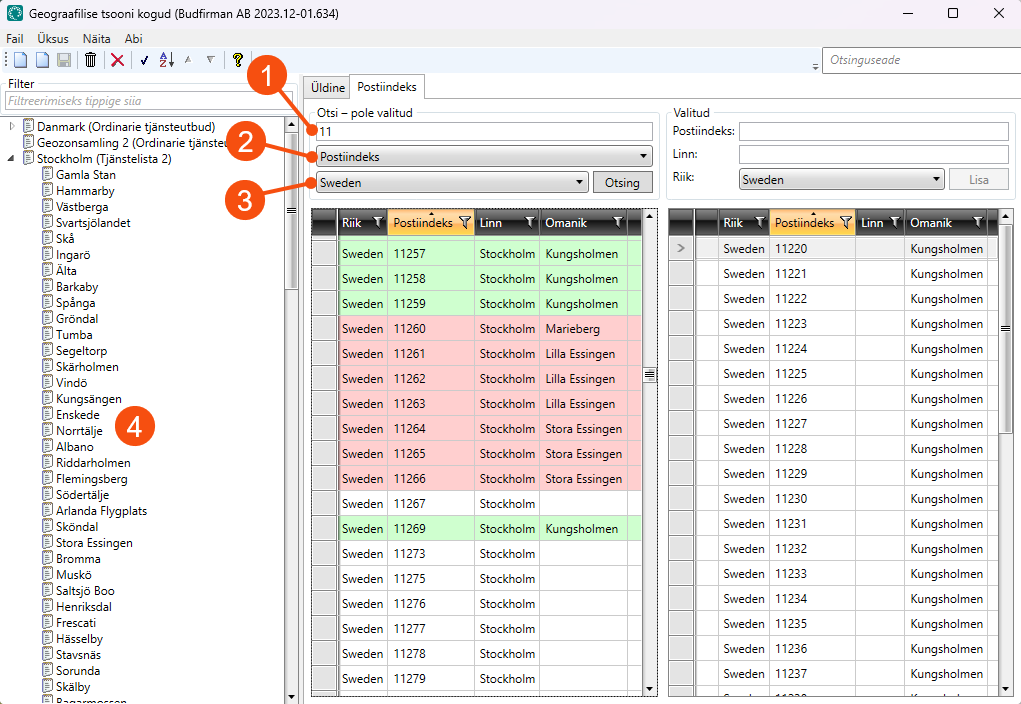
Otsi – pole valitud
In the top field (1), enter the postcode or town to be searched for. "11" finds all the postcodes starting with "11" and "mal" finds all the towns starting with "Mal". In the drop-down list below the search field (2), choose whether to search by postcode or town. Selecting Kõik will list all postcodes in the country that has been selected (3).
The colours in the list mean the following:
-
White: The postcode does not belong to a geo-zone.
-
Pink: The postcode belongs to a different geo-zone than the one selected in the list on the left (4). The geo-zone to which the postcode belongs is shown in the Omanik column. The postcode can be moved to the selected geo-zone by dragging it to the right-hand list, under Valitud (5).
-
Green: The postcode already belongs to the selected geo-zone. It doesn’t matter if a postcode that already exists in a geo-zone is accidently added again; there will be no duplication.
-
Orange: The row is highlighted. The postcode can be moved to the relevant geo-zone by dragging it to the right-hand list, under Valitud (5). Multiple rows can be selected and moved at the same time.
The colour markers are not shown if the selected geo-zone is a postcode range, e.g. 10000-19999.
Valitud
This shows the postcodes that belong to the geo-zone highlighted in the list on the left (4).
A postcode can be added to the geo-zone by entering the postcode or town in the Postiindeks or Linn fields, selecting the country and then clicking on Lisa.
Postcodes can be removed from the geo-zone by selecting them in the list, pressing Delete and then clicking  in the toolbar to save the changes. Another way of deleting a postcode is to drag it to the list under Otsi – pole valitud and then click on in the toolbar to save the changes.
The columns in the lists
|
Function |
Description |
|---|---|
|
Riik |
The country in which the postcode and town are located. |
|
Postiindeks |
Postcode. |
|
Linn |
Postal town. |
|
Omanik |
The names of the geo-zone to which the postcode currently belongs. |

