Length weight calculation (window)
Last updated: 13 August 2026
 Settings > Weight calculation >
  next to the drop-down menu Length weight calculation.
In this article
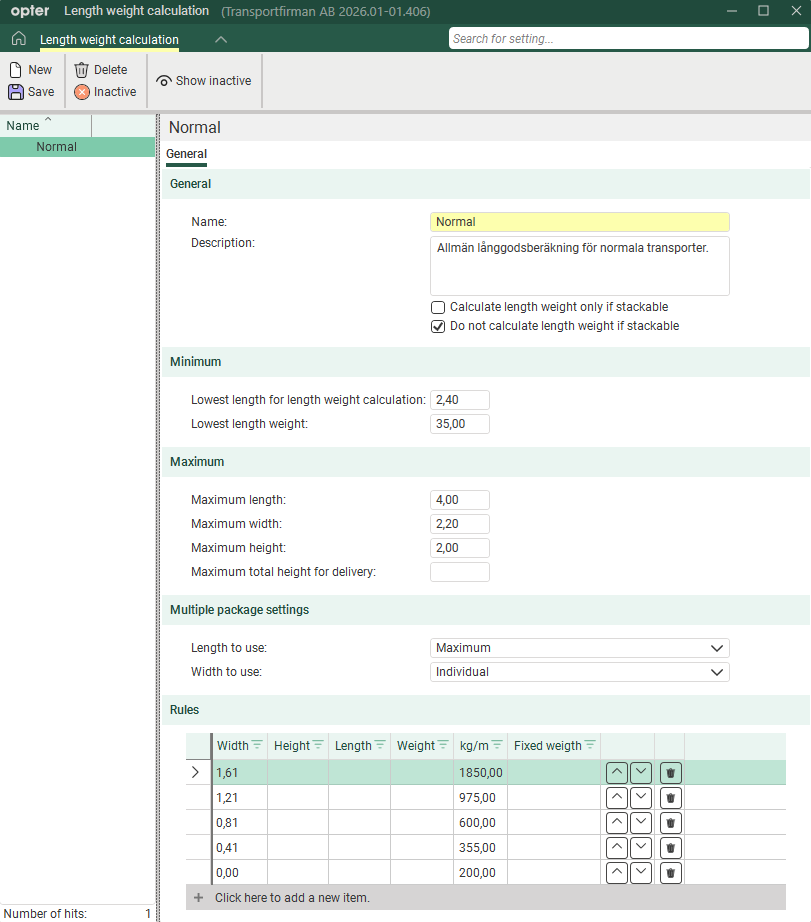
In this window, you can set the rules that apply to weight calculations for long goods.
General
|
Function |
Description |
|---|---|
|
Name |
Used for identification. The name is shown in the list on the left when a new configuration is saved. |
|
Description |
Free text field for internal notes. The description is not displayed anywhere else but here. |
|
Calculate length weight only if stackable + Do not calculate length weight if stackable |
These settings allow you to define what you mean by ‘stackable’ in your business. Whether or not stackable packages are to be regarded as long goods, that is to say, whether you mean that the bottom or top item is the one that is ‘stackable’. The checkbox on the parcel row in the order reception determines which parcels are stackable.
See examples in Set up weight calculation for long loads. |
 +
+  +
+ Minimum
|
Function |
Description |
|---|---|
|
Lowest length for length weight calculation |
Enter the minimum length, in metres, for a parcel to be classified as long goods. |
|
Lowest length weight |
Enter the minimum length weight of long goods that the calculation can return, in kg. Example: If you enter 35 kg in the field, and if the length weight calculation produces a total weight of 22 kg (i.e. less than 35 kg), 35 kg will be used as the length weight. |
Maximum
|
Function |
Description |
|---|---|
|
Maximum length Maximum width Maximum height |
Enter the maximum length, width and height in metres for a parcel to be classified as oversized goods. The settings for how orders with multiple parcels are handled (see below) may also affect whether parcels are classified as long goods or not. Database fields: LRS_MaxLength, LRS_MaxWidth, LRS_MaxHeight, LRS_MaxHeight |
|
Maximum total height for delivery |
This field has no bearing on the length weight calculation. The maximum height is checked for each parcel against the field Maximum height. |
Multiple package settings
Here you can choose how the length weight should be calculated if the order contains more than one parcel, and whether the parcels should be classified as long goods. Examples of the results of various combinations of the settings can be found in Set up weight calculation for long loads.
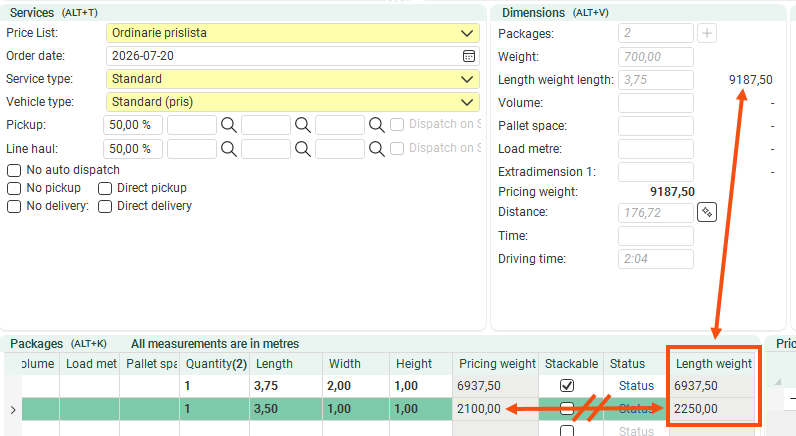
The Pricing weight and Length weight columns on the line items in the order reception may show different totals depending on how you combine these settings. The pricing weight is always the consignment’s own length × the factor used in the length weight calculation, regardless of the settings you choose here. The length weight is the actual length weight and takes these settings into account. This means that the totals in columns Pricing weight and Length weight may differ.
The price weight shown under Dimensions in the order reception is a total of the parcels’ length weights, not price weights.
In this example, Length to use: Maximum and Width to use are used: Individual. The pricing weight for the parcel in the second row is 3.50 × the factor 600 = 2,100, but the length weight is 3.75 × the factor 600 = 2,250. The pricing weight under Dimensions is the sum of the length weights (6,937.50 + 2,250 = 9,187.50), not the sum of the pricing weights (6,937.50 + 2,100 = 9,037.50).
|
Function |
Description |
|---|---|
|
Length to use |
|
|
Width to use |
|
Rules
In the table, enter the rules that will apply to the long goods weight calculation. Enter one line per row.
In the first four columns (Width, Height, Length and Weight) you indicate which conditions apply. You can enter one or more conditions on the same line, for example Width and Height, or simply Width.
In the next two columns (kg/m and Fixed weigth), enter the result you want. Select whether you wish to use a fixed length-based weight (Fixed weigth) for parcels that meet the criteria in a row, or if you wish to use a factor (kg/m) by which the parcel’s length is multiplied to calculate the length weight. For more information and examples, see Set up weight calculation for long loads.
Opter checks the rules from the top down in the table, so it is important that you place the rules in the correct order. You can use  and
and  to move the rows up and down.
|
Function |
Description |
|---|---|
|
Width Height Length Weight |
Specifications for width, height and length in metres. Weight specifications are given in kilograms. Example: If you enter “1.61” in column Width, Opter will check whether the width of the package is 1.61 metres or more. If this is the case, Opter uses the factor in column kg/m or the value in column Fixed weigth when calculating the length weight. If the width of the parcel not is 1.61 metres or more, Opter moves on to check the next row in the table. |
|
kg/m |
A factor used to calculate the length weight, i.e. how many kilograms one metre of the consignment corresponds to. The factor is multiplied by the length of the package. |
|
Fixed weigth |
Parcels that meet the criteria for long goods are assigned a fixed length weight. Expressed in kg. |
|
|
Moves the rows up or down. Opter checks the rules from the top down in the table. Arrange the rules in the order you wish. |
|
|
Deletes the line. |


