Supplier bill adjustments
Last updated: 29 July 2025
In this article
In the case of supplier and subcontractor billing, they are paid according to the resource price of the orders they have carried out. To add or deduct money from a supplier bill, for example if you rent terminal space from the supplier, or if the supplier rents terminal space from you, it is possible to add or deduct money from the supplier bill for that rent. The total of the surcharges and deductions is then added to or deducted from the amount to be paid to the supplier. Such adjustments can be made in three ways:
-
Regularly: You set up a scheduled supplier bill surcharge. The surcharge is created according to the schedule and is added the next time there is supplier/subcontractor billing.
-
One-offs: If a surcharge/deduction occurs before it is time for billing, that adjustment can be entered in advance as a predefined supplier bill surcharge, and is applied to the next supplier/subcontractor billing. This means the surcharge/deduction doesn’t have to be remembered at the time of billing.
-
Directly on the supplier bill: When creating supplier bills, surcharges/deductions can be added directly to a supplier bill in an open supplier bill period.
The supplier bill adjustments can be exported to Excel (see Exporting predefined bill surcharges to Excel).
Types of supplier bill adjustments
In order to be able to make any supplier bill adjustments at all, there must be adjustment types. The VAT rate, account coding and name of the supplier bill adjustments are set in the adjustment type. It is possible to have either one adjustment type for each item for a surcharge is to be applied, for example "Terminal rental", "Workwear" and "Fuel", or one type can be created for each VAT rate.
How to create an adjustment type:
-
Click on Majandus > Hankija arved > Arve lisamise tüübid.
-
Fill in the form and any specific account coding required for the adjustments.
-
Surcharges are coded in the accounts as transport costs as they are extra money received by the supplier/subcontractor.
-
Deductions are coded in the accounts as transport sales as they are compensation for goods/services you have provided.
-
More information on the individual fields, such as report tags, can be found at Arve lisamise tüübid (window).
Scheduled supplier bill surcharges
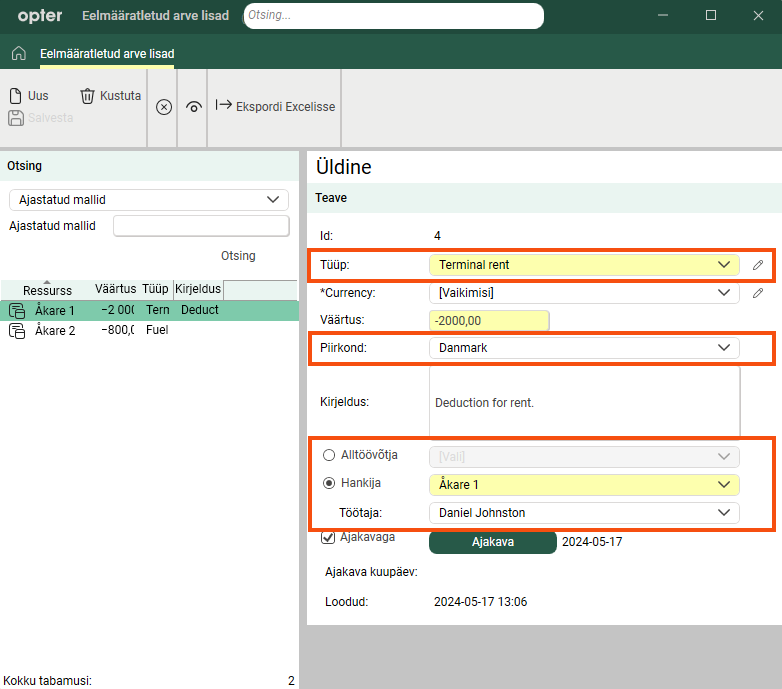
Scheduled supplier bill surcharges are set up for a particular supplier/subcontractor in the Eelmääratletud arve lisad window.
The surcharge is created according to the schedule and is then added to the supplier bill the next time there is supplier/subcontractor billing. If supplier billing is done once a month, schedule the surcharge to be created once a month. If supplier billing is done once a week, schedule the surcharge to be created once a week. This allows it to be automatically added to each supplier bill.
If a scheduled surcharge is not billed once, it is saved and billed the next time the billing is done for that resource. The adjustments that have been created but not yet applied to any supplier bill can be viewed by selecting Pole krediteeritud in the search box and clicking on Otsing.
A supplier bill adjustment is scheduled as follows:
-
Click on Majandus > Hankija arved > Eelmääratletud arve lisad.
-
Fill in the form and select Ajakavaga.
It is not compulsory to select a resource when scheduling a bill surcharge, but if it is not selected the surcharge will be created each time in accordance with the schedule but then never added to a supplier bill.
-
Click on Ajakava and configure the schedule. For more information and examples, see Creating schedule templates. This article relates to scheduled orders, but also applies to predefined bill surcharges.
More information on the individual fields can be found at Eelmääratletud arve lisad (window).
Example
Courier Services does the billing for its suppliers on the 25th of each month. One of the suppliers rents terminal space which is payable monthly. Courier Services therefore sets up a scheduled supplier bill surcharge that is created on the 20th of each month. The deduction is included automatically when the supplier billing is done on the 25th.
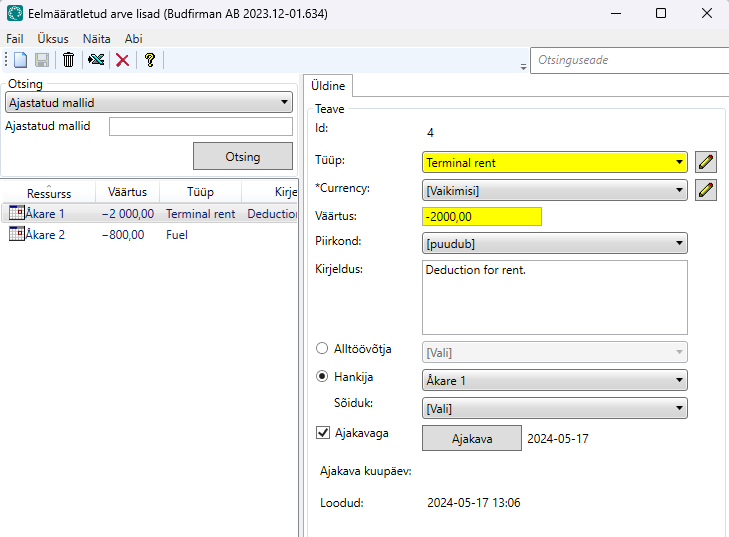
In July, Courier Services had to do the billing on the 19th because everyone was going on holiday. The deduction for the rent had not been created at that time and was therefore not included in that supplier bill. The deduction for July, created on 20 July, is saved until the next time the resource is billed, on 25 August. A deduction for the August rent has then also been created on 20 August, which means that there will be two deduction items for the rent on the 25 August billing.
Single predefined bill surcharges
It is also possible to enter one-off supplier bill adjustments as they arise, so that you don't have to remember to make them manually when billing. The adjustment is entered in the same way in Eelmääratletud arve lisad, with the difference that the adjustment is not scheduled. The surcharge is therefore created only once.
How a single adjustment is added in advance:
-
Click on Majandus > Hankija arved > Eelmääratletud arve lisad.
-
Fill in the form but make sure not to select Ajakavaga.
More information on the individual fields can be found at Eelmääratletud arve lisad (window).
Example
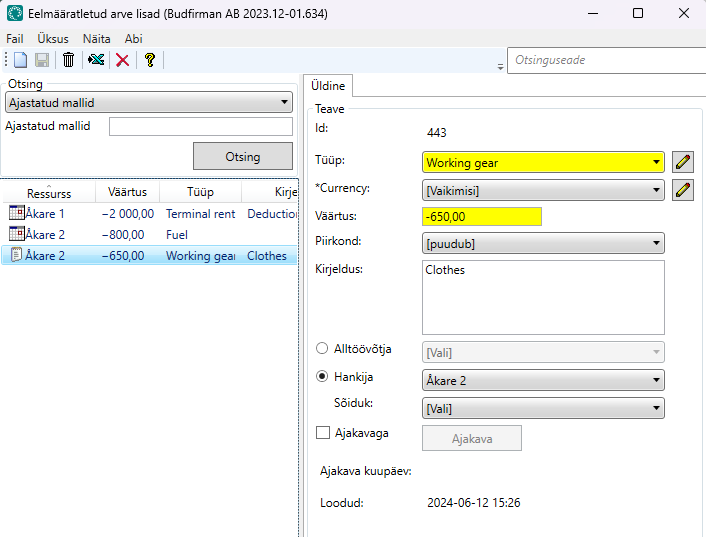
Courier Services sold special work clothes to one of its suppliers on 12 June. As there are two weeks until the billing is to be done for the supplier on 25 June, the deduction for the clothes is entered as a single predefined supplier bill surcharge directly on 12 June, so that the business does not have to remember that the deduction should be made when the supplier bill is created. The deduction is only made the next time the billing is done for the supplier, as it is not scheduled to recur. The deduction is therefore not automatically created in June.
Supplier bill adjustments directly on the supplier bill
Once a billing period has been created, manual adjustments can be made as long as you have not closed the period and sent the supplier bills to the suppliers/subcontractors. Right-click on a supplier bill in the bottom pane of the Kreeditarved window, select Muuda and fill in the form.
This window also displays the predefined supplier bill surcharges that have been applied to the supplier bill. They can be removed or changed by selecting them from the list on the left.
More information on the individual fields, such as report tags, can be found at Hankija arve lisamine (window).
Example
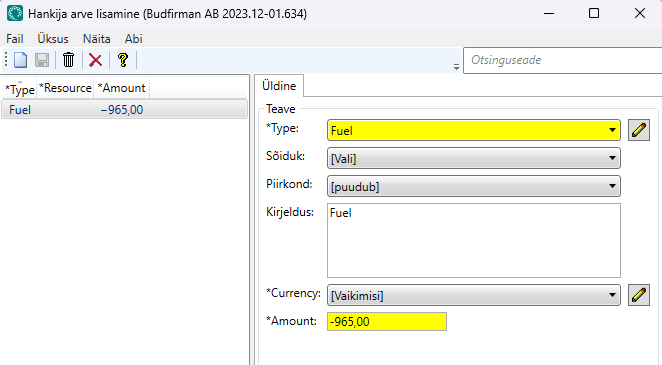
One of Courier Services’ suppliers buys fuel from Courier Services. It should be deducted on the supplier bills. As the amount varies from month to month, the deduction is not scheduled but is instead made directly on the supplier bill when it is created.
Currency for supplier bill adjustments
Supplier bill adjustments can be made in currencies other than the default currency and the currency set for the supplier/subcontractor. The amount can be displayed on the supplier bill in all three currencies, and they are also displayed in the Hankija arve lisamine window (see Hankija arve lisamine (window)). For scheduled supplier bill adjustments, select the currency in the Eelmääratletud arve lisad window. For manual supplier bill adjustments, select the currency in the Hankija arve lisamine window.
Make sure you have an exchange rate that converts the amount from the default currency to the currency you choose on the supplier bill adjustments (see Currencies). The exchange rate must be valid on the date the supplier bill period is created. If there is no valid exchange rate, the amount for the adjustment will be "0.00" on the supplier bill.
Example
Courier Services has the following settings in Opter:
-
Default currency (office settings): SEK
-
Currency for Supplier 1: DKK
-
Currency on supplier bill adjustment: EUR
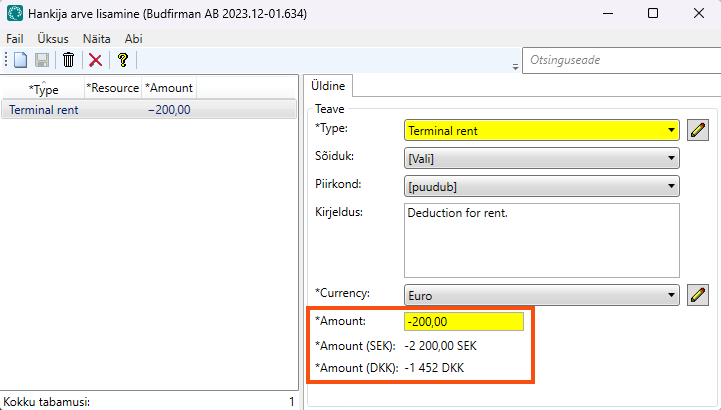
Courier Services sets up a scheduled deduction of EUR 200, as it is related to third parties. It therefore needs to have an exchange rate between EUR and SEK for the amount to be correct in DKK, as the currency is converted EUR > SEK > DKK. The deduction will then be EUR 200 > SEK 2,200 > DKK 1,452.
If an exchange rate had not been entered between EUR and SEK, or if the exchange rate was added after the supplier bill period was created, the deduction would have been 0 DKK on the supplier bill.
The amount is displayed in all three currencies in the Hankija arve lisamine window.
Account coding of supplier bill adjustments
The supplier bill adjustments are posted according to the order of priority set in the Raamatupidamise eelisjärjestus window and take into account the following registers
-
Subcontractor or vehicle/driver (employee)
-
Region.
-
Type of supplier bill adjustments (called Arve lisamise tüüp in the window Raamatupidamise eelisjärjestus)
Show the adjustments on the supplier bill
When creating a supplier bill period, it can be seen which adjustments will be applied by right-clicking on a supplier bill in the bottom pane and selecting Muuda. It is also possible to delete and add adjustments there.
To see how they appear on the supplier bill sent to the supplier/subcontractor, click on Eelvaade. To edit the template in any way, click on Muuda aruannet.
Report tags
The tags for supplier bill adjustments can be found in the list BillAdditions. Information on the reporting tags for individual fields can be found at Arve lisamise tüübid (window), Eelmääratletud arve lisad (window) and Hankija arve lisamine (window).
<dataitem source="object" command="BillAdditions">
<dataitemheader fontbold="true">
<item name="Name" x="10" y="5" fontsize="10" width="100" />
<item name="Description" x="10" y="12" width="60" />
</dataitemheader>
<data name="BAT_Name" x="30" y="1" width="40" />
<data name="BAT_Descr" x="70" y="1" width="79" />
</dataitem>
