Order check
Last updated: 1 June 2026
In this article
In the order check section, you can view an overview of all orders in the system in a list that you can filter and customise. You can search for orders using a variety of criteria.
Further information on individual settings and what the columns in the list contain can be found in Tellimuse kontroll (window).
The order list
(missing or bad snippet)For more information, see Tellimuse kontrolli seaded (window).
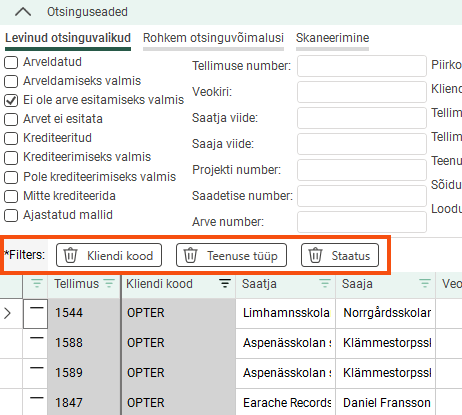
If you filter by any of the columns, they will appear as buttons just above the list. You can also use these buttons to disable the filters.
At the bottom of the window, the sum of the values in the columns is displayed.

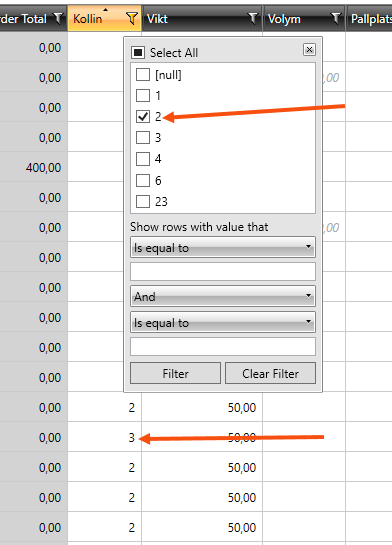
If you have filtered a column and sorted the search results, the list will not be updated if you change a value, such as the number of parcels. This also applies once you have saved the new number of packages. The search results will not be updated until you filter or sort the list again.
The above applies only to columns containing free-text values, not to columns that retrieve values from a register (for example, Ressurss), or when you use the special filters under Filter näitab ridu väärtusega, mis.
Save searches
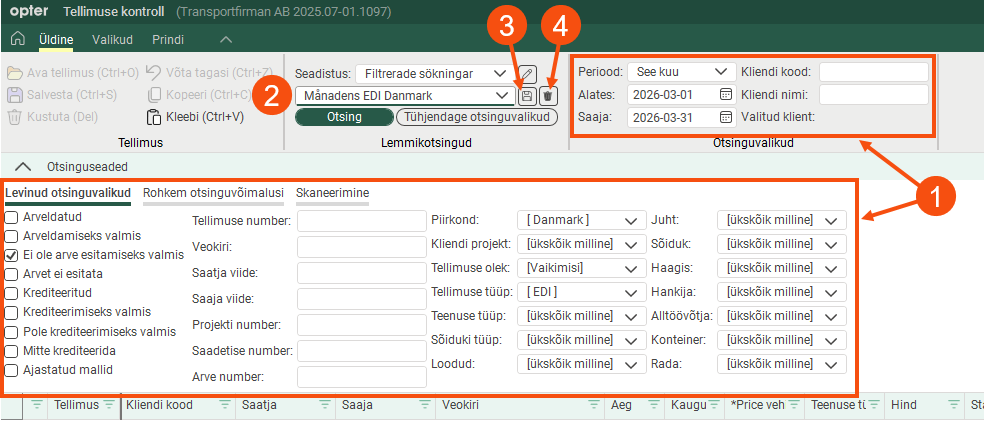
Common searches can be saved so that they can quickly be used again when needed. Proceed as follows:
Enter the period, customer and the rest of the search settings you wish to use.
Give the search a descriptive name in the text field above the Otsing button.
Click
 to the right of the text field containing the search name to save it.
Next time you want to perform the same search, simply select it from the drop-down menu and click on Otsing.
The default search, [Vaikimisi], searches for today's orders that are not ready for invoicing. It cannot be deleted. You can change the search settings, but they will be reset when you close the order check.
Update orders with new values
If you change a setting anywhere in Opter that affects the values on orders, the new setting will apply to new orders. If you want the new setting to apply to existing orders that have not yet been invoiced, you can update those orders in the order check module.
For example, if you add a service period to a manual price item that did not previously have one, you can search for all orders containing that item and update them.
The following values can be updated:
price (see also Adjusting prices)
weight
distance
auto dispatch
address position
proposed time (earliest and latest)
total time
zones
service time
CO2 emissions (see also Recalculate CO2 emissions for orders)
The figures are only recalculated for orders that have not yet been invoiced.
Proceed as follows
Find the orders that need to be updated.
If you only want to update some of the orders in the list, select those rows by holding down the Ctrl key and clicking on the left-hand side of the rows.
Click on Arvuta uuesti... (Ctrl+R) in the Valikud menu tab. The Arvuta uuesti window opens.
Select the values to be recalculated and click OK. You are provided with information about how many orders have been recalculated.
Click Salvesta (Ctrl+S) to save your changes.
Copy the same value to multiple cells
You can copy values to several orders at once. Proceed as follows:
Select the contents of a cell and copy them using Ctrl + C.
Select the cells to which the value is to be copied. This can be done in one of three different ways:
Click and drag over the cells you want to copy to.
Click on the first cell, hold down the Shift key, and then click on the last cell; this will select all the cells in between.
Click on a cell, press Ctrl, and then click on the cells you want to copy to.
Paste the value into the highlighted cells using Ctrl + V.
Copying and pasting checkboxes
Selected and deselected checkboxes can be copied and pasted in the same way as other values, instead of having to select/deselect the checkboxes one by one. To select a cell with a checkbox, click in the cell next to the box.
Widen the column if more space is needed to click next to the checkbox.
Reports for printing
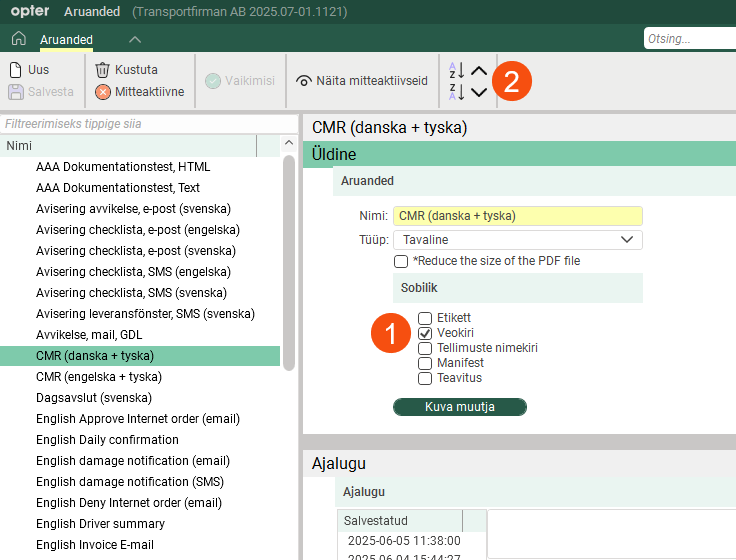
In the Prindi menu, you can preview and print freight bills, parcel labels and order lists. You can choose which reports should be available when you click on  in the menu options. Click Seaded > Aruanded and select the following reports to be available in each menu (1):
Veokiri
Etikett
Tellimuste nimekiri
The reports are displayed in the same order on the menu as in the window Aruanded. You can change the order by dragging the reports up and down (2).